
Meross Smart Table Lamp is my best overall smart home desk lamp because it combines tunable white and color lighting with the broadest named ecosystem support in this lineup. Govee RGBIC Smart Table Lamp 2 is the stronger choice for layered color effects, while the Micomlan Clamp Desk Lamp offers better coverage for a large work surface. The main choice is between genuine connected control and practical features such as auto-dimming, charging, or extensive local brightness settings. Buyers also need to weigh decorative RGB lighting against focused task illumination and decide how much desk space a base can occupy. Continue reading for the full breakdown and buyer-specific recommendations.

Get home appliances delivered free — and shop member deals
- Fast, free delivery on millions of items
- Access to Prime Big Deal Days deals on October 6–7
- Prime Video, Amazon Music and more included
Complete the kit



Key Takeaways
- I rank the Meross model first because its named support for Apple HomeKit, Alexa, and SmartThings gives it the strongest smart-home foundation in the group.
- Govee separates itself through RGBIC effects and 64 scene modes, making it better for atmosphere than the work-focused Honeywell, LEPOWER, and Micomlan lamps.
- Several products use “smart” to describe touch controls, charging, timers, or auto-dimming rather than voice assistants and home automations.
- The wireless-charging model offers the most consolidated desk utility, but its 800-lumen output and charger do not replace ecosystem compatibility.
- Micomlan and LEPOWER are stronger task-lighting specialists than the compact bedside models, though they sacrifice some decorative flexibility and smart-home reach.
| Meross Smart Table Lamp |  | Best Overall | Smart-home compatibility: Apple HomeKit, Amazon Alexa, SmartThings | Color options: 16 million colors | Color temperature: 2700K-6500K | VIEW LATEST PRICE | See Our Full Breakdown |
| Govee RGBIC Smart Table Lamp 2 | 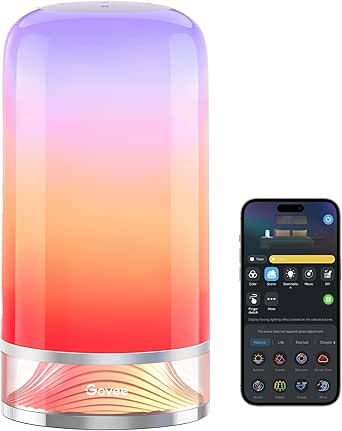 | Best for Color Effects | Brightness: 500 lumens | Color temperature: 2700K-6500K | Scene modes: 64+ | VIEW LATEST PRICE | See Our Full Breakdown |
| Touch Bedside Table LED Lamp with RGB Mode and Dimmable White Lights |  | Best App-Free Pick | Light source: LED | Color modes: RGB with cycle mode | Brightness levels: 10%, 50%, and 100% | VIEW LATEST PRICE | See Our Full Breakdown |
| LED Desk Lamp with Wireless Charger and Pen Holder |  | Best Desk Organizer | Brightness: 800 lumens | Wireless charging: 10W | Color modes: 3 | VIEW LATEST PRICE | See Our Full Breakdown |
| Honeywell Sunturalux LED Desk Lamp |  | Best for Color-Accurate Task Lighting | Color temperature: 3000K, 4000K, and 5500K | Color rendering index: 95 | Dimming range: 10%-100% | VIEW LATEST PRICE | See Our Full Breakdown |
| Honeywell LED Desk Lamp for Home Office |  | Best for USB Charging | Light Type: LED | Color Modes: 2700K, 4000K, 5000K, and 5700K | Dimming: Stepless touch control | VIEW LATEST PRICE | See Our Full Breakdown |
| LEPOWER 800LM LED Desk Lamp |  | Best for Broad Task Lighting | Brightness: 800 lumens | Power: 12W | Lighting Modes: 50 | VIEW LATEST PRICE | See Our Full Breakdown |
| Micomlan Auto-Dimming LED Desk Lamp with Clamp |  | Best Auto-Dimming Work Lamp | Power: 24W | Color Temperature Range: 3000K–6500K | Dimming: Auto and stepless dimming | VIEW LATEST PRICE | See Our Full Breakdown |
| RGB LED Desk Lamp with Atmosphere Lighting |  | Best for Gaming Ambience | Colors: 16 million | Scene Modes: 99+ | Control: App and remote | VIEW LATEST PRICE | See Our Full Breakdown |
More Details on Our Top Picks
Meross Smart Table Lamp
I rank the Meross Smart Table Lamp first because it offers the strongest balance of platform compatibility, practical controls, and everyday automation. HomeKit support makes it especially appealing to Apple households, while Alexa and SmartThings compatibility leave room for mixed-device setups. Compared with the Govee RGBIC Smart Table Lamp 2, Meross provides fewer elaborate effects, but its tunable white range and 1%-to-100% dimming are better aligned with focused work, evening reading, and scheduled routines. Touch control also keeps the lamp usable when a phone or voice assistant is unavailable. The tradeoff is a potentially involved Wi-Fi setup, and its cord limits placement. I would choose Govee for animated mood lighting, but Meross is the more balanced smart-home choice for a desk that serves several purposes.
Pros:- Supports Apple HomeKit, Alexa, and SmartThings
- Offers tunable white plus 16 million colors
- Touch, voice, and app controls cover different daily situations
- Scheduling and timers support useful desk routines
Cons:- Initial Wi-Fi and platform setup may feel complicated
- Corded design limits placement and portability
- Advanced controls depend on a Wi-Fi-enabled environment
Best for: Apple HomeKit users or mixed-platform households that want one desk lamp for work lighting, ambient color, and scheduled routines
Not ideal for: Buyers who want elaborate animated scenes or need a portable lamp that works without Wi-Fi and a nearby outlet
- Smart-home compatibility:Apple HomeKit, Amazon Alexa, SmartThings
- Color options:16 million colors
- Color temperature:2700K-6500K
- Brightness range:1%-100%
- Control methods:Touch, voice, and app
- Automation:Schedules and timers
- Connectivity:Wi-Fi
- Power source:Corded electric
Our verdict“This is my strongest all-around pick for buyers who want broad smart-home support without sacrificing useful desk lighting.”
Govee RGBIC Smart Table Lamp 2
The Govee RGBIC Smart Table Lamp 2 earns its place through richer decorative lighting than any other model in this batch. Its 64-plus scenes, eight music-sync modes, and RGBIC effects suit gaming desks, streaming backgrounds, and rooms where a lamp doubles as visual entertainment. Matter support also gives it broader ecosystem flexibility than the Meross Smart Table Lamp, though Meross remains my preference for straightforward HomeKit routines and restrained task lighting. Govee reaches 500 lumens and offers adjustable white light, but spectacle is its main advantage rather than high-output desk illumination. Several features require the app, and Pat-to-Wake only switches the lamp on instead of providing full touch control. I rank it behind Meross because it is less work-focused, yet its creative controls are unmatched for buyers who value atmosphere.
Pros:- RGBIC lighting can display vivid multi-color effects
- Includes more than 64 scenes and eight music-sync modes
- Supports Matter, Alexa, Google Home, and SmartThings
- Provides adjustable white light from 2700K to 6500K
Cons:- Core customization and wake-up settings require app setup
- 500-lumen output is less suited to lighting a large work surface
- Pat-to-Wake only turns the lamp on and is not full touch control
Best for: Gamers, streamers, and smart-home enthusiasts who want animated color scenes, music synchronization, and Matter support beside a computer
Not ideal for: Minimalist office users who mainly need bright task lighting and want every feature accessible without opening an app
- Brightness:500 lumens
- Color temperature:2700K-6500K
- Scene modes:64+
- Music-sync modes:8
- Smart-home compatibility:Matter, Alexa, Google Home, SmartThings
- Lighting technology:RGBIC multi-color
- Controls:Touch, app, voice, and Pat-to-Wake
- Customization:Preset scenes and DIY effects
- Power source:Corded electric
Our verdict“I recommend this model when expressive color effects matter more than maximum task-lighting coverage.”
Touch Bedside Table LED Lamp with RGB Mode and Dimmable White Lights
I include the Touch Bedside Table LED Lamp as the simplest route to app-free color lighting, not as a fully connected smart-home device. A top-mounted touch sensor and three fixed brightness levels make it easier to operate than the Meross Smart Table Lamp when guests, children, or less technical users share the desk. Its RGB cycle can add atmosphere, but it lacks Wi-Fi, voice assistants, schedules, and precise 1%-to-100% dimming. That makes Meross far more capable for automation, while the Govee RGBIC Smart Table Lamp 2 offers much deeper effect customization. The missing dimensions also make fit harder to judge before purchase. I rank this model below the connected picks because its intelligence stops at touch control, yet its low-friction operation makes sense for anyone who wants basic mood lighting without accounts or pairing.
Pros:- Top touch sensor provides simple app-free operation
- RGB cycle mode adds ambient color
- Three brightness levels include a low 10% setting
- Minimalist white design suits bedrooms and compact desks
Cons:- No Wi-Fi, app, voice-assistant, or automation support
- Only three fixed brightness levels rather than smooth dimming
- Dimensions are not specified, making desk-fit planning difficult
Best for: Children, guest-room users, or tech-averse buyers who want touch-operated white and RGB lighting without an app or voice assistant
Not ideal for: Smart-home owners who need remote control, schedules, voice commands, or confirmed dimensions for a tightly planned workspace
- Light source:LED
- Color modes:RGB with cycle mode
- Brightness levels:10%, 50%, and 100%
- Control:Top touch sensor
- Finish:White
- Power source:Included power cord
- Dimensions:Not specified
Our verdict“This is my pick for buyers who want simple touch lighting and RGB ambiance without connected-home complexity.”
LED Desk Lamp with Wireless Charger and Pen Holder
The LED Desk Lamp with Wireless Charger and Pen Holder is my utility-focused choice because it combines 800-lumen task lighting, a phone stand, storage, and 10W wireless charging in one footprint. Compared with the Govee RGBIC Smart Table Lamp 2, it sacrifices app control, voice commands, Matter support, and animated color effects, but it casts more light across paperwork and removes extra accessories from a crowded desk. Stepless 5%-to-100% dimming also gives it finer brightness control than the three-step Touch Bedside Table LED Lamp. Its weaknesses center on charging compatibility: thick cases can interrupt power, and devices requiring Qi EPP may not receive their expected charging performance. A CRI of 85+ is adequate rather than exceptional beside Honeywell’s CRI 95 lamp. I rank it as the best multifunction workstation pick, not the smartest connected model.
Pros:- 800-lumen output is suitable for paperwork and focused desk tasks
- Integrated 10W wireless charger reduces cable clutter
- Pen holder and phone stand consolidate desk accessories
- Stepless dimming provides precise control from 5% to 100%
Cons:- Has no app, voice-assistant, or smart-home platform support
- Thick phone cases can interfere with wireless charging
- Lack of Qi EPP support limits charging performance for some devices
Best for: Dorm residents and home-office users who want brighter task lighting, phone charging, and stationery storage in a compact workstation
Not ideal for: Buyers building app-controlled lighting routines or phone owners whose devices rely on Qi EPP charging through thick cases
- Brightness:800 lumens
- Wireless charging:10W
- Color modes:3
- Dimming range:5%-100% stepless
- Color rendering index:85+
- Rated lifespan:50,000 hours
- Integrated accessories:Pen holder and phone stand
- Power adapter:5V/3A included
Our verdict“I would choose this for a crowded workstation where lighting, charging, and organization matter more than home automation.”
Honeywell Sunturalux LED Desk Lamp
I rank the Honeywell Sunturalux LED Desk Lamp as the strongest choice for readers, artists, and remote workers who care more about accurate, comfortable illumination than colorful smart-home scenes. Its CRI 95 full-spectrum light renders colors more faithfully than the 85+ CRI LED Desk Lamp with Wireless Charger, while three color temperatures and 10%-to-100% dimming cover work and evening use. Dual USB-A and USB-C ports are more broadly useful for wired devices than a charging pad that may struggle with thick cases. The compromise is clear: unlike the Meross Smart Table Lamp, Honeywell provides no app, voice, scheduling, or multi-color controls. Its 180-degree fold also saves space, though it still needs an outlet. I place it below the connected leaders for this smart-home roundup, but it is the better task-lighting tool when light quality drives the purchase.
Pros:- CRI 95 full-spectrum light supports accurate color rendering
- Three color temperatures adapt to work, reading, and evening use
- USB-A and USB-C ports can charge two wired devices
- Foldable 0-to-180-degree design saves desk space
Cons:- No Wi-Fi, app, voice, or smart-home ecosystem compatibility
- Offers white-light modes only, with no RGB ambiance
- USB output is limited to 5V/2.1A rather than modern fast-charging rates
Best for: Remote workers, readers, artists, and students who prioritize high color accuracy, adjustable white light, and wired device charging
Not ideal for: Smart-home users seeking RGB colors, voice commands, remote app control, or automated lighting schedules
- Color temperature:3000K, 4000K, and 5500K
- Color rendering index:95
- Dimming range:10%-100%
- USB ports:USB-A and USB-C
- USB output:5V/2.1A
- Foldable range:0°-180°
- Lighting technology:Full-spectrum, flicker-free LED
- Energy use:75% lower than incandescent lamps
Our verdict“This is my choice for buyers who value high-quality task light and wired charging above connected controls or RGB effects.”
Honeywell LED Desk Lamp for Home Office
I rank the Honeywell LED Desk Lamp as the most practical charging companion here. Its USB-A and USB-C ports let a phone and another accessory share the desk outlet, while four color temperatures and stepless dimming cover focused work and softer evening reading. Compared with the LEPOWER Desk Lamp, it offers fewer lighting combinations and less positioning freedom, but its foldable structure is easier to accommodate on a small desk. The CRI of at least 94 also makes colors appear more natural than they do under many basic task lamps. This is not a deeply connected smart-home device: there is no listed app, voice control, or automation support. It also must remain plugged in, and its compact coverage is less suitable for large drafting or craft surfaces.
Pros:- USB-A and USB-C ports can charge two types of devices
- Four color temperatures and stepless dimming suit varied tasks
- Foldable, adjustable design fits compact work areas
- High CRI and flicker-free output support comfortable reading
Cons:- No listed app, voice-assistant, or smart-home platform support
- Requires continuous plug-in power
- Compact format provides less coverage for wide desks
Best for: Home-office workers with small desks who want adjustable task lighting and convenient USB-A and USB-C charging
Not ideal for: Smart-home users seeking app routines or voice control, and creators who need broad illumination across a large work surface
- Light Type:LED
- Color Modes:2700K, 4000K, 5000K, and 5700K
- Dimming:Stepless touch control
- USB Ports:USB-A and USB-C
- Power Source:Plug-in
- LED Lifespan:Up to 30,000 hours
- Timer:30 minutes
- CRI:≥94
Our verdict“I recommend this Honeywell model for compact desks where charging convenience matters more than connected-home automation.”
LEPOWER 800LM LED Desk Lamp
I give the LEPOWER Desk Lamp the broad-task role because its 800-lumen output, listed 50-inch panel, and 360-degree gooseneck are geared toward spreading light across reading, office, or craft work. Its 50 combinations pair five color temperatures with multiple brightness levels, offering more fine-tuning than the Honeywell LED Desk Lamp. The memory function also restores a preferred setting without repeated adjustments. That flexibility comes with more control choices to learn, while the large panel may overwhelm a tight bedside setup. Unlike the app-controlled RGB Desk Lamp, LEPOWER focuses on functional white light rather than colorful scenes or phone control. It is a stronger choice for sustained desk work, but buyers seeking voice commands, app routines, or a compact decorative lamp will find its task-first design less aligned with their setup.
Pros:- 800-lumen output supports detailed desk tasks
- 50 lighting combinations provide extensive brightness and color adjustment
- 360-degree gooseneck directs light across varied work positions
- Memory function recalls the previous lighting setting
Cons:- Numerous lighting controls can take time to learn
- Large listed panel width may be unsuitable for compact desks
- No listed app, RGB, or smart-home ecosystem control
Best for: Readers, crafters, and remote workers who need bright, widely distributed white light across a large desk
Not ideal for: Users with narrow desks or anyone who wants app control, RGB scenes, or voice-assistant integration
- Brightness:800 lumens
- Power:12W
- Lighting Modes:50
- Color Temperatures:5
- Adjustability:360° flexible gooseneck
- Lamp Panel Width:50 inches
- Control:Touch control
- Memory:Smart memory function
Our verdict“I favor the LEPOWER for buyers who value wide, adjustable task illumination over colorful effects or connected controls.”
Micomlan Auto-Dimming LED Desk Lamp with Clamp
I place the Micomlan LED Desk Lamp highest for responsive task lighting because its ambient sensor can adjust brightness as room conditions change. That behavior feels smarter than the fully manual controls on the LEPOWER Desk Lamp, even though neither product lists voice-assistant or app integration. Seven joints, a clamp mount, and asymmetric anti-glare lighting also make this model better suited to carefully positioning light over monitors, drawings, or study materials. Its 24W output and 3000K–6500K range offer ample flexibility, while the rear atmosphere light softens the contrast between a bright screen and a dark room. The price may be higher than simpler lamps, and seven joints plus advanced touch controls create a steeper setup curve. For a small bedside table, the Honeywell model is less elaborate; for an adjustable workstation, Micomlan provides the stronger automation feature.
Pros:- Ambient sensor adjusts brightness as surrounding light changes
- Seven joints allow precise placement across complex workstations
- Asymmetric anti-glare design limits direct light and screen reflections
- Clamp mounting preserves usable desk surface
Cons:- Advanced controls and multiple joints require more setup than a basic lamp
- Likely costs more than simpler manual task lamps
- No listed app or voice-assistant integration
Best for: Designers, students, and monitor-based workers who want sensor-driven brightness and precise positioning over a dedicated workstation
Not ideal for: Budget shoppers, casual bedside readers, or users who specifically need app and voice-assistant control
- Power:24W
- Color Temperature Range:3000K–6500K
- Dimming:Auto and stepless dimming
- CRI:>90
- Adjustable Joints:7
- Mounting Style:Desk clamp
- Control:Touch panel with memory function
- Additional Lighting:Atmosphere lighting
Our verdict“I recommend the Micomlan for serious workspaces where automatic brightness and exact light placement justify added complexity.”
RGB LED Desk Lamp with Atmosphere Lighting
I assign the RGB LED Desk Lamp the gaming-ambience spot because its 16 million colors, 99-plus scenes, and app control offer far more decorative range than the work-focused Micomlan or LEPOWER lamps. Four foldable sections and 360-degree adjustment let buyers shape the fixture around a monitor or desk arrangement, while the included remote keeps basic changes accessible without opening a phone. Its music-reactive effects suit gaming rooms and entertainment setups, although the supplied data indicates that music synchronization does not extend to the atmosphere-lighting component. The app is also required for full control, and there is no listed Alexa, HomeKit, or SmartThings compatibility; the Meross Smart Table Lamp is the clearer choice for broader home-platform integration. I see this as a scene-setting lamp first, not the strongest option for color-accurate reading or detailed work.
Pros:- 16 million colors and more than 99 scenes provide extensive ambience choices
- App and remote offer two control methods
- Four foldable sections support varied desk layouts
- Music-reactive effects add energy to gaming and entertainment
Cons:- Full control requires downloading an app
- Music synchronization does not apply to the atmosphere-lighting component
- No listed support for Alexa, HomeKit, or SmartThings
Best for: Gamers and streaming-desk owners who want app-controlled RGB scenes and a shapeable decorative light
Not ideal for: Readers, artists, and connected-home users who need verified task-light performance or major voice-platform compatibility
- Colors:16 million
- Scene Modes:99+
- Control:App and remote
- Foldable Sections:4
- Adjustability:360°
- Lighting Style:RGB atmosphere lighting
- Audio Feature:Music synchronization
- Base:Solid and stable
Our verdict“I recommend this model for RGB-focused gaming desks, while task-light and whole-home automation buyers should choose a more specialized lamp.”
How We Picked
I compared the published capabilities of all nine lamps through a smart-home-first lens. Ecosystem compatibility, app or voice control, tunable light, automation potential, and dependable manual controls carried the most weight. I then examined task-light performance, including brightness, color-temperature range, adjustability, glare management, and coverage. Desk footprint, charging options, build format, and ease of daily operation shaped the middle of the ranking. Decorative effects received credit when they added a distinct use case, but they did not outweigh weak working light or limited control.
The order reflects how completely each lamp serves its intended buyer rather than how many features appear in its name. Models with real connected control lead because that capability aligns most closely with the roundup title. Strong work lamps follow when their ergonomics, auto-dimming, or coverage solve a clear problem that the connected models do not. Simpler touch lamps rank as accessible or budget-oriented choices, while highly specialized RGB and clamp designs earn narrower recommendations. I also penalized unclear ecosystem support, crowded bases, limited positioning, and features that may duplicate devices already on a desk.
Factors to Consider When Choosing Smart Home Desk Lamps
I would start by deciding what “smart” needs to mean in the room where the lamp will live. For some buyers, it means voice commands and scheduled scenes; for others, it means automatic brightness, touch controls, or built-in charging. That distinction changes which model offers the strongest value. The factors below help separate useful daily functions from features that may go unused.
Choose the Right Type of Smart Control
App and voice compatibility matter most when a lamp will join existing routines, such as a work scene that also adjusts blinds and room lighting. I would verify the exact ecosystem named by the manufacturer instead of assuming that every “smart” lamp supports a preferred assistant. A model with only touch controls can still be convenient, but it cannot usually respond to remote commands or household automations. Cloud-based control may also depend on an account and internet access, while local touch controls keep basic functions available during an outage. Matter support can simplify mixed-platform homes, although none of the supplied product names explicitly promises it. Buyers who rarely create routines may get more benefit from a responsive physical control panel than from another phone app.
Match the Light Pattern to the Work
Brightness alone does not define good task lighting. A narrow, intense beam can create harsh contrast around a monitor, while a wide lamp head spreads light more evenly across papers, keyboards, and drawing tools. I favor adjustable white temperatures because cooler light can support detail work and warmer light feels calmer late in the day. High mode counts are useful only when the controls make favorite settings easy to recover. For long reading sessions, low glare and even coverage usually matter more than animated color scenes. Buyers who switch between video calls, handwriting, and screen work should prioritize a movable head or gooseneck over decorative presets.
Plan Around Desk Size and Mounting Style
A lamp base competes with notebooks, speakers, chargers, and input devices, so I would map the available surface before choosing. Clamp lamps preserve working space and can provide broad overhead coverage, but they need a compatible desk edge and enough clearance behind the surface. A compact table lamp is easier to move and works well beside a laptop, though it may illuminate less of a wide workstation. Flexible necks offer precise placement, while folding arms are easier to store and carry. Heavy bases add stability but can become awkward on shallow desks. The best format depends on whether space efficiency, portability, or reach is the main priority.
Treat Charging as a Convenience Feature
Wireless charging can reduce cable clutter, especially when a phone normally rests beside the keyboard. Its usefulness depends on coil alignment, phone-case thickness, charging speed, and whether the lamp base remains easy to reach. USB ports are often more flexible because they can power headphones, watches, or older phones, but they may deliver less power than a dedicated adapter. I would not pay a large premium for charging if a fast charger already occupies the desk. Combining several functions in one lamp also creates a single point of failure. Buyers with limited outlets gain the most from integrated charging, while performance-focused users may prefer separate devices.
Decide How Much RGB Lighting You Will Use
RGB and RGBIC lighting can add visual separation between work, gaming, and relaxation, especially when scenes are easy to save. RGBIC systems can display multiple colors at once, producing richer effects than a lamp that shows one color across the whole diffuser. Music synchronization suits entertainment spaces but may have little value during focused work. I would look for a strong neutral-white mode before choosing any color-focused model as the only desk light. Scene libraries can be enjoyable at first yet cumbersome if basic brightness controls sit behind several menus. A buyer who mainly reads documents should prioritize white-light quality, while streamers and gamers may value effects more highly.
Know When Paying More Makes Sense
I would spend more for broader ecosystem support, better articulation, or wider illumination because those benefits affect everyday use. Extra scene counts and small differences in mode totals are weaker reasons to increase the budget. A premium connected lamp makes sense when it will participate in daily schedules, voice routines, and whole-room scenes. A premium task lamp earns its price when auto-dimming or a wide head reduces repeated manual adjustment across long work sessions. Budget touch lamps fit occasional use, guest rooms, and simple bedside setups where app control would add friction. The strongest value comes from paying for the one capability that solves the desk’s main problem, rather than choosing the longest feature list.
Frequently Asked Questions
Do All Smart Home Desk Lamps Work With Alexa, Apple Home, or SmartThings?
No, the word “smart” does not guarantee support for any home platform. I would look for explicit compatibility labels for Alexa, Apple Home, Google Home, SmartThings, or Matter before buying. The Meross listing names several ecosystems, while many other lamps here emphasize touch controls, charging, or automated brightness instead. A companion app may provide remote control without allowing the lamp to join broader household routines. Buyers with multiple platforms should prioritize cross-ecosystem support over large preset libraries.
Is an RGB Lamp Bright Enough for Reading and Office Work?
An RGB lamp can handle desk work if it also offers a capable, adjustable white-light mode. I would check the neutral-white brightness and beam coverage rather than judging it by the number of color scenes. Diffused bedside designs may create pleasant ambient light without illuminating documents evenly. A dedicated task model with an adjustable head is usually better for detailed reading, drawing, or paperwork. RGB makes the most sense when mood lighting and task lighting share equal priority.
Is a Wireless-Charging Desk Lamp Better Than One With USB Ports?
Neither charging method is universally better. Wireless charging offers a clean drop-and-charge routine, but positioning can be fussy and thick cases may reduce performance. USB ports work with more device types and let the phone remain usable while charging, though they add another cable to the desk. I would choose wireless charging for a compatible phone that frequently rests on the lamp base. Multiple-device households may get more daily utility from accessible USB ports.
Should I Choose a Clamp Lamp or a Lamp With a Base?
A clamp design is better when usable desk area and wide coverage are the priorities. It can place the light above a monitor or large work surface without occupying the desktop, but not every desk has a suitable edge. A base lamp moves easily between rooms and works on enclosed desks, shelves, and bedside tables. I would choose a base for portability and a clamp for a permanent workstation. Checking edge thickness, wall clearance, and arm reach prevents mounting surprises.
Can a Smart Desk Lamp Replace a Dedicated Daylight or Therapy Lamp?
Most smart desk lamps are built for task and ambient lighting, not regulated light-therapy output. Tunable cool-white light may make a workspace feel brighter, but that does not make it a substitute for a device designed around a specified intensity and exposure distance. I would treat color temperature and therapy performance as separate buying categories. Buyers seeking help with seasonal symptoms should discuss suitable devices and usage with a qualified healthcare professional. For ordinary desk work, prioritize comfortable brightness, low glare, and adjustability.
Conclusion
For most connected homes, I would choose the Meross Smart Table Lamp as Best Overall because its HomeKit, Alexa, and SmartThings support gives it the clearest automation advantage. The LED Desk Lamp with Wireless Charger is my Best Value for buyers who want 800-lumen task light, charging, storage, and adjustable white modes in one footprint. I would select the Govee RGBIC Smart Table Lamp 2 as the Best Premium Effects Pick, especially for gaming desks, streaming backgrounds, and scene-based rooms. The basic Touch Bedside Table LED Lamp is the Best for Beginners because its local controls avoid app setup and ecosystem decisions. For specific needs, Micomlan suits wide workstations, LEPOWER favors fine positioning and mode choice, the Honeywell models fit productivity-focused desks with charging, and the foldable music-sync lamp serves entertainment-heavy setups. My final choice would come down to one question: whether the desk needs connected automation, stronger working light, less clutter, or more expressive color.
Fall yard work Picks
leaf blowers
As an affiliate, we earn on qualifying purchases.