TL;DR

Get home appliances delivered free with Prime
- Fast, free delivery on millions of items
- Prime Video, Amazon Music and more included
- Member-only deals all year
A smart ceiling fan can be controlled through an app, voice assistant, or home automation system, while a handheld remote gives you direct control nearby. Before buying, verify that the remote is included, check which functions work offline, and compare airflow, lighting, smart-home compatibility, and installation requirements.
You tap the wall switch on the way out, and your ceiling fan disappears from the app until you restore power. That small annoyance is why smart ceiling fans with remote can be more practical than a fan controlled only by phone or voice: you get connected features when they help and a handheld control when you just want a breeze.
This guide explains what “smart” means, how remote, app, and voice controls differ, and what to check before you buy. You’ll also see why airflow, wiring, lighting, and offline control matter just as much as a list of smart-home features.
Imagine a bedroom fan you schedule to slow down at midnight, then adjust from bed with a remote when the room still feels warm. That setup works well when the fan suits the room and its controls keep working locally. The product name alone can’t promise either thing.
“Remote included” does not guarantee the remote offers smart features or that it is sold with every model.
Check which functions work by remote, app, and voice; speed, light, timers, and direction reversal can differ by control method.
Verify the exact model’s Wi-Fi, hub, and smart-home compatibility in current manufacturer documentation.
Confirm wiring, wall switch, room-size, and mounting requirements before purchase; hire a licensed electrician for electrical work.
Compare airflow, lighting, offline control, support, and energy information alongside the motor type.
What makes a ceiling fan smart—and what does the remote actually do?
A smart ceiling fan connects to an app, voice assistant, or home automation system so you can adjust it beyond the room. A handheld remote may be included, but that remote can be a separate local control with no Wi-Fi features at all. Check the manual to see which functions each control supports.
For example, a fan might let you change speed and light brightness from its remote, while its app adds schedules and voice control. Another model may require a separate receiver or a specific wall control for connected features. “Remote included” tells you there’s a handheld controller in the box; it does not tell you whether the controller can connect to your network.
Some newer product lines pair quieter, more efficient DC motors with finer speed adjustment and app controls. That can make a low bedroom setting less choppy, but a DC motor doesn’t tell you how much air a particular fan moves. Compare the fan’s airflow, size, speed settings, and noise information alongside its connected features.
Think of the remote as the light switch you can reach from bed, and the app as a control panel you can reach from the sofa or across town. You may use the remote every night and the app only to set a timer. That’s a perfectly useful smart fan; you don’t need to automate every button.
Products Worth Considering

Philips Hue Festavia 65-Foot Smart LED String Lights, 250 Color-Changing Mini LEDs

Bose Smart Soundbar 700 with Alexa, Black

Philips Hue White and Color Ambiance Smart Retrofit Recessed LED Downlights, 5/6-Inch, 4-Pack
As an affiliate, we earn on qualifying purchases.
Compare remote, app, and voice controls before choosing a fan
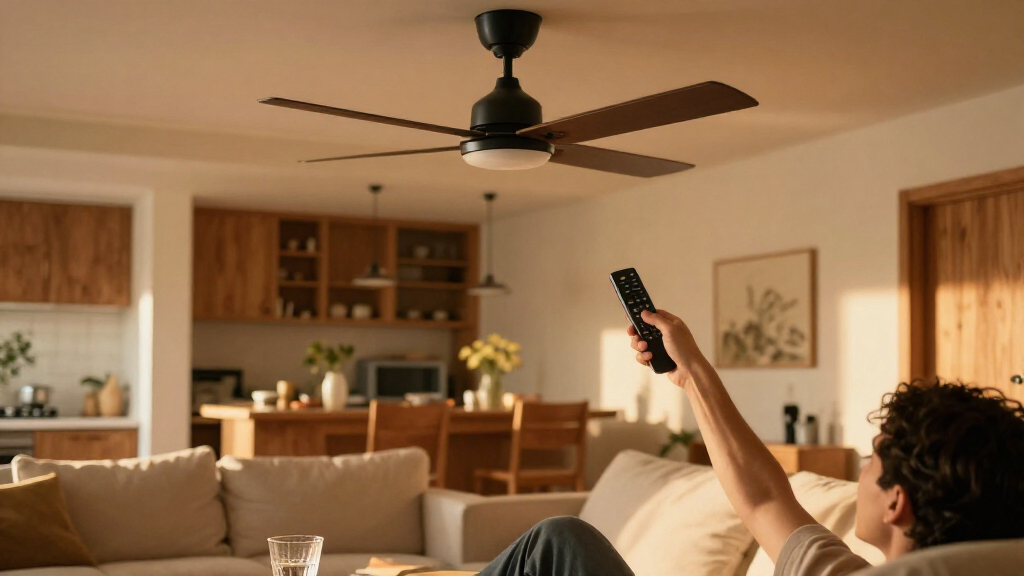
Remote, app, and voice controls serve different moments: a remote is quick nearby, an app handles schedules and settings, and voice control lets you adjust the fan without reaching for either. A single fan may offer all three, but their functions don’t always match. Confirm which features work through each control before you buy.
| Control | Best for | What to check |
|---|---|---|
| Handheld remote | Changing settings from bed or a chair | Whether it’s included and controls fan and light separately |
| Phone app | Schedules, settings, and away-from-home access | Wi-Fi or hub needs, account requirements, and supported features |
| Voice assistant | Hands-free speed or light changes | Alexa, Google Home, or Apple Home support for this model |
Picture a living room where the ceiling fan runs on a weekday schedule, but guests prefer a slower speed during dinner. You could set the schedule in the app, then hand over the remote. Voice commands might be handy while carrying plates, though advanced options such as direction reversal may still need the app or remote.
Smart home compatibility varies by model and sometimes by region. A familiar brand name does not guarantee that every fan supports your preferred platform or its newest features. Check the manufacturer’s current product page and manual for the exact model, and treat claims about home automation as specific to that product.
Check these five details before you place an order
To choose a smart ceiling fan with a remote, check five things in order: included controls, connectivity, local fallback, airflow, and lighting. This quick pass can catch common mismatches, such as buying a fan whose smart features depend on a wall switch you plan to use to cut power. Write down your room needs first, then compare product specifications.
- Confirm the remote is included. Look for the exact box contents and whether the remote is paired at the factory or needs setup.
- Match the connection to your home. Verify Wi-Fi, Bluetooth, or hub requirements and compatibility with Alexa, Google Home, or Apple Home.
- Check offline control. Find out whether the remote still changes speed and light when internet or app access fails.
- Match airflow to the room. Compare airflow ratings, blade span, speed count, mounting style, and manufacturer room-size guidance.
- Read the lighting details. Check brightness, color temperature, dimming, and whether the fan uses replaceable bulbs or an integrated LED module.
For example, if your current wall switch is the only way to cut power to a bedroom fan, turning it off may also disconnect app control. A remote that talks directly to the fan can be a useful fallback, but the manufacturer should confirm how it works. Check these details before ordering so your new fan fits both the room and your routine.
Plan for a wall switch, installation, and lost internet
Smart features depend on a compatible receiver, wall control, and wiring setup, so check the installation requirements before replacing a fan. A wall switch that cuts power can stop app and voice control while it’s off. A handheld remote may still work in some setups, but the fan’s wiring and model determine what remains available.
Say you want to keep using a two-switch wall setup: one switch for the fan and another for the light. A particular smart fan may expect a receiver and a different control arrangement. Read the manual and product details before assuming the existing switches will work as they do now. A qualified electrician can help assess the wiring and complete electrical work safely.
Ask what happens when the internet drops. Some fans retain remote control locally, while app features, schedules, or away-from-home access may depend on Wi-Fi or a cloud service. Remote access also depends on the model’s app and account setup; don’t assume you can control a fan from outside your home just because it has a smartphone app.
Power matters: Fan installation involves household wiring. Turn off power at the breaker and verify it is off before work begins; if you’re not qualified, hire a licensed electrician and follow the manufacturer’s instructions.
If the remote is lost or an app stops receiving support, your options depend on the product. Before buying, check warranty terms, the manufacturer’s support history, and whether local controls can operate the fan without an account.
Choose airflow and lighting for the room you actually have
A smart control system cannot make an undersized fan move enough air or make an oversized fan fit comfortably. Choose a fan using the manufacturer’s room-size guidance, blade span, ceiling height, mounting style, and airflow information. The connected features make adjustments easier; they do not set the fan’s physical performance.
For instance, a compact guest room with a low ceiling needs a different size and mounting style from a wide living room with a high ceiling. A fan that hangs too low can feel intrusive, while one too small for a large room may leave you reaching for the highest speed. Measure the room and check the model’s listed clearances before choosing a finish or remote.
Lighting needs a separate check. Two fans can both claim dimming, yet differ in brightness, color temperature, and how low the light can dim. Some models also use integrated LED modules instead of standard bulbs, which can affect replacement and repair. If you like warm light for winding down, check for the color temperature you want rather than assuming every smart light changes color.
Fan direction can help move air differently across seasons, but the correct setting and method depend on the model and room. Some fans reverse from a remote or app; others use a switch on the fan. A quiet low setting may suit a bedroom at night, while a brighter light and stronger airflow may work better in a kitchen during the day.
Treat efficiency and privacy as part of the purchase
A DC motor is often more efficient than a traditional AC motor, but the full energy picture depends on fan size, speed, and lighting. Compare energy claims only when manufacturers use the same measurement conditions. A larger fan running at high speed with its light on can use more energy than a smaller fan at a gentle setting, whatever the motor label says.
Imagine you run a bedroom fan for eight hours each night. A useful comparison starts with the specific wattage or energy information for the models and settings you expect to use, including the light if you’ll leave it on. If a product page gives only a broad efficiency claim, check the manufacturer’s specifications before treating it as a promise about your bill.
App features may require an account, cloud service, or ongoing software support. Review the privacy policy to learn what information the service collects and how it handles account data, and look at the manufacturer’s updates and support terms. A fan that still works by remote when the app is unavailable gives you a practical fallback.
Compatibility can change as smart-home platforms and product support evolve. Verify support for the exact fan model and region in current documentation; don’t assume that a product’s “smart” label guarantees every integration. That five-minute check can spare you from buying a fan that connects nicely to an app you never wanted to use.
Frequently Asked Questions
Can I use a smart ceiling fan without Wi-Fi?
Sometimes. A handheld remote may control basic fan and light functions without Wi-Fi, but the answer depends on the model and receiver. Check the manual for which features work locally if your internet or app is unavailable.
Does every smart ceiling fan include a remote?
No. Some models include a handheld remote, while others require a separate compatible one. Check the exact product’s box contents; a “smart” label alone does not tell you what accessories come with it.
Can I control the fan and light independently?
Many models offer separate fan and light controls, but not every remote or voice integration supports both in the same way. Look for independent speed and light settings in the product specifications, including any dimming limits.
Will a smart ceiling fan work with Alexa, Google Home, or Apple Home?
Compatibility depends on the fan’s exact model and sometimes region. Check the manufacturer’s current documentation for your chosen platform, and confirm which actions it supports; voice control may not include every function available on the remote or app.
Can I use my existing wall switch with a smart fan?
It depends on the fan’s receiver, wiring, and wall control requirements. A switch that cuts power may make app and voice control unavailable until power returns, so review the installation manual before replacing your fan. A licensed electrician can assess the wiring and install it safely.
Are DC-motor smart fans quieter and more efficient?
A DC motor is often more efficient than a traditional AC motor, and some models provide finer speed adjustment. Actual energy use and noise depend on the specific fan, speed, size, and lighting, so compare model specifications under similar conditions.
Conclusion
Choose a smart ceiling fan for the way you’ll use it on an ordinary Tuesday night: the airflow your room needs, a remote that’s actually included, and connected features that match your home. Read the model’s current manual for compatibility, wiring, and offline behavior before you order.
A good fan should feel simple from bed, dependable when the Wi-Fi falters, and quiet enough that the breeze—not the motor—is what you notice.