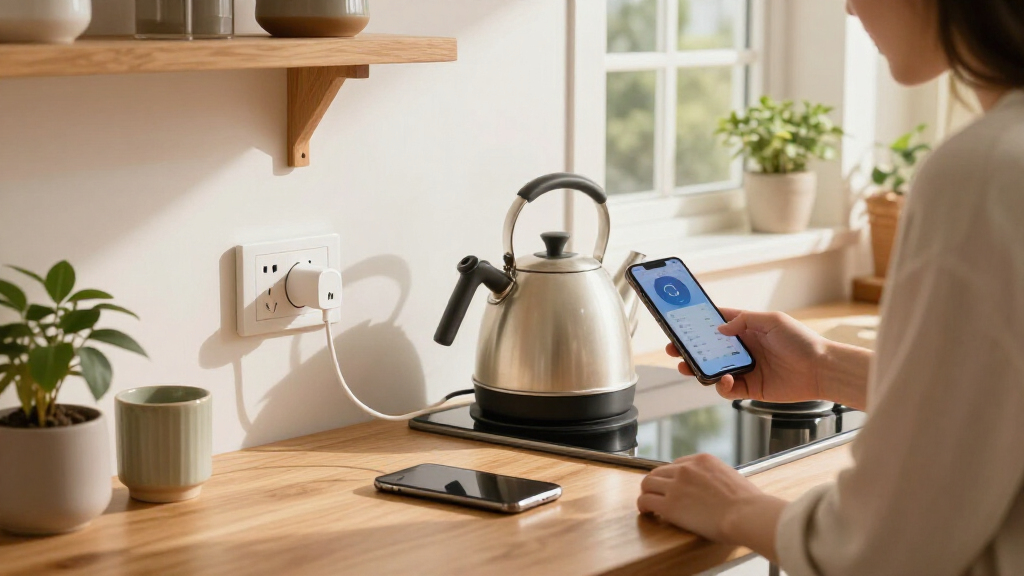

Smart plug energy monitors show how much electricity an individual appliance uses while adding app-based control. My best overall pick is the Kasa Matter KP125MP4 for its 15A capacity and Matter support; the Tapo P115 stands out for multi-plug bundles, while the Emporia Whole-Home Energy Monitor is the broader choice for tracking circuits alongside plug-level use. The main tradeoffs are whether you need room-by-room appliance data or whole-home context, and whether Matter, Wi-Fi, or Z-Wave best fits your setup. Monitoring detail, device compatibility, and bundle size also vary across these options. Read on for the full comparison and guidance on choosing the right monitor for your home.

Get home appliances delivered free with Prime
- Fast, free delivery on millions of items
- Prime Video, Amazon Music and more included
- Member-only deals all year
Complete the kit


Key Takeaways
- Kasa Matter KP125MP4 ranks first for buyers who want a 15A monitor with Matter support; its four-plug bundle is also available as the KP125MP2 two-pack.
- Tapo P115 is the practical multi-room pick: its two-pack and four-pack let buyers scale plug-level monitoring without moving to a whole-home system.
- Emporia is the only lineup option that combines plug and circuit-level tracking, making it a stronger fit for energy audits than a stand-alone smart plug.
- Protocol choice changes the shortlist: Matter models suit compatible smart-home setups, while the Minoston MP21ZP is aimed at existing Z-Wave networks.
- Bundle size is not the same as monitoring depth: Govee, AiSeek, and Emporia plug packs cover multiple appliances, but only Emporia’s whole-home system adds sensor-based circuit context.
| Kasa Matter Smart Plug with Energy Monitoring, KP125MP4, 15A/1800W |  | Best for Matter Smart Homes | Model: KP125MP4 | Maximum current: 15 A | Maximum power: 1800 W | VIEW LATEST PRICE | See Our Full Breakdown |
| Tapo P115 Wi-Fi Smart Plug with Energy Monitoring, 15A, 2-Pack |  | Best Value for Two Outlets | Model: P115 | Pack size: 2 plugs | Connectivity: Wi-Fi | VIEW LATEST PRICE | See Our Full Breakdown |
| Emporia Whole-Home Energy Monitor with 16 Sensors and 4 Smart Plugs |  | Best for Whole-Home Energy Context | Energy monitor sensors: 16 | Smart plugs: 4 Wi-Fi plugs | Monitoring: Whole-home and up to 16 individual circuits | VIEW LATEST PRICE | See Our Full Breakdown |
| TP-Link Tapo P115 Smart Wi-Fi Plug with Energy Monitoring, 4-Pack, 15A | 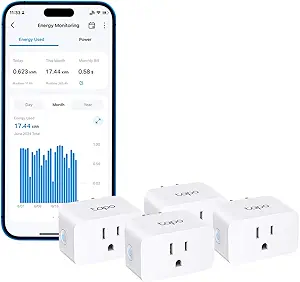 | Best for Monitoring Several Rooms | Model: P115 | Pack size: 4 plugs | Maximum current: 15 A | VIEW LATEST PRICE | See Our Full Breakdown |
| Emporia Energy Monitoring Wi-Fi Smart Plug, 4-Pack |  | Best for Alexa and Google Voice Control | Pack size: 4 plugs | Operating voltage: 120 V | Maximum peak load: 15 A for up to 1 hour per day | VIEW LATEST PRICE | See Our Full Breakdown |
| Kasa Matter Smart Plug with Energy Monitoring, KP125MP2, 15A/1800W |  | Best for Matter Smart Homes | Model: KP125MP2 | Maximum current: 15A | Maximum power: 1800W | VIEW LATEST PRICE | See Our Full Breakdown |
| TOPELER 15A Smart Plug with Energy Monitoring, Timer, and Remote Control (2-Pack) |  | Best for Offline Local Control | Quantity: 2 plugs | Maximum power: 1800W | Connectivity: 2.4 GHz Wi-Fi and Bluetooth | VIEW LATEST PRICE | See Our Full Breakdown |
| Govee Smart Plug with Energy Monitoring, Wi-Fi and Bluetooth, 4-Pack |  | Best for Long-Term Usage History | Connectivity: Wi-Fi and Bluetooth | Wi-Fi compatibility: 2.4 GHz; does not support 5 GHz | Energy monitoring: Power, current, and voltage | VIEW LATEST PRICE | See Our Full Breakdown |
| AiSeek Smart Plug with Energy Monitoring, 15A, 2.4 GHz Wi-Fi, 4-Pack |  | Best for Basic Four-Outlet Coverage | Pack size: 4 | Maximum current: 15A | Maximum power: 1800W | VIEW LATEST PRICE | See Our Full Breakdown |
| Kasa Smart Plug Mini with Energy Monitoring (KP115) |  | Best for Kasa App and Safety Features | Model: KP115 | Connectivity: 2.4 GHz Wi-Fi | Voice assistants: Amazon Alexa and Google Assistant | VIEW LATEST PRICE | See Our Full Breakdown |
| TP-Link Tapo P110M Matter Smart Plug with Energy Monitoring, 15A, 4-Pack |  | Best for Multi-Platform Homes | Model: Tapo P110M | Pack size: 4 plugs | Maximum current: 15 A | VIEW LATEST PRICE | See Our Full Breakdown |
| Govee Smart Plug with Energy Monitoring, Wi-Fi and Bluetooth, 2-Pack |  | Best for Long-Term Usage History | Pack size: 2 plugs | Operating voltage: 120 V AC | Maximum wattage: 1800 W | VIEW LATEST PRICE | See Our Full Breakdown |
| Minoston Z-Wave Smart Plug with Energy Monitoring (MP21ZP) |  | Best for Existing Z-Wave Systems | Model: MP21ZP | Wireless protocol: Z-Wave 800 Series | Security: S2 authenticated security | VIEW LATEST PRICE | See Our Full Breakdown |
| smart plug energy monitor | Energy monitoring | Connectivity | Model | Pack size |
|---|---|---|---|---|
| Kasa Matter Smart Plug with En | Yes | Matter over Wi-Fi | KP125MP4 | — |
| Tapo P115 Wi-Fi Smart Plug wit | Yes | Wi-Fi | P115 | 2 plugs |
| Emporia Whole-Home Energy Moni | — | — | — | — |
| TP-Link Tapo P115 Smart Wi-Fi | Yes | Wi-Fi | P115 | 4 plugs |
| Emporia Energy Monitoring Wi-F | — | 2.4 GHz Wi-Fi | — | 4 plugs |
| Kasa Matter Smart Plug with En | Yes | Matter over Wi-Fi | KP125MP2 | — |
| TOPELER 15A Smart Plug with En | Power usage, current, and voltage | 2.4 GHz Wi-Fi and Bluetooth | — | — |
| Govee Smart Plug with Energy M | Power, current, and voltage | Wi-Fi and Bluetooth | — | 4 |
| AiSeek Smart Plug with Energy | Real-time power and energy tracking | — | — | 4 |
| Kasa Smart Plug Mini with Ener | Yes; specific readings and history not provided | 2.4 GHz Wi-Fi | KP115 | — |
| TP-Link Tapo P110M Matter Smar | Yes | — | Tapo P110M | 4 plugs |
| Govee Smart Plug with Energy M | — | Wi-Fi and Bluetooth | — | 2 plugs |
| Minoston Z-Wave Smart Plug wit | Supported | — | MP21ZP | — |
More Details on Our Top Picks
Kasa Matter Smart Plug with Energy Monitoring, KP125MP4, 15A/1800W
The Kasa KP125M makes the most sense when energy tracking needs to fit into a smart home built around more than one platform. Its Matter support spans Apple Home, Alexa, Google Home, and SmartThings, while local network control can keep supported routines working through an internet outage. That flexibility sets it apart from the Tapo P115, which relies on Wi-Fi and the Tapo app for remote control and lists Alexa and Google Assistant compatibility. The compact, UL-certified flame-retardant design also helps preserve access to a neighboring outlet, a practical advantage when monitoring devices at a crowded power strip. The tradeoff is that Matter features depend on the platform and devices in the home, so the broad compatibility promise may not translate into identical controls everywhere. Pick it for cross-platform flexibility; skip it if you want a simple app-only setup.
Pros:- Matter compatibility spans four major smart-home platforms.
- Tracks energy use at the outlet.
- Local network control can work when internet access is unavailable.
- Compact, UL-certified flame-retardant design helps preserve nearby outlet access.
Cons:- Matter features depend on compatible platforms and devices.
- Cross-platform support may not provide identical controls in every ecosystem.
Best for: Smart-home owners who use Apple Home, SmartThings, Alexa, or Google Home and want outlet-level energy tracking with local network control.
Not ideal for: Buyers who want the simplest single-app setup or need every energy feature to work the same way across all platforms.
- Model:KP125MP4
- Maximum current:15 A
- Maximum power:1800 W
- Connectivity:Matter over Wi-Fi
- Energy monitoring:Yes
- Compatible platforms:Apple Home, Amazon Alexa, Google Home, Samsung SmartThings
- Safety:UL-certified flame-retardant design
- Warranty:2-year limited warranty
Our verdict“Choose the KP125M if broad Matter compatibility and local control matter more than a single, uniform app experience.”
Tapo P115 Wi-Fi Smart Plug with Energy Monitoring, 15A, 2-Pack
The Tapo P115 two-pack suits buyers who want to start tracking a pair of appliances without adding a whole-home monitoring system. Its usage charts and statistics make outlet-level consumption easier to follow, while schedules can shift operation to preferred hours. Compared with the four-plug Tapo P115 pack, this bundle covers fewer devices at once, but it asks for less commitment when only two outlets need monitoring. Alexa and Google Assistant voice control add convenience, and overload shutoff plus configurable smart charging give it useful safeguards for compatible setups. The tradeoff is a more app-centered experience: remote control depends on Wi-Fi and the Tapo app, and the charging cutoff relies on a battery limit the user sets. Choose this pack for a small, managed setup; look to Emporia’s four-plug pack if you need broader outlet coverage.
Pros:- Energy statistics and charts show outlet-level usage.
- Two plugs cover a focused pair of appliances.
- Schedules and remote control are available through the Tapo app.
- Overload shutoff and configurable smart charging add useful control features.
Cons:- Remote control requires Wi-Fi and the Tapo app.
- Smart charging cutoff depends on a user-set battery limit.
Best for: Renters or households who want to monitor two specific appliances and use schedules, charts, and Alexa or Google Assistant.
Not ideal for: Buyers monitoring several rooms or seeking local control independent of Wi-Fi and the Tapo app.
- Model:P115
- Pack size:2 plugs
- Connectivity:Wi-Fi
- Energy monitoring:Yes
- Voice assistants:Amazon Alexa, Google Assistant
- Remote control:Tapo app
- Scheduling:Supported
- Protection:Overload shutoff
Our verdict“Pick this two-pack for app-based energy tracking on a pair of devices without committing to a larger bundle.”
Emporia Whole-Home Energy Monitor with 16 Sensors and 4 Smart Plugs
Most smart plugs in this roundup show what one connected appliance draws; the Emporia bundle adds that reading to a larger picture of household electricity use. It tracks the home and up to 16 individual circuits, with second-by-second updates, and includes four Wi-Fi plugs for outlet-level monitoring, scheduling, and remote control. That makes it a stronger fit for buyers trying to connect appliance use with circuit activity or solar production than the four-pack Tapo P115, which focuses on individual plug statistics and app routines. The extra context comes with real setup costs: installation requires sensors in the electrical panel, and anytime app access requires cloud data storage. Its scale is wasted if the goal is simply to monitor a couple of lamps or appliances. Choose it when panel-level visibility matters as much as plug readings.
Pros:- Combines whole-home and up to 16 circuit readings.
- Second-by-second monitoring provides detailed usage timing.
- Includes four smart plugs with scheduling and remote control.
- Supports solar monitoring and net metering.
Cons:- Electrical-panel sensors make installation more involved than plug-only options such as the Tapo P115.
- Anytime app access requires cloud data storage.
Best for: Homeowners who want outlet readings alongside whole-home, circuit-level, or solar energy monitoring and can arrange electrical-panel sensor installation.
Not ideal for: People who only need plug-level tracking, cannot install panel sensors, or do not want anytime app access to depend on cloud storage.
- Energy monitor sensors:16
- Smart plugs:4 Wi-Fi plugs
- Monitoring:Whole-home and up to 16 individual circuits
- Update frequency:Second-by-second
- App compatibility:iOS, Android
- Other compatible devices:Solar systems, Alexa-enabled devices
- Bundle type:Emporia Energy Monitoring Bundle
- App data access:Cloud data storage required for anytime access
Our verdict“Choose Emporia when you want to relate smart-plug use to whole-home, circuit, and solar energy data.”
TP-Link Tapo P115 Smart Wi-Fi Plug with Energy Monitoring, 4-Pack, 15A
The Tapo P115 four-pack is the practical choice when several appliances need the same energy-tracking and scheduling setup. Like the two-pack version, it provides usage charts, remote app control, Alexa and Google Assistant support, smart charging, and overload shutoff; the difference is coverage for four outlets at once. That makes it a more direct fit for a multi-room sweep than the two-plug Tapo bundle, while remaining simpler than Emporia’s whole-home system with panel sensors and circuit readings. Schedules can help run devices during preferred hours, but the plugs rely on Wi-Fi and the Tapo app for remote control. Some smart charging and energy-bill features may also depend on compatible devices or billing integrations. Choose this set for multiple monitored appliances; skip it if Matter or local network control is a priority.
Pros:- Four plugs extend energy monitoring to multiple appliances.
- Usage charts and statistics help compare connected-device consumption.
- Schedules and remote Tapo app control are supported.
- Overload shutoff and configurable charging cutoff provide added control.
Cons:- Remote control requires Wi-Fi and the Tapo app.
- Some charging and energy-bill features depend on compatible devices or billing integrations.
Best for: Households that want to track and schedule up to four appliances across rooms using one Wi-Fi app setup.
Not ideal for: Matter-first smart-home owners or buyers who need remote control without Wi-Fi and the Tapo app.
- Model:P115
- Pack size:4 plugs
- Maximum current:15 A
- Connectivity:Wi-Fi
- Energy monitoring:Yes
- Voice assistants:Amazon Alexa, Google Assistant
- App control:Tapo app
- Overload protection:Automatic shutoff
Our verdict“Choose the four-pack when you want Tapo’s app-based monitoring and schedules on several outlets at once.”
Emporia Energy Monitoring Wi-Fi Smart Plug, 4-Pack
The Emporia four-pack gives buyers four outlet monitors with app, voice, touch, and push-button control, making it a straightforward fit for appliances spread across a home. It tracks connected-device energy use and supports schedules, much like the Tapo P115 four-pack. The Emporia model’s listed control methods add direct touch and button operation, while Tapo’s provided details emphasize charts, smart charging, and overload shutoff. The load ratings need attention: this plug lists a 1200 W wattage and a continuous load limited to 10 A, despite a 15 A peak load allowed for up to one hour per day. That makes it a poor pick for sustained high-draw equipment. It also needs 2.4 GHz Wi-Fi and does not support 5 GHz. Choose it for routine appliance tracking and voice control within those limits.
Pros:- Four plugs provide energy monitoring across multiple outlets.
- Supports schedules and remote control through the Emporia app.
- Works with Amazon Alexa and Google Assistant.
- App, remote, touch, voice, and push-button control methods are listed.
Cons:- Does not support 5 GHz Wi-Fi; remote control requires 2.4 GHz Wi-Fi.
- Continuous load is limited to 10 A, with 1200 W listed wattage.
- The 15 A peak load is limited to up to one hour per day.
Best for: Alexa or Google Assistant households seeking four app-controlled outlet monitors for compatible 120 V appliances with modest continuous loads.
Not ideal for: Buyers with 5 GHz-only Wi-Fi or appliances that require sustained loads above 10 A or 1200 W.
- Pack size:4 plugs
- Operating voltage:120 V
- Maximum peak load:15 A for up to 1 hour per day
- Wattage:1200 W
- Connectivity:2.4 GHz Wi-Fi
- Control methods:App, remote, touch, voice, push button
- Compatible assistants:Amazon Alexa, Google Assistant
- Operating temperature:14°F to 140°F
- Color:White
Our verdict“Choose this Emporia pack for voice-controlled tracking on compatible lower-load appliances, provided your network includes 2.4 GHz Wi-Fi.”
Kasa Matter Smart Plug with Energy Monitoring, KP125MP2, 15A/1800W
The Kasa KP125MP2 is the strongest fit here for a home that already uses Matter-compatible platforms. Its support for Apple Home, Alexa, Google Home, and SmartThings gives it broader ecosystem flexibility than the TOPELER and Govee plugs, which list Alexa and Google Assistant support. Local network control can keep automations available during an internet outage, though it still depends on the home network working. Energy monitoring helps identify which connected appliance is drawing power, while its 15A/1800W rating covers typical plug-in loads within that limit. The tradeoff is that this two-plug listing offers less coverage than the four-packs from Govee and AiSeek. I’d choose it for platform compatibility and local control, not for outfitting many outlets at once.
Pros:- Works with Apple Home, Alexa, Google Home, and SmartThings through Matter
- Local network control can continue without internet service
- Energy monitoring helps track connected appliance use
- Compact, UL-certified flame-retardant design with a two-year limited warranty
Cons:- Two-plug pack covers fewer outlets than the Govee and AiSeek four-packs
- Local control still depends on a functioning home network
Best for: Matter households that use Apple Home or SmartThings alongside other major voice platforms and want energy tracking at selected outlets
Not ideal for: Buyers who want to monitor several rooms in one purchase or need plug control to work when their home Wi-Fi network is down
- Model:KP125MP2
- Maximum current:15A
- Maximum power:1800W
- Connectivity:Matter over Wi-Fi
- Energy monitoring:Yes
- Compatible platforms:Apple Home, Amazon Alexa, Google Home, Samsung SmartThings
- Warranty:2-year limited
Our verdict“Choose the KP125MP2 if broad Matter platform support and local network control matter more than getting four monitored plugs in one pack.”
TOPELER 15A Smart Plug with Energy Monitoring, Timer, and Remote Control (2-Pack)
The TOPELER pair stands out for combining power, current, and voltage readings with Bluetooth control when Wi-Fi is unavailable. That gives it a useful fallback for nearby control that the Govee four-pack does not specify. Its Smart Life app also provides daily, weekly, and monthly energy reports, making it easier to spot changes in appliance use over time. The 2.4 GHz Wi-Fi requirement and app-first setup add friction: voice control with Alexa or Google Assistant comes after setup in Smart Life. Compared with the Kasa KP125MP2, TOPELER has narrower listed platform support, but Bluetooth offers a different kind of local access. This is a practical choice for buyers who value monitoring and nearby control over Matter compatibility or broader smart-home integration.
Pros:- Tracks power usage, current, and voltage
- Bluetooth enables local control when Wi-Fi is unavailable
- Daily, weekly, and monthly usage reports are available in Smart Life
- Two-plug pack needs no hub and is designed to leave neighboring outlets accessible
Cons:- Works with 2.4 GHz Wi-Fi only
- Alexa and Google Assistant integration requires Smart Life setup first
- Listed voice platform support is narrower than the Kasa KP125MP2
Best for: People who want energy readings and nearby Bluetooth control for two outlets, including when their Wi-Fi connection is unavailable
Not ideal for: Matter users or buyers who want to set up voice assistants without first configuring the Smart Life app
- Quantity:2 plugs
- Maximum power:1800W
- Connectivity:2.4 GHz Wi-Fi and Bluetooth
- App:Smart Life
- Voice assistants:Amazon Alexa and Google Assistant
- Energy monitoring:Power usage, current, and voltage
- Certifications:ETL and FCC
- Hub required:No
Our verdict“Pick TOPELER if Bluetooth fallback and detailed electrical readings matter more than Matter support or a four-plug pack.”
Govee Smart Plug with Energy Monitoring, Wi-Fi and Bluetooth, 4-Pack
Govee’s four-pack is the pick for buyers who want to compare how an appliance’s consumption changes over time. The Govee Home app stores usage history for up to one year, alongside daily, weekly, and monthly views; that longer record is more explicit than the reporting details provided for the AiSeek four-pack. It also tracks power, current, and voltage, with schedules, group control, and Alexa or Google Assistant commands for everyday use. The tradeoff is a required 2.4 GHz Wi-Fi connection and dependence on the Govee Home app for setup and control. Unlike the Kasa KP125MP2, it does not list Matter or Apple Home support. I’d favor Govee when historical energy data across several outlets matters more than ecosystem breadth.
Pros:- Tracks power, current, and voltage
- Usage history spans daily, weekly, monthly, and up to one year
- Four plugs support schedules, remote control, and group control
- Alexa and Google Assistant support plus FCC and ETL certifications
Cons:- Requires 2.4 GHz Wi-Fi and does not support 5 GHz
- Setup and control require the Govee Home app
- Does not list Matter or Apple Home compatibility like the Kasa KP125MP2
Best for: Households monitoring several appliances that want to review energy patterns across daily, monthly, and year-long periods
Not ideal for: Buyers with 5 GHz-only Wi-Fi or smart homes centered on Matter and Apple Home
- Connectivity:Wi-Fi and Bluetooth
- Wi-Fi compatibility:2.4 GHz; does not support 5 GHz
- Energy monitoring:Power, current, and voltage
- Usage history:Daily, weekly, monthly, and up to 1 year
- Voice assistants:Amazon Alexa and Google Assistant
- Certifications:FCC and ETL
- Pack size:4
Our verdict“Choose Govee if year-long usage history across four outlets is more useful to you than Matter compatibility.”
AiSeek Smart Plug with Energy Monitoring, 15A, 2.4 GHz Wi-Fi, 4-Pack
AiSeek makes sense when the main goal is adding energy monitoring to four outlets with schedules, timers, and group control. Its real-time power and energy tracking covers the core monitoring task, while SmartLife offers familiar automation and Alexa or Google Assistant control after account linking. Compared with Govee’s four-pack, AiSeek’s listed data does not specify a year-long usage history or current and voltage readings, so it is less suited to buyers who want richer historical or electrical detail. It does, however, state short-circuit and overload protection alongside fire-resistant materials. The 2.4 GHz-only Wi-Fi and SmartLife linking step are setup constraints, and direct Alexa connection is not supported. This is a straightforward multi-outlet pick when basic monitoring is enough.
Pros:- Monitors real-time power and energy consumption
- Four plugs support schedules, timers, and group control
- Works with Alexa and Google Assistant through SmartLife
- Lists fire-resistant materials and short-circuit and overload protection
Cons:- Requires 2.4 GHz Wi-Fi
- Voice assistant use requires linking through SmartLife, with no direct Alexa connection
- Does not specify the year-long history offered by Govee or current and voltage readings
Best for: Buyers who want four outlets with real-time energy tracking and routine scheduling through SmartLife
Not ideal for: People who need detailed long-term reports, Matter support, or direct Alexa setup without linking SmartLife
- Pack size:4
- Maximum current:15A
- Maximum power:1800W
- Wi-Fi:2.4 GHz
- Energy monitoring:Real-time power and energy tracking
- App:SmartLife
- Voice assistants:Alexa and Google Assistant
- Safety features:FCC certified; fire-resistant materials; short-circuit and overload protection
Our verdict“Choose AiSeek for four monitored outlets and basic SmartLife automation if detailed history and direct Alexa setup are not priorities.”
Kasa Smart Plug Mini with Energy Monitoring (KP115)
The Kasa KP115 suits buyers who want a familiar app-controlled plug with several stated safety features and voice control through Alexa or Google Assistant. Its overheating protection, fire-resistant shell, sliding safety cover, and UL certification give it a more detailed safety feature list than the Govee and AiSeek descriptions. For an energy-monitoring roundup, though, there is a gap: the supplied product data describes this model as having energy monitoring, but its listed specs do not detail what readings or history the app provides. The Govee four-pack is a clearer match for buyers focused on long-term usage records, while the Kasa KP125MP2 explicitly lists Matter and broader platform support. The KP115 requires 2.4 GHz Wi-Fi and lists only Alexa and Google Assistant. I’d pick it for Kasa app control and its stated protections.
Pros:- Remote control through the Kasa app
- Supports Amazon Alexa and Google Assistant
- Lists overheating protection, a fire-resistant shell, and a sliding safety cover
- UL certified with a two-year warranty
Cons:- Requires a 2.4 GHz Wi-Fi connection
- Provided specs do not detail energy readings or usage history
- Does not list Matter support or the broader platform compatibility of the KP125MP2
Best for: Kasa app users who want a single monitored plug with stated overheating protection and a sliding safety cover
Not ideal for: Buyers seeking documented long-term energy reports, Matter compatibility, or multi-plug coverage
- Model:KP115
- Connectivity:2.4 GHz Wi-Fi
- Voice assistants:Amazon Alexa and Google Assistant
- Energy monitoring:Yes; specific readings and history not provided
- Safety features:Overheating protection, fire-resistant shell, sliding safety cover
- Certification:UL certified
- Warranty:2 years
Our verdict“Choose the KP115 if Kasa app control and its stated safety features are your priorities, and verify that its energy reporting meets your needs.”
TP-Link Tapo P110M Matter Smart Plug with Energy Monitoring, 15A, 4-Pack
The Tapo P110M is a strong fit for households that want energy monitoring across several smart home ecosystems. Its Matter support covers Alexa, Apple HomeKit, Google Home, and SmartThings, giving it broader platform reach than the Govee Smart Plug with Energy Monitoring, which lists Alexa and Google Assistant. A four-pack also makes it practical to monitor several appliances without mixing plug models. You can check usage, schedule devices, and set a power threshold that cuts power automatically. That cutoff adds a useful safeguard alongside routine tracking, though it does not replace checking whether an appliance is suitable for smart plug control. The tradeoff is that energy cost estimates need billing-system integration, so this is a better choice for tracking consumption than for getting a ready-made bill forecast.
Pros:- Matter compatibility spans Alexa, Apple HomeKit, Google Home, and SmartThings.
- Energy monitoring provides usage statistics for connected devices.
- Power thresholds can trigger automatic cutoff.
- Four plugs support monitoring across several appliances.
Cons:- Cost estimates require integration with billing systems.
- The listed voice control support names Alexa and Google Assistant, while other platform control may depend on the smart home setup.
Best for: Households using Apple HomeKit, SmartThings, or multiple Matter-compatible platforms that want to monitor several appliances.
Not ideal for: Buyers who want plug-in electricity cost estimates without connecting a billing system.
- Model:Tapo P110M
- Pack size:4 plugs
- Maximum current:15 A
- Connectivity standard:Matter
- Energy monitoring:Yes
- Compatible platforms:Amazon Alexa, Apple HomeKit, Google Home, Samsung SmartThings
- Voice control:Amazon Alexa, Google Assistant
- Automatic cutoff:Power cutoff based on user-set thresholds
Our verdict“Choose the Tapo P110M four-pack if broad Matter platform support and threshold-based cutoff matter more than built-in cost estimates.”
Govee Smart Plug with Energy Monitoring, Wi-Fi and Bluetooth, 2-Pack
The Govee two-pack is the pick for buyers who want to look back at appliance consumption over time: its app stores historical data for up to one year and tracks power, current, and voltage. That history gives it a different strength from the Tapo P110M, whose supplied details emphasize Matter compatibility and threshold-based cutoff rather than a stated history window. Govee connects over 2.4 GHz Wi-Fi or Bluetooth, needs no hub, and supports schedules, app control, touch, and Alexa or Google Assistant voice control. The tradeoff is narrower platform support than the Tapo, with no listed Apple HomeKit or SmartThings compatibility. It also cannot join a 5 GHz Wi-Fi network, so buyers should check their home network setup before choosing it.
Pros:- Tracks power, current, and voltage.
- Govee Home app keeps historical usage data for up to one year.
- Wi-Fi and Bluetooth connectivity work without a hub.
- Supports remote, touch, voice, and scheduled control.
Cons:- Does not support 5 GHz Wi-Fi.
- Voice assistant support is limited to Alexa and Google Assistant.
- The two-pack covers fewer appliances than the four-plug Tapo P110M bundle.
Best for: Alexa or Google Assistant households that want year-long appliance usage history in an app without adding a hub.
Not ideal for: People whose smart home depends on Apple HomeKit, SmartThings, or a 5 GHz-only Wi-Fi setup.
- Pack size:2 plugs
- Operating voltage:120 V AC
- Maximum wattage:1800 W
- Connectivity:Wi-Fi and Bluetooth
- Wi-Fi compatibility:2.4 GHz; does not support 5 GHz
- Voice assistants:Amazon Alexa, Google Assistant
- Control methods:App, touch, voice
- Certifications:ETL and FCC
Our verdict“Pick Govee if year-long energy history and hub-free Alexa or Google control matter more than broader smart home compatibility.”
Minoston Z-Wave Smart Plug with Energy Monitoring (MP21ZP)
The Minoston MP21ZP makes sense for buyers who already run a Z-Wave hub and want energy monitoring inside that setup. Its Z-Wave 800 Series radio, S2 security, and SmartStart pairing fit a hub-managed network; Long Range may extend coverage up to 1,300 feet when the hub supports it. That makes this a different proposition from the Govee Smart Plug, which connects directly over Wi-Fi and Bluetooth without a hub. Minoston supports remote control, timers, and schedules through compatible hubs, with Alexa and Google Assistant access routed through the hub as well. The main drawback is the extra hub requirement and its compatibility limits: it cannot connect directly to Echo Plus, and Long Range depends on supported hub hardware.
Pros:- Energy monitoring works within a compatible Z-Wave setup.
- S2 authenticated security and SmartStart pairing are supported.
- Timers and schedules are available through a compatible hub.
- Long Range can extend coverage with a supporting hub.
Cons:- A Z-Wave hub is required and sold separately.
- It cannot connect directly to Echo Plus.
- The stated 1,300-foot Long Range depends on hub support.
Best for: SmartThings, Hubitat, or other compatible Z-Wave hub owners who want to add energy monitoring and scheduled appliance control.
Not ideal for: Buyers seeking a standalone Wi-Fi plug or those without a compatible Z-Wave hub.
- Model:MP21ZP
- Wireless protocol:Z-Wave 800 Series
- Security:S2 authenticated security
- Pairing:SmartStart
- Maximum range:Up to 1,300 ft with a compatible Long Range hub
- Energy monitoring:Supported
- Hub requirement:Compatible Z-Wave hub required; sold separately
- Compatible hubs:SmartThings, Hubitat, Vera, Wink, Z-Box, Fibaro, Ring, 2GIG, HomeSeer
Our verdict“Choose the Minoston MP21ZP if you already have a compatible Z-Wave hub and want energy data within that network.”
How We Picked
I ranked these products by how well they serve the central job of a smart plug energy monitor: making an appliance’s electricity use visible and actionable. I weighed stated electrical capacity, monitoring scope, smart-home protocol, bundle flexibility, and how much extra hardware or ecosystem commitment each option calls for. The ranking favors a strong balance of monitoring and control first, then options with clear advantages for value, beginners, compact setups, or specialized networks.
That puts the Kasa Matter KP125MP4 first for its combination of 15A capacity and Matter compatibility, with the Tapo P115 bundles close behind for buyers monitoring several appliances. Emporia’s whole-home kit earns a distinct role because it connects plug-level readings with circuit data, though its broader setup may be more than a plug-only buyer needs. Other Wi-Fi and Bluetooth bundles provide alternatives for basic multi-device coverage, while the Kasa KP115 and Minoston Z-Wave plug serve more specific size and protocol needs. I also accounted for tradeoffs: a larger bundle does not add whole-home visibility, and protocol flexibility depends on the buyer’s existing devices and hub.
| smart plug energy monitor | Model | Energy monitoring | Voice assistants |
|---|---|---|---|
| Kasa Matter Smart Plug with En | KP125MP4 | Yes | — |
| Tapo P115 Wi-Fi Smart Plug wit | P115 | Yes | Amazon Alexa, Google Assistant |
| Emporia Whole-Home Energy Moni | — | — | — |
| TP-Link Tapo P115 Smart Wi-Fi | P115 | Yes | Amazon Alexa, Google Assistant |
| Emporia Energy Monitoring Wi-F | — | — | — |
| Kasa Matter Smart Plug with En | KP125MP2 | Yes | — |
| TOPELER 15A Smart Plug with En | — | Power usage, current, and voltage | Amazon Alexa and Google Assistant |
| Govee Smart Plug with Energy M | — | Power, current, and voltage | Amazon Alexa and Google Assistant |
| AiSeek Smart Plug with Energy | — | Real-time power and energy tracking | Alexa and Google Assistant |
| Kasa Smart Plug Mini with Ener | KP115 | Yes; specific readings and history not provided | Amazon Alexa and Google Assistant |
| TP-Link Tapo P110M Matter Smar | Tapo P110M | Yes | — |
| Govee Smart Plug with Energy M | — | — | Amazon Alexa, Google Assistant |
| Minoston Z-Wave Smart Plug wit | MP21ZP | Supported | — |
Factors to Consider When Choosing Smart Plug Energy Monitors
Before choosing a plug, decide what you want the energy data to help you do. A useful purchase depends on the appliances you plan to monitor, the smart-home system you already have, and whether you need readings for a few outlets or a broader view of household consumption.
Match the Monitoring Scope to Your Question
Plug-level monitoring answers questions about a single appliance, such as whether a dehumidifier draws power overnight or how much standby use a media setup adds. It does not show the full home’s consumption or explain which circuit is responsible for a change in the utility bill. If your goal is to find one or two high-use devices, a plug monitor keeps the setup focused. For a renovation, solar assessment, or broader energy audit, circuit sensors can add context that individual plugs miss. A common mistake is buying several plugs when the real question concerns heating, hardwired equipment, or total household load. Start with the decision you want the data to support, then choose the monitoring scale that can answer it.
Check the Appliance Load Before Plugging In
A 15A rating is useful context, but the rating alone does not make every appliance suitable for a smart plug. Check the appliance label and the plug’s stated limits, especially for equipment with motors, compressors, heating elements, or high startup draw. Smart plugs are generally aimed at cord-connected devices, not hardwired loads or appliances that require specialized controls. Leave margin when the load approaches the stated maximum, and follow the manufacturer’s guidance for the device and outlet. Buyers often focus on energy tracking and overlook the switching function, even though the plug must safely handle the connected device every time it turns on. If the load or usage pattern is unclear, a plug monitor may not be the right control point.
Choose a Protocol That Fits Your Home
Wi-Fi plugs usually connect directly to a home network, while Matter support can make compatible devices easier to use across participating smart-home platforms. Z-Wave plugs typically rely on a compatible hub, so they make the most sense when that network is already part of the home. Bluetooth can help with local setup or control, but check what functions still depend on Wi-Fi or the vendor’s app. Do not assume that a protocol label means every energy reading will appear in every platform; confirm which data the maker exposes and where. If you are buying several plugs, platform consistency can matter more than adding a second protocol. Pick the path that fits the devices you already use and the controls you want to keep.
Look Beyond the Live Watt Reading
A live power reading shows what an appliance is drawing now, while cumulative energy totals help reveal use over time. Some buyers need alerts or schedules; others mainly want a record they can compare across days or billing periods. Check whether the app presents energy data in a clear history and whether it supports export or automation for the task you have in mind. A detailed dashboard has limited value if it is hard to find the readings or if the data period is too short for your comparison. Decide whether you are tracking a one-time question, like standby consumption, or watching a recurring pattern. That distinction helps prevent paying for controls or reporting features you will not use.
Treat Bundle Size as a Coverage Decision
Multi-packs can make it easier to monitor several appliances at once, but count the outlets you can actually use before choosing a bundle. Smart plugs may occupy adjacent receptacles, and a plug’s shape can affect access to nearby outlets. Think about where the devices will sit, whether they need a strong Wi-Fi signal, and whether you want consistent app controls across rooms. A four-pack is not automatically better value if two plugs will remain unused or if the devices you care about are far apart. Conversely, starting with a single monitoring point may leave you unable to compare appliances during the same period. Buy for the number and location of your intended measurements, not the bundle’s headline count.
Know When a Broader System Is Worth the Setup
A standalone smart plug is usually the simpler choice when you want to monitor a few cord-connected appliances. A whole-home monitor adds sensors and installation steps, but it can help connect appliance-level observations to circuit behavior. That extra scope matters when plug readings leave unanswered questions about major or hardwired loads. It also brings more setup and a greater commitment to a specific monitoring system. Buyers sometimes choose a broad kit for one appliance question, then find the additional data and installation unnecessary. Pay for the larger system when circuit context is part of the decision you need to make, rather than as a substitute for a basic plug reading.
Frequently Asked Questions
Can a smart plug energy monitor show what an appliance costs to run?
It can show energy use, but a cost estimate depends on the electricity rate entered in the app and how that rate is billed. If your utility uses time-of-use pricing, a single flat rate may not reflect the true cost of operating a device at different hours. Check whether the app supports rate settings and whether you can adjust them when your plan changes. For a useful comparison, measure over a representative period that includes the appliance’s normal operating cycle. Treat the result as an estimate unless the app accounts for your tariff details.
Should I buy Matter, Wi-Fi, or Z-Wave for energy monitoring?
Choose based on the network and smart-home platform you already maintain, then verify that it exposes the energy data you want. Matter can simplify use across compatible platforms, but platform support for specific readings can vary. Wi-Fi models avoid a dedicated hub, while Z-Wave generally makes sense when you already have a compatible hub and network. Bluetooth features may have different limits from remote app access, so confirm how monitoring works away from home. Protocol compatibility alone does not guarantee identical app history, automations, or reporting.
Will a smart plug monitor work with a refrigerator or other motor appliance?
Compatibility depends on the appliance’s load, startup behavior, plug rating, and the manufacturer’s guidance. Motors and compressors can draw more power briefly when starting than their ordinary running use suggests. Check the appliance label and the plug documentation rather than relying only on the advertised 15A figure. Also consider whether turning the appliance off remotely could create a food-safety or equipment concern. If any rating or use restriction is unclear, choose a monitoring method approved for that appliance.
Do I need a whole-home monitor if I already have energy-monitoring plugs?
Not necessarily: smart plugs can answer focused questions about specific cord-connected devices. A whole-home monitor becomes useful when you need circuit-level context or want to investigate loads that cannot be plugged into a monitor. Using both can help connect a measured appliance’s behavior with broader household patterns, though it adds setup and another system to manage. Start by listing the unanswered questions left by your plug readings. If they concern only a few appliances, additional plugs may be enough; if they concern circuits or total consumption, broader monitoring may help.
Is it better to buy a multi-pack or start with one energy-monitoring plug?
A multi-pack is useful when you already know which appliances you want to compare and can place the plugs where they have reliable connectivity. Starting with one plug can help you learn whether the app’s history and reports answer your question before you scale up. Keep in mind that measuring devices at different times can make comparisons less reliable if their usage changes with weather or household routines. Check whether the bundle uses the same model and app features across every plug. Choose the pack size based on the number of simultaneous measurements you will use, not on the idea that more devices automatically mean better insight.
Conclusion
For most buyers, I recommend the Kasa Matter KP125MP4 as the best overall: it combines 15A capacity with Matter support in a four-plug bundle. The Tapo P115 is my best value and beginner-friendly direction for straightforward Wi-Fi monitoring, with two- and four-pack choices to match the number of appliances. For best premium and broader energy insight, choose the Emporia Whole-Home Energy Monitor if you need circuit sensors alongside smart plugs and are comfortable with a larger system. The Kasa KP115 suits buyers who prioritize a compact plug, while the Minoston MP21ZP is the specific pick for a compatible Z-Wave home. If you mainly want several app-controlled plugs, compare the Govee, AiSeek, and Emporia plug bundles by their ecosystem and monitoring needs before choosing.
NFL season / tailgating Picks
team gear
As an affiliate, we earn on qualifying purchases.