Among these smart ceiling fan dimmer switches, I’d put the Kasa KS240 first for shoppers seeking fan and light control in one connected wall switch. The Lutron Caseta Smart Light and Fan Switch stands out for buyers already building around Caseta, while the Enbrighten Z-Wave Plus is a strong fit for a Z-Wave setup. The main tradeoffs are smart-home compatibility, whether the fan and light can be controlled separately, and whether the switch suits your wiring and fan motor. Some picks emphasize app and voice control; others favor straightforward wall controls or a particular home-automation hub. Read on for the full comparison and guidance on matching a switch to your ceiling fan and household.

Get home appliances delivered free with Prime
- Fast, free delivery on millions of items
- Prime Video, Amazon Music and more included
- Member-only deals all year
Complete the kit


Key Takeaways
- The Kasa KS240 leads for all-in-one control: it combines smart fan control and light dimming in a single-pole switch, while the lineup also includes options built around specific ecosystems.
- Smart-home platform can decide the shortlist: Enbrighten targets Z-Wave systems, Caseta models serve Lutron’s ecosystem, and Wi-Fi picks such as Kasa, Meross, GHome, and Treatlife suit buyers looking for app-connected controls.
- Fan speed and light dimming are separate requirements: not every fan controller also dims a light, and a dimmer label alone does not confirm compatibility with your fan or bulbs.
- Multipacks change the value proposition: Meross and Treatlife offer two-switch packs, which can make sense for multiple rooms but may be unnecessary if you only need one control.
- Lutron’s lineup covers distinct use cases: Caseta options focus on connected control, while Maestro models offer local wall controls; the Claro Smart Switch serves a Caseta-related role rather than replacing every fan-and-light combination switch.
| Kasa Smart Ceiling Fan Control and Dimmer Switch, KS240, Single Pole |  | Best Overall | Model: KS240 | Circuit type: 1-way | Fan speeds: 4 | VIEW LATEST PRICE | See Our Full Breakdown |
| Enbrighten Z-Wave Plus In-Wall Smart Fan Control Switch, White and Light Almond Paddles |  | Best for Z-Wave Fan-Only Setups | Model: 14314 | Connectivity: Z-Wave | Hub requirement: Compatible Z-Wave hub required | VIEW LATEST PRICE | See Our Full Breakdown |
| Lutron Caseta Smart Light and Fan Switch |  | Best for Multi-Location On/Off Control | Operation mode: On/off | Circuit type: Single-pole or 3-way | Operating voltage: 120 V | VIEW LATEST PRICE | See Our Full Breakdown |
| Lutron Caseta Smart Fan Speed Control, 4-Speed, White |  | Best Premium Fan-Speed Control | Model: PD-FSQN-WH | Fan speeds: 4 plus off | Fan compatibility: AC fans; not compatible with DC fans | VIEW LATEST PRICE | See Our Full Breakdown |
| Treatlife Wi-Fi Ceiling Fan Control and Dimmer Switch |  | Best for Alexa and Google Home Value | Connectivity: 2.4 GHz Wi-Fi | Wiring requirement: Neutral wire and separate fan and light load wires | Circuit type: Single-pole | VIEW LATEST PRICE | See Our Full Breakdown |
| Meross Smart Ceiling Fan Control and Dimmer Light Switch, 2-Pack |  | Best Two-Room Smart Dimming Pick | Pack quantity: 2 | Fan speed settings: 3 or 4 configurable levels | Light dimming range: 1%–100% | VIEW LATEST PRICE | See Our Full Breakdown |
| meross Smart Ceiling Fan Control and Dimmer Light Switch |  | Best Single-Switch Platform Flexibility | Fan speed settings: 3 or 4 adjustable levels | Light dimming range: 1%–100% | Operating voltage: 120 V AC | VIEW LATEST PRICE | See Our Full Breakdown |
| GHome Smart Ceiling Fan and Light Dimmer Switch |  | Best for Stepless Dimming | Fan speeds: 4 | Light dimming: 0%–100%, stepless | Voltage: 120 V | VIEW LATEST PRICE | See Our Full Breakdown |
| Lutron Maestro Fan Control and Light Dimmer for Dimmable LEDs, White |  | Best Simple Physical Control | Operating voltage: 120 V AC | Wattage: 180 W | Circuit type: 1-way | VIEW LATEST PRICE | See Our Full Breakdown |
| TREATLIFE Smart Ceiling Fan Control, 2-Pack, 4-Speed |  | Best Two-Room Fan-Only Control | Pack quantity: 2 | Fan speed settings: 4 | Maximum fan load: 1.5 A | VIEW LATEST PRICE | See Our Full Breakdown |
| Lutron Maestro Fan Control and Light Dimmer, Single-Pole, White | 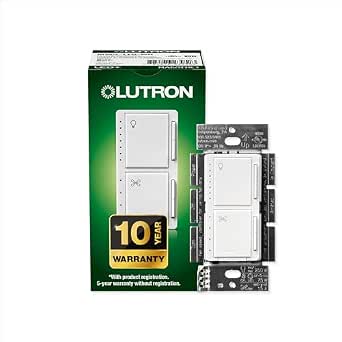 | Best No-Neutral Manual Control | Model: MACL-LFQ-WH | Control: Manual push-button | Fan speeds: 4 | VIEW LATEST PRICE | See Our Full Breakdown |
| TREATLIFE Smart Ceiling Fan Control and Dimmer Light Switch, 2-Pack |  | Best Two-Room Smart Value | Quantity: 2 switches | Model: IT-FAN-15H-403 | Fan load and speeds: Up to 1.5 A; 4 speeds | VIEW LATEST PRICE | See Our Full Breakdown |
| Lutron Claro Smart Switch for Caseta, White (DVRF-5NS-WH-R) |  | Best for Caseta 3-Way On-Off Control | Model: DVRF-5NS-WH-R | Operation: On-off | Switch type: Paddle | VIEW LATEST PRICE | See Our Full Breakdown |
| smart ceiling fan dimmer switch | Connectivity | Circuit type | Operating voltage |
|---|---|---|---|
| Kasa Smart Ceiling Fan Control | 2.4 GHz Wi-Fi | 1-way | 120 V AC |
| Enbrighten Z-Wave Plus In-Wall | Z-Wave | 3-way | 120 V |
| Lutron Caseta Smart Light and | — | Single-pole or 3-way | 120 V |
| Lutron Caseta Smart Fan Speed | Caseta Smart Hub required for app and smart-home control | 3-way | 120 V |
| Treatlife Wi-Fi Ceiling Fan Co | 2.4 GHz Wi-Fi | Single-pole | — |
| Meross Smart Ceiling Fan Contr | 2.4 GHz Wi-Fi | — | — |
| meross Smart Ceiling Fan Contr | 2.4 GHz Wi-Fi (IEEE 802.11 b/g/n) | — | 120 V AC |
| GHome Smart Ceiling Fan and Li | 2.4 GHz Wi-Fi | — | — |
| Lutron Maestro Fan Control and | — | 1-way | 120 V AC |
| TREATLIFE Smart Ceiling Fan Co | 2.4 GHz Wi-Fi, Bluetooth | 1-way, single-pole | 120 V |
| Lutron Maestro Fan Control and | — | — | 120 V |
| TREATLIFE Smart Ceiling Fan Co | 2.4 GHz Wi-Fi; Smart Life or Treatlife app | — | — |
| Lutron Claro Smart Switch for | — | 3-way | — |
More Details on Our Top Picks
Kasa Smart Ceiling Fan Control and Dimmer Switch, KS240, Single Pole
The Kasa KS240 is the most balanced pick here for buyers who want one wall control for both fan speed and light brightness. Its four fan speeds and 1–100% dimming give finer everyday control than the Lutron Caseta Smart Light and Fan Switch, which provides on/off control rather than fan-speed adjustment. Kasa also connects directly over 2.4 GHz Wi-Fi and supports Apple HomeKit, Alexa, and Google Assistant, so a separate hub is not listed as a requirement. Schedules, timers, and app-guided setup add convenience, but the installation still needs a neutral wire and separate fan and light wiring compatibility should be checked. Compared with the Treatlife Wi-Fi Ceiling Fan Control and Dimmer Switch, this is the broader smart-home fit, though both require a neutral wire and 2.4 GHz Wi-Fi.
Pros:- Controls fan speed and light brightness from one switch
- Brightness adjusts from 1% to 100%
- Works with Apple HomeKit, Amazon Alexa, and Google Assistant
- App supports schedules and timers, with guided installation
Cons:- Requires a neutral wire
- Connects on 2.4 GHz Wi-Fi only
- Single-pole design limits use in multi-location switching setups
Best for: Homeowners with a compatible single-pole ceiling fan and light who want both speed and dimming control plus support for HomeKit, Alexa, or Google Assistant.
Not ideal for: Homes without a neutral wire, buyers using 5 GHz-only Wi-Fi, or installations that need 3-way control.
- Model:KS240
- Circuit type:1-way
- Fan speeds:4
- Light brightness:Adjustable from 1% to 100%
- Operating voltage:120 V AC
- Connectivity:2.4 GHz Wi-Fi
- Compatible assistants:Apple HomeKit, Amazon Alexa, Google Assistant
- Installation requirement:Neutral wire required
- Certification:ETL
Our verdict“Choose the KS240 if you want one hub-free Wi-Fi switch with broad assistant support and separate fan-speed and light-dimming control.”
Enbrighten Z-Wave Plus In-Wall Smart Fan Control Switch, White and Light Almond Paddles
The Enbrighten Z-Wave Plus is a specialized choice for homes already built around a Z-Wave hub. It offers three fan speeds and can control up to two fans, while repeating the Z-Wave signal to help extend network coverage. That makes it more useful for hub-based fan automation than the Wi-Fi Kasa KS240 if Z-Wave is already part of the home setup. The tradeoff is central to its ranking: this switch does not control or dim fan lights, so a separate light switch or dimmer is needed. Unlike the Lutron Caseta Smart Fan Speed Control, it uses Z-Wave rather than the Caseta hub ecosystem and includes interchangeable white and light almond paddles. Skip it if your goal is a single control for both fan and light.
Pros:- Controls high, medium, and low fan speeds
- Can control up to two fans
- Repeats the Z-Wave signal to extend network coverage
- Includes white and light almond paddles
Cons:- Requires a compatible Z-Wave hub
- Controls fan speeds only; lighting needs a separate switch or dimmer
- Three speed settings offer less adjustment than four-speed options such as the Lutron Caseta Smart Fan Speed Control
Best for: Z-Wave homeowners who want scheduled control of one or two compatible ceiling fans and already own a supported hub.
Not ideal for: Buyers who need light dimming at the same wall control or do not want to add a compatible Z-Wave hub.
- Model:14314
- Connectivity:Z-Wave
- Hub requirement:Compatible Z-Wave hub required
- Fan speed settings:High, medium, low
- Maximum fans controlled:2
- Operating voltage:120 V
- Circuit type:3-way
- Paddles included:White and light almond
- Z-Wave range extension:Up to 150 ft
Our verdict“Pick Enbrighten for hub-based Z-Wave fan scheduling, but choose a combined control such as the Kasa KS240 if light dimming is also required.”
Lutron Caseta Smart Light and Fan Switch
The Lutron Caseta Smart Light and Fan Switch fits buyers who value flexible placement and straightforward on/off control over variable fan speed. With a Caseta Smart Hub, it supports app control, scenes, schedules, and voice assistants; separately sold Pico remotes can add a control point without new wiring. Its single-pole or 3-way compatibility gives it an installation role the single-pole Kasa KS240 and Treatlife Wi-Fi switch do not share. The key compromise is that it is not a fan-speed controller or light dimmer: it switches compatible loads on and off. That makes it less aligned with buyers seeking a true smart ceiling fan dimmer switch, but a sensible fit when coordinated lighting and fan on/off control matter more. The hub, remote, and wall plate are extra components.
Pros:- Supports single-pole and 3-way wiring
- Pico remote can add multi-location control without new wiring
- Works with Apple Home, Alexa, and Google Assistant through a Smart Hub
- Supports schedules, scenes, and smart-away lighting
Cons:- Provides on/off control rather than fan-speed selection or dimming
- Requires a Lutron Smart Hub for app and smart-home features
- Wall plate and Pico remote are sold separately
Best for: Caseta households needing smart on/off control for compatible fan and light loads, especially where a Pico remote can add another control location.
Not ideal for: Buyers who want variable fan speeds or adjustable light brightness from the switch.
- Operation mode:On/off
- Circuit type:Single-pole or 3-way
- Operating voltage:120 V
- Fan capacity:Up to 6 A
- Light load capacity:Up to 600 W; product description also states up to 720 W for some load types
- Wiring requirement:Neutral wire required
- Smart control requirement:Lutron Smart Hub required for app and smart-home control
- Compatible assistants:Apple Home, Amazon Alexa, Google Assistant
Our verdict“Choose this Caseta switch when multi-location on/off control matters more than fan-speed changes or light dimming.”
Lutron Caseta Smart Fan Speed Control, 4-Speed, White
The Lutron Caseta Smart Fan Speed Control is the strongest fit when the priority is dependable wall, app, and voice adjustment of an AC fan. It offers four speeds plus off, as does the Kasa KS240, but this Caseta model is dedicated to fan control rather than combining fan speed with light dimming. That separation can suit rooms with a distinct lighting control plan, while buyers wanting one combined switch should favor Kasa or Treatlife. A Caseta Smart Hub is needed for app and smart-home functions, and the optional Fan Pico remote and wall plate add to the setup. The AC-only limitation is decisive: it is not compatible with DC fans. Its clearer role over the Enbrighten Z-Wave switch is four-speed control, but it belongs in a Caseta system.
Pros:- Offers four fan speeds plus off
- Supports wall, app, and voice control with the required Caseta Smart Hub
- Schedules and scenes can be set through the app
- Can pair with a separately sold Fan Pico remote
Cons:- Requires a Caseta Smart Hub for app and smart-home features
- Not compatible with DC fans
- Does not dim fan lighting; Pico remote and wall plate are sold separately
Best for: Caseta users with a compatible AC ceiling fan who want four wall-controlled speeds and app, voice, or optional Pico remote access.
Not ideal for: Owners of DC fans, shoppers seeking fan and light control in one switch, or buyers unwilling to use a Caseta Smart Hub.
- Model:PD-FSQN-WH
- Fan speeds:4 plus off
- Fan compatibility:AC fans; not compatible with DC fans
- Operating voltage:120 V
- Wattage:180 W
- Wiring:Hard wired
- Circuit type:3-way
- Connectivity:Caseta Smart Hub required for app and smart-home control
- Compatible assistants and devices:Amazon Alexa, Apple Home, Google Assistant, Ring, Serena shades, Sonos
Our verdict“Choose this model for four-speed control of a compatible AC fan in a Caseta setup, not for an all-in-one fan-and-light dimmer.”
Treatlife Wi-Fi Ceiling Fan Control and Dimmer Switch
The Treatlife Wi-Fi Ceiling Fan Control and Dimmer Switch combines four fan speeds with 10–100% light dimming, making it a direct alternative to the Kasa KS240 for a single-pole, Wi-Fi-based setup. It supports app, touch, schedule, timer, Alexa, and Google Assistant control, but unlike Kasa it does not support Apple HomeKit. Its installation requirements are also specific: the box needs a neutral wire and separate fan and light load wires, and the switch is not for 3-way circuits, DC fans, or remote-controlled fans. Dimming is limited to compatible dimmable bulbs within the listed load limits. Compared with the fan-only Enbrighten, Treatlife better serves buyers seeking one combined control; compared with Kasa, it has narrower smart-home and wiring flexibility.
Pros:- Combines four fan speeds and light dimming in one switch
- Dimming range runs from 10% to 100%
- Supports app, touch, schedules, timers, and voice control
- Works with Alexa and Google Assistant
Cons:- Requires a neutral wire and separate fan and light load wires
- Not compatible with 3-way setups, DC fans, or remote-controlled fans
- Does not support HomeKit and requires 2.4 GHz Wi-Fi
Best for: Alexa or Google Assistant households with a compatible single-pole, four-speed AC fan and dimmable light bulbs wired to separate fan and light loads.
Not ideal for: HomeKit users, 3-way installations, DC or remote-controlled fans, or homes using non-dimmable bulbs.
- Connectivity:2.4 GHz Wi-Fi
- Wiring requirement:Neutral wire and separate fan and light load wires
- Circuit type:Single-pole
- Fan compatibility:4-speed AC ceiling fans up to 1.5 A
- Light compatibility:Dimmable bulbs only
- Light load limits:Up to 150 W LED/CFL or 300 W incandescent
- Dimming range:10%–100%
- Voice assistants:Alexa and Google Assistant
- Dimensions:4.13 × 1.73 × 1.38 in
Our verdict“Choose Treatlife for combined fan-speed and light-dimming control if your wiring and bulbs match and Alexa or Google Assistant support is enough.”
Meross Smart Ceiling Fan Control and Dimmer Light Switch, 2-Pack
The two-switch bundle makes this Meross a practical choice for outfitting two compatible rooms at once. Each control handles fan speed and 1%–100% light dimming, with three or four configurable fan levels, scheduling, and app or voice access through Apple HomeKit, Alexa, Google Home, and SmartThings. That platform range is broader than the Alexa- and Google-focused TREATLIFE Smart Ceiling Fan Control, 2-Pack, making this the more flexible fit for mixed smart-home households. Its timers and schedules can keep preset routines running during an internet outage, and the backlight can be disabled for bedrooms. The tradeoff is that both locations need neutral wires and single-pole circuits; it also cannot reverse fan direction or control incompatible DC-motor and built-in-remote fans. Choose it when you want dimming as well as fan control, not just speed control.
Pros:- Two controls in one package suit a two-room installation.
- Combines fan speed adjustment with 1%–100% light dimming.
- Supports Apple HomeKit, Alexa, Google Home, and SmartThings.
- Schedules can run preset routines without internet access, and the backlight can be turned off.
Cons:- Requires neutral wiring, 2.4 GHz Wi-Fi, and single-pole circuits at both installation points.
- Does not reverse fan direction and excludes several fan types, including DC-motor and built-in-remote models.
Best for: Households replacing switches in two rooms that need dimmable lights and compatibility with Apple HomeKit or SmartThings as well as Alexa or Google Home.
Not ideal for: Owners of DC-motor, exhaust, or built-in-remote fans, and anyone without neutral wiring or a single-pole circuit.
- Pack quantity:2
- Fan speed settings:3 or 4 configurable levels
- Light dimming range:1%–100%
- Maximum fan power:120 W
- Maximum light load:300 W incandescent; 150 W LED or CFL
- Connectivity:2.4 GHz Wi-Fi
- Compatible platforms:Apple HomeKit, Amazon Alexa, Google Home, SmartThings
- Wiring:Neutral wire required; single-pole only
Our verdict“Choose this two-pack for two compatible rooms when broad platform support and full-range light dimming matter more than fan-direction control.”
meross Smart Ceiling Fan Control and Dimmer Light Switch
This single Meross switch suits buyers who want to combine fan and light control without purchasing a multi-switch bundle. It offers 1%–100% dimming, adjustable fan speeds, schedules, and timers, with support for Apple HomeKit, Alexa, Google Home, and SmartThings. That makes its ecosystem coverage wider than the GHome Smart Ceiling Fan and Light Dimmer, which supports Alexa and Google Assistant but not the listed Apple or SmartThings platforms. The Meross also has a switchable backlight, useful when a constantly lit control is distracting at night. Its limits are a familiar part of this category: neutral wire and single-pole wiring are required, and the control does not suit smart bulbs, DC-motor fans, or fans with built-in remote or wireless controls. Unlike the two-pack Meross, this listing is for one control, so it fits a single-room project better.
Pros:- Controls fan speed and light dimming from one wall switch.
- Works with Apple HomeKit, Alexa, Google Home, and SmartThings.
- Provides app and voice control, schedules, and timers.
- Backlight can be turned off.
Cons:- Requires a neutral wire, 2.4 GHz Wi-Fi, and a single-pole circuit.
- Does not support smart bulbs, DC-motor fans, or fans with built-in remote or wireless controls.
- Does not reverse fan direction.
Best for: A smart-home user fitting one room who wants combined fan and dimmer control across Apple HomeKit, SmartThings, Alexa, or Google Home.
Not ideal for: Buyers needing two controls in one package, or owners of smart bulbs, DC-motor fans, and fans with built-in wireless controls.
- Fan speed settings:3 or 4 adjustable levels
- Light dimming range:1%–100%
- Operating voltage:120 V AC
- Maximum fan power:120 W
- Maximum light load:300 W incandescent; 150 W LED or CFL
- Connectivity:2.4 GHz Wi-Fi (IEEE 802.11 b/g/n)
- Compatible platforms:Apple HomeKit, Amazon Alexa, Google Home, SmartThings
- Wiring:Neutral wire required; single-pole only
Our verdict“Pick this single Meross control for one compatible room when broad smart-platform support matters more than a two-switch bundle.”
GHome Smart Ceiling Fan and Light Dimmer Switch
GHome stands apart for its stepless touch dimming, specified from 0% to 100%, rather than the Meross switches’ stated 1%–100% range. That gives dimmer-focused buyers a control aimed at fine adjustment, while its four fan speeds offer a fixed set of airflow choices. App control, timers, scenes, Alexa, and Google Assistant cover everyday smart routines, though platform support is narrower than either Meross option, which also lists Apple HomeKit and SmartThings. The light-load ceiling is 400 W for incandescent bulbs and up to 150 W for LED or CFL, but the fan is limited to 120 W and 1 A. It requires a neutral wire, single-pole wiring, and 2.4 GHz Wi-Fi, and it cannot control smart bulbs. I’d favor GHome for touch dimming over wider ecosystem flexibility.
Pros:- Offers stepless touch dimming from 0% to 100%.
- Provides four fan-speed settings.
- Supports app control, timers, and scenes.
- Works with Amazon Alexa and Google Assistant.
Cons:- Requires neutral wiring, a single-pole circuit, and 2.4 GHz Wi-Fi.
- Does not support smart bulbs.
- Fan load is limited to 120 W and 1 A; LED and CFL lighting is limited to 150 W.
Best for: Buyers who want four fan-speed choices and touch-based, stepless dimming, and use Alexa or Google Assistant.
Not ideal for: Apple HomeKit or SmartThings households, smart-bulb users, or anyone whose fan or light load exceeds the stated limits.
- Fan speeds:4
- Light dimming:0%–100%, stepless
- Voltage:120 V
- Maximum fan load:120 W; 1 A
- Maximum light load:400 W incandescent; up to 150 W LED or CFL
- Connectivity:2.4 GHz Wi-Fi
- Voice assistants:Amazon Alexa, Google Assistant
- Installation:Single-pole; neutral wire required
Our verdict“Choose GHome if fine touch dimming and four fan speeds matter more than the broader platform support offered by Meross.”
Lutron Maestro Fan Control and Light Dimmer for Dimmable LEDs, White
The Maestro takes a different route from the Wi-Fi switches here: its rotary actuator and push-button control provide direct wall operation instead of app, voice, or schedule features. That makes it a sensible fit for buyers who want a straightforward fan-and-dimmer control for compatible fans and dimmable LEDs, without relying on a smart-home platform. Compared with the Meross and GHome options, it gives up remote control and smart routines, but also avoids their stated 2.4 GHz Wi-Fi requirement. The available specs identify a 120 V installation and a one-way circuit, so it is not a fit for multi-location switching. Compatibility is described for dimmable LED lights and compatible fans; the supplied data does not spell out detailed fan limits or smart features. I’d choose it for simple local operation, not for a connected ceiling-fan setup.
Pros:- Combines fan speed control and light dimming in one wall control.
- Rotary actuator and push button provide direct physical operation.
- Designed for compatible dimmable LED lights.
- Does not list a Wi-Fi requirement.
Cons:- Limited to one-way circuit installations.
- No app, voice, scheduling, or other smart-control features are specified.
- Compatibility depends on using a compatible fan and dimmable LED lighting.
Best for: Homeowners seeking a physical rotary-and-button control for a compatible fan and dimmable LED light on a one-way circuit.
Not ideal for: Smart-home users who need app or voice commands, schedules, or control from a multi-location circuit.
- Operating voltage:120 V AC
- Wattage:180 W
- Circuit type:1-way
- Actuator type:Rotary
- Control type:Push button
- Lighting compatibility:Compatible dimmable LED lights
- Unit count:1
- Color:White
Our verdict“Choose the Maestro for local rotary-and-button operation, but select Meross or GHome if smart control is a requirement.”
TREATLIFE Smart Ceiling Fan Control, 2-Pack, 4-Speed
This TREATLIFE bundle is for buyers who need smart control in two rooms but do not need light dimming. Its two wall controls provide four fan speeds, on/off operation, app scheduling, and Alexa or Google Assistant voice commands without a hub. That narrower purpose separates it from the two-pack Meross, which also dims a connected light and supports Apple HomeKit and SmartThings. TREATLIFE’s stated compatibility excludes light bulbs altogether, along with DC-motor, exhaust, and built-in-control fans, so it is a poor match for a fan-and-light combination where one switch must handle both. A neutral wire, single-pole circuit, and 2.4 GHz Wi-Fi are required. For a pair of compatible fans, the bundle offers a focused setup; for dimmable lighting, the Meross or GHome is the better direction.
Pros:- Includes two fan controls for a multi-room installation.
- Offers four fan-speed settings and on/off control.
- Supports app scheduling and Alexa or Google Assistant voice control without a hub.
- Uses adjustable LED indicator status through the app.
Cons:- Does not provide light dimming or support light bulbs.
- Requires a neutral wire, single-pole circuit, and 2.4 GHz Wi-Fi.
- Not compatible with DC-motor, exhaust, or built-in-control fans.
Best for: Buyers outfitting two rooms with compatible ceiling fans who want four-speed app and voice control but do not need light dimming.
Not ideal for: Anyone seeking a fan-and-light dimmer, or owners of DC-motor, exhaust, built-in-control, or light-bulb loads.
- Pack quantity:2
- Fan speed settings:4
- Maximum fan load:1.5 A
- Operating voltage:120 V
- Connectivity:2.4 GHz Wi-Fi, Bluetooth
- Voice assistants:Amazon Alexa, Google Assistant
- Circuit type:1-way, single-pole
- Installation requirement:Neutral wire required
Our verdict“Choose this TREATLIFE two-pack for two compatible fans when you want smart speed control and have no need to dim lights.”
Lutron Maestro Fan Control and Light Dimmer, Single-Pole, White
I’d choose the Lutron Maestro when the wall box has no neutral wire and the goal is dependable fan-and-light control without app setup. Its four fan speeds and separate light dimming let a compatible pull-chain fan replace two wall controls with one. Gradual fade settings soften changes in brightness, while LED indicators make the selected settings easier to see. Compared with the TREATLIFE Smart Ceiling Fan Control and Dimmer Light Switch, Maestro gives up schedules and voice control, but avoids Wi-Fi requirements and the need for a neutral wire. That simpler installation fit comes with firm limits: it works with pull-chain fans without remotes, and its wallplate is sold separately. I’d skip it if smart-home control or compatibility with a remote-equipped fan is a priority.
Pros:- Combines four fan speeds and compatible light dimming in one control.
- Does not require a neutral wire.
- Gradual fade settings and LED indicators aid everyday operation.
- Supports dimmable LEDs as well as incandescent and halogen bulbs.
Cons:- Only works with compatible pull-chain fans without remotes.
- Manual push-button control offers no app or voice features.
- Wallplate is sold separately.
Best for: Homeowners with a single-pole wall box lacking a neutral wire and a pull-chain ceiling fan who want fan speeds and light dimming at the switch.
Not ideal for: Buyers with a fan that uses a remote or built-in smart controls, or anyone seeking app, schedule, or voice control.
- Model:MACL-LFQ-WH
- Control:Manual push-button
- Fan speeds:4
- Lighting load:Dimmable LEDs up to 75 W; incandescent or halogen up to 250 W
- Fan compatibility:Pull-chain ceiling paddle fans up to 1.5 A; not compatible with fans with remotes
- Wiring:Single-pole; no neutral wire required
- Operating voltage:120 V
- Dimensions:2.75 × 3.91 × 6 in
Our verdict“Choose Maestro for straightforward fan and light control where a neutral wire is absent, provided the fan is a compatible pull-chain model.”
TREATLIFE Smart Ceiling Fan Control and Dimmer Light Switch, 2-Pack
For someone outfitting two compatible rooms, this TREATLIFE two-pack offers a more useful smart-control package than the manual Lutron Maestro: both fan speed and light brightness can be adjusted through an app, schedules, or Alexa and Google Assistant. The 10%–100% dimming range gives more control over evening lighting than a basic on-off switch, and four fan speeds cover everyday airflow preferences. No hub is needed, but the wall box must have a neutral wire and separate fan and light wiring; setup also depends on 2.4 GHz Wi-Fi. Compared with the single-unit Lutron Claro Smart Switch for Caseta, TREATLIFE provides dimming and fan-speed adjustment rather than simple on-off control, but it does not suit 3-way circuits, DC motor fans, or fans with built-in smart or remote controls.
Pros:- Two switches support upgrades in two compatible locations.
- Controls four fan speeds and dims lights from 10% to 100%.
- App control, schedules, vacation mode, and Alexa or Google Assistant support.
- Works over 2.4 GHz Wi-Fi without a separate hub.
Cons:- Requires a neutral wire and separate fan and light wires at the switch.
- Limited to single-pole installations and 2.4 GHz Wi-Fi.
- Not compatible with DC motor fans or fans with built-in smart or remote controls.
Best for: Households with two single-pole rooms, neutral wiring, and compatible AC ceiling fans that want app, voice, and scheduled control without a hub.
Not ideal for: Buyers with 3-way wiring, no neutral wire, a DC motor fan, or a fan with built-in remote or smart controls.
- Quantity:2 switches
- Model:IT-FAN-15H-403
- Fan load and speeds:Up to 1.5 A; 4 speeds
- Lighting load:Up to 150 W dimmable LED/CFL or 300 W incandescent
- Dimming range:10%–100%
- Connectivity:2.4 GHz Wi-Fi; Smart Life or Treatlife app
- Wiring:Single-pole; neutral wire required
- Voice assistants:Amazon Alexa and Google Assistant
Our verdict“Pick this two-pack for app-managed fan speed and light dimming in two properly wired rooms, not for 3-way or remote-controlled fan setups.”
Lutron Claro Smart Switch for Caseta, White (DVRF-5NS-WH-R)
The Lutron Claro Smart Switch is the lineup’s fit for buyers who want a paddle-style control that can operate a compatible fan or light from multiple switch locations. Its support for 3-way installations sets it apart from the single-pole TREATLIFE two-pack, which adds app-based fan speeds and dimming but cannot handle 3-way circuits. Claro is a different kind of solution: it offers on-off switching, not variable fan speed or light dimming. App control and smart-home integration also require a Lutron Caseta hub, and the wall box needs a neutral wire. I’d favor it when matching Claro wall controls and multi-location switching matter more than adjusting airflow or brightness; buyers seeking a dedicated fan dimmer should look at the Maestro or TREATLIFE instead.
Pros:- Supports 3-way installations for control from multiple locations.
- Paddle design coordinates with Claro switches.
- Can control compatible lights, ceiling fans, and exhaust fans.
- Rated for fan loads up to 3 A.
Cons:- On-off operation does not provide fan-speed control or light dimming.
- Requires a neutral wire.
- Caseta hub is required for app control and smart-home integration.
Best for: Caseta households with neutral wiring that need a matching paddle switch for compatible fan or light on-off control in a 3-way setup.
Not ideal for: Buyers who need selectable fan speeds, light dimming, or app control without purchasing a Caseta hub.
- Model:DVRF-5NS-WH-R
- Operation:On-off
- Switch type:Paddle
- Lighting load:Up to 5 A (LED, incandescent, or halogen)
- Fan load:Up to 3 A
- Wiring:Neutral wire required
- Circuit type:3-way
- Smart control:Lutron Caseta hub required for app control
Our verdict“Choose Claro for Caseta-compatible, multi-location on-off switching, but select a dedicated fan-and-light control if you need speed adjustment or dimming.”
How We Picked
I ranked these switches around the decisions that matter most for ceiling-fan control: whether a product handles fan speed, light dimming, or both; how clearly it fits a given smart-home setup; and how much effort its controls are likely to add to daily use. I also weighed the practical value of single switches versus multipacks, the usefulness of established control ecosystems, and whether a model fills a distinct need rather than repeating another pick with a different label.
The Kasa KS240 ranks first because it directly addresses the combined fan-and-light use case. Other positions reflect narrower strengths: Enbrighten suits Z-Wave households, Caseta products suit buyers invested in Lutron, and multipacks appeal to homes outfitting several rooms. I treated compatibility and function as more important than a long feature list; a switch is a poor match if its wiring, fan motor, light load, or required hub does not fit the installation. Verify the manufacturer’s current specifications before buying, since product revisions and compatibility details can vary.
Factors to Consider When Choosing Smart Ceiling Fan Dimmer Switches
Before choosing a switch, I’d start with the fan, wiring, and smart-home setup already in the room. A product name can suggest broad compatibility, but the control method, motor type, and light circuit determine whether the installation will work as expected.
Decide Whether You Need One Control or Separate Controls
A ceiling fan may have independently controlled fan and light circuits, or a single wall control may serve both. Check how many conductors run from the wall box to the fan and whether the fan uses a remote receiver before choosing a combined switch. A dual-function control can simplify the wall plate, but it may not suit a fan whose light and motor are wired in a way the switch cannot independently manage. If you need only fan speeds, a dedicated fan controller may be a better fit than paying for light dimming you will not use. If separate wall controls matter, confirm the switch’s supported wiring diagram rather than assuming that “fan and light” means every arrangement is supported.
Match the Switch to the Fan Motor and Bulbs
Fan-speed controllers and light dimmers handle different electrical loads, so compatibility with one does not prove compatibility with the other. Check the fan manufacturer’s guidance, switch load limits, and supported motor type; some fans with integrated electronics or proprietary remotes may not work with a wall-mounted speed controller. For dimming, verify that the bulbs are dimmable and that the switch supports their type, especially with LED lamps. A mismatch can lead to flicker, buzzing, limited dimming range, or unreliable speed changes. When the fan has an integrated LED module, check its specifications too rather than treating it like a replaceable bulb.
Choose the Smart-Home Connection Before Buying
Wi-Fi, Z-Wave, and brand-specific ecosystems create different setup and maintenance demands. A Wi-Fi switch may be appealing if you want app access without adding a separate hub, while a Z-Wave option makes more sense when your home already has a compatible controller. Caseta products are most useful when you plan to use Lutron’s connected ecosystem, so check whether the required hub or bridge is part of your setup. Also confirm support for the voice assistant or automation platform you actually use; broad “smart” labeling does not guarantee every integration. Keeping a home on fewer platforms can make automations and troubleshooting simpler than mixing devices with different apps and hubs.
Check the Wall Box, Neutral Wire, and Existing Controls
Many smart switches need more room behind the wall plate than a basic toggle, and some require a neutral wire. Before ordering, inspect the wall box and identify the existing wiring, but do not rely on wire color alone to determine function. A switch designed for single-pole wiring may not support a multi-location circuit, and removing a fan’s receiver can change how its controls behave. If the wiring is unfamiliar, have a qualified electrician check it before installation. Choosing around the actual box and circuit prevents the common mistake of buying a feature-rich switch that cannot be installed in the intended location.
Pay for the Features You Will Use
A connected combination switch can be worth choosing when app control, schedules, or voice commands will be part of everyday use. If you mainly want reliable adjustments at the wall, a simpler local-control model may be a better match than adding an app and hub to the system. Multipacks can suit several bedrooms or living spaces, but only if the switches cover the same functions and fit the wiring in each room. For a single fan, a two-pack may leave you with an unused device rather than meaningful savings. Compare the control features and ecosystem requirements first, then decide whether a bundle or premium platform solves a real household need.
Frequently Asked Questions
Can I use a smart dimmer switch with any ceiling fan?
No. Compatibility depends on the fan’s motor, wiring, and any built-in receiver or proprietary control system. A light dimmer is not automatically safe for controlling fan speed, since the motor needs a compatible fan controller. Check the fan and switch specifications together, including supported load and wiring style. If the fan uses a remote receiver or integrated electronics, consult its documentation before replacing the wall control.
Do I need a hub for a smart ceiling fan switch?
It depends on the switch and the smart-home system you want to use. Some Wi-Fi models connect through a home network, while Z-Wave products require a compatible hub or controller. Lutron Caseta products are designed for Lutron’s connected ecosystem, so check the bridge requirements for the functions you want. If you already own a hub, confirm the exact model and integration support before purchasing rather than assuming that devices using the same wireless standard will work together automatically.
Can one wall switch control both fan speed and light brightness?
Some combination switches are designed to control both functions, but the fan and light must be wired in a supported configuration. A single control may not offer independent operation if the wiring or fan receiver combines the loads in a way the switch cannot manage. Confirm the product’s wiring diagram and the fan’s control setup before buying. If independent wall controls are a priority, check whether the switch provides separate fan and light controls rather than relying on the product title.
Will a smart fan switch work if my bulbs are not dimmable?
The fan-speed function may still work, but the light-dimming function requires compatible dimmable bulbs or a supported integrated light module. Non-dimmable bulbs can flicker, fail to respond properly, or be damaged when used with a dimmer. Check both the switch’s supported lamp types and the bulb packaging before installation. If you only need on-off light control, choose a compatible control method that does not apply dimming to that circuit.
Should I choose a Wi-Fi, Z-Wave, or Lutron switch?
Choose based on the system already running your home and the controls you want to maintain. Wi-Fi options can suit buyers who prefer app-based control without a separate automation hub, while Z-Wave is a sensible match for a home with a compatible controller. Lutron Caseta models fit buyers who want to build around Lutron’s connected controls, and the lineup also includes local-control options for simpler setups. Before deciding, confirm app, voice-assistant, hub, and wiring compatibility for the exact model.
Conclusion
For the broadest match to the category, I recommend the Kasa KS240 as best overall because it combines connected fan and light control in one switch. Buyers outfitting several rooms should compare the Meross and Treatlife multipacks for best value, while checking that each unit has the functions and compatibility they need. The Lutron Caseta options are my best premium direction for households already committed to Lutron’s ecosystem; the Enbrighten is the more natural pick for a Z-Wave home. For beginners, I’d start with the switch that matches an existing Wi-Fi setup and offers the exact wall controls needed, rather than adding an unfamiliar hub or buying a bundle. If your priority is straightforward local control instead of app features, compare the Maestro models; if you have a particular fan, bulb type, or wiring layout, let that compatibility need lead the decision.