
TL;DR
Google has added digital home keys to Google Wallet, letting compatible Android phones unlock supported smart locks by tap or, on some devices, by approach. The feature is in public preview through Google Home and is expected to roll out more widely over the coming weeks; compatible hardware remains limited.
Google Wallet can now store digital home keys that let Android users unlock compatible smart locks by tapping a phone or, on supported devices, walking up to a door. Google says the feature is available in a public preview through the Google Home app and will reach more users over the coming weeks, though it currently depends on a limited set of locks, phones and home hardware.

Get home appliances delivered free with Prime
- Fast, free delivery on millions of items
- Prime Video, Amazon Music and more included
- Member-only deals all year
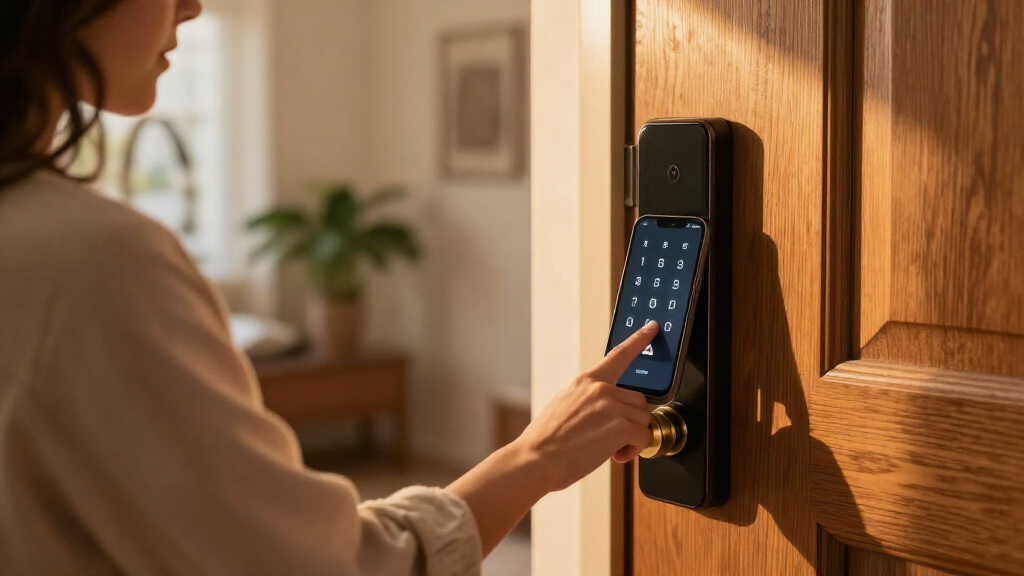
Google’s new Wallet support uses NFC for Tap to Unlock: users hold the back of an NFC-enabled Android phone near the lock reader. The phone does not need to be unlocked to use this method. Users can also enable Unlock on Approach in Wallet, which can open a compatible door when the phone detects that its owner is approaching. That hands-free option requires compatible Ultra-Wideband (UWB) hardware.
A single digital key can control multiple locks, and members of the same Google Home household can add their own keys to their personal Wallets. Google says the feature is built on Aliro, an open standard intended to allow smartphones to work with compatible smart locks. At launch, Google lists the Aqara U400, Schlage Sense Pro and Nuki Keypad 2 NFC as supported locks. Google says more models will follow.
The setup also requires a Matter-enabled Google Hub with a Thread Border Router, such as the second-generation Nest Hub. Tap to Unlock works with NFC-enabled phones running Android 9 or later. Unlock on Approach is restricted to Aliro UWB-compatible Android phones, including the Google Pixel 10 Pro series and newer devices. Google says Wear OS watches are not supported at launch.
Phone Keys Reach Google Wallet
The update brings Google Wallet into a category where Apple and Samsung users already have digital home-key features, giving eligible Android owners another way to enter their homes without carrying a separate key or opening a smart-lock app. The two unlocking options offer different trade-offs: NFC requires a deliberate tap, while UWB can support hands-free unlocking when the device and lock are compatible.
For now, the feature’s practical reach depends on more than having an Android phone. A user needs a supported lock, a suitable Google Home hub and, for hands-free entry, a phone with compatible UWB hardware. That makes this an addition for households with specific equipment rather than a universal replacement for physical keys. Broader lock support and device compatibility will shape how useful the service becomes.
Products Worth Considering

Dyson V8 Cyclone Cordless Vacuum
Bose SoundLink Max Portable Bluetooth Speaker, Black

Bose Smart Dolby Atmos Soundbar, All-in-One Soundbar for TV, A.I. Dialogue Mode, Voice Control and Amazon Alexa Built-in, Supports Bluetooth
As an affiliate, we earn on qualifying purchases.
Aliro and the Required Home Setup
Google Home already offered some smart-lock control, but Wallet’s digital key feature adds the use of NFC and UWB for entry at the door. Google says the capabilities are built on Aliro, a standard designed to let phones and smart locks from different makers interoperate. The standard alone does not make every existing lock compatible: the lock must support the required hardware and be included among supported models.
Google’s launch list includes Aqara U400, Schlage Sense Pro and Nuki Keypad 2 NFC. Support differs by product and technology: Google says the Schlage Sense Pro supports NFC at launch, with UWB support to follow. Users also need the specified Google Home hub, while phone requirements vary by unlocking method. These requirements explain why access may not be available to every Wallet or Google Home user immediately.
““over the coming weeks””
Compatibility and Watch Support
The full rollout schedule has not been specified beyond Google’s estimate of “over the coming weeks.” It is also unclear when additional lock models will be supported or which ones will be next. Google has not provided a timetable for UWB support on the Schlage Sense Pro beyond saying it will follow NFC support.
Wear OS watches are unsupported at launch, but Google has not confirmed whether or when they will gain home-key access. The announcement also does not establish that every phone meeting Android 9 and NFC requirements will support every Wallet function: hands-free unlocking has separate UWB compatibility requirements. Users should check their lock, hub and phone compatibility before relying on Wallet as their only way inside.
Broader Rollout and Lock Support
Google says Wallet home keys will roll out to everyone over the coming weeks, following the public preview available through Google Home. The company has said additional locks are planned but has not named further models or announced dates. Users can watch for availability in Google Home and Wallet, then confirm that their lock and hub meet the listed requirements.
Further updates may clarify the pace of the rollout, expansion of the Aliro-compatible lock list and whether Google adds UWB support for more devices or Wallet keys on Wear OS. Until those details are announced, phone and hardware compatibility remain the main limits on who can use the feature.
Key Questions
How does a Google Wallet home key unlock a door?
With Tap to Unlock, hold the back of an NFC-enabled Android phone near a compatible lock reader. The phone does not need to be unlocked. With Unlock on Approach enabled, a compatible UWB phone can open a supported lock as the user approaches.
Which smart locks work with the feature?
Google currently lists the Aqara U400, Schlage Sense Pro and Nuki Keypad 2 NFC. The company says more locks are planned. The Schlage model has NFC support at launch, with UWB support to follow.
What does a user need to set it up?
The setup requires a supported lock and a Matter-enabled Google Hub with a Thread Border Router, such as a second-generation Nest Hub. Tap to Unlock also requires an NFC-enabled Android phone running Android 9 or later.
Can Google Wallet unlock a door without a tap?
Yes, if the user enables Unlock on Approach and has an Aliro UWB-compatible Android phone and supported lock. Google lists the Pixel 10 Pro series and newer devices as examples. NFC-only devices cannot use this hands-free option.
Can Wear OS watches use home keys?
Not at launch. Google has not announced whether smartwatch support will arrive later or provided a schedule for it.
Source: theverge.com