
Choosing a smart ceiling fan timer starts with deciding what you want timed: a fan already controlled by a wall switch, or a fan and light that need a new remote-control system. I rank the TREATLIFE Smart Ceiling Fan Switch first for app-based scheduling and four fan speeds, while the Minoston MT10W is a better match when a simple countdown is the main job. If your fan and light need separate control without replacing the wall switch, the Prichor kit brings a timer, dimming, and several control methods together.

Get home appliances delivered free with Prime
- Fast, free delivery on millions of items
- Prime Video, Amazon Music and more included
- Member-only deals all year
The tradeoffs are practical rather than cosmetic. In-wall switches require compatible wiring, including a neutral wire for TREATLIFE and Minoston, while receiver kits mean checking the fan motor and available canopy space. Some options offer app scheduling; others provide straightforward countdowns without smart-home setup. I ranked these picks by how directly they solve a ceiling-fan timing need, how clearly their compatibility is described, and what the buyer gives up to get that convenience.
Complete the kit


Key Takeaways
- TREATLIFE is my leading pick for smart fan-speed control and app scheduling, but it needs a neutral wire and does not control the fan light.
- Minoston is the clearest choice for preset or custom countdowns on a compatible single-pole circuit; its general-purpose design is less fan-specific.
- Nexete and Prichor add fan-and-light control through a receiver; check your fan’s compatibility and canopy space before choosing either kit.
- Prichor offers a dimmer and a 2–8-hour timer, while Nexete pairs app control with a wireless wall-mountable remote.
- LPHUMEX is a simpler radio-frequency option with four timer settings, but it lacks app control, light dimming, and support for DC motor fans.
| TREATLIFE Smart Ceiling Fan Switch, 4-Speed WiFi Control, Works with Alexa & Google Home, Neutral Wire Required | 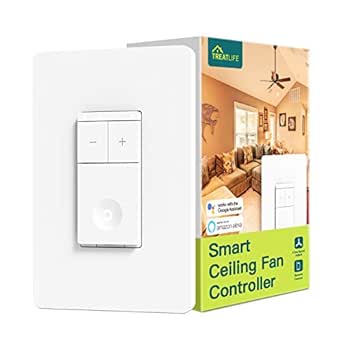 | Best Overall for Smart Fan Scheduling | Connectivity: 2.4 GHz Wi-Fi | Speed settings: 4 | Compatibility: Alexa and Google Home | VIEW LATEST PRICE | See Our Full Breakdown |
| Minoston Wi-Fi Countdown Timer Switch, 15A, White (MT10W) |  | Best for Straightforward Countdown Timing | Model: MT10W | Timer settings: 5, 10, or 30 minutes; 1, 2, or 4 hours; custom app countdown | Operating voltage: 120 VAC, 60 Hz | VIEW LATEST PRICE | See Our Full Breakdown |
| Nexete Smart Wi-Fi Ceiling Fan Remote Control Kit with Light Dimmer |  | Best for a Wireless Wall Remote and Light Dimming | Model: JF016 Wi-Fi | Control methods: Handheld remote, Smart Life app, Alexa, Google Assistant | Functions: Fan speed and light dimmer | VIEW LATEST PRICE | See Our Full Breakdown |
| Prichor Smart WiFi Ceiling Fan Remote Control Kit with Dimmer and Timer |  | Best for Fan-and-Light Control with a Defined Timer Range | Connectivity: 2.4 GHz Wi-Fi | Fan speeds: 3 levels | Timer: 2–8 hours | VIEW LATEST PRICE | See Our Full Breakdown |
| LPHUMEX Universal Ceiling Fan Remote Control Kit for AC Motor Fans |  | Best Basic Remote Timer Without Wi-Fi | Motor compatibility: AC motor fans only; not DC | Fan speeds: 3 | Timer settings: 4; intervals not specified | VIEW LATEST PRICE | See Our Full Breakdown |
| smart ceiling fan timer | Connectivity |
|---|---|
| TREATLIFE Smart Ceiling Fan Sw | 2.4 GHz Wi-Fi |
| Minoston Wi-Fi Countdown Timer | 2.4 GHz Wi-Fi |
| Nexete Smart Wi-Fi Ceiling Fan | — |
| Prichor Smart WiFi Ceiling Fan | 2.4 GHz Wi-Fi |
| LPHUMEX Universal Ceiling Fan | Radio frequency |
More Details on Our Top Picks
TREATLIFE Smart Ceiling Fan Switch, 4-Speed WiFi Control, Works with Alexa & Google Home, Neutral Wire Required
I put the TREATLIFE Smart Ceiling Fan Switch first because it is the most directly focused option here for connected ceiling-fan control. Its four fan speeds, app access, and scheduling make it a stronger match for someone who wants regular smart control rather than only a one-off countdown. Alexa and Google Home compatibility adds hands-free operation, and it does not require a separate hub. That makes it more fan-specific than the Minoston countdown switch, which is designed for several kinds of electrical loads and does not list fan-speed settings.
The key tradeoff is that this is a fan switch, not a fan-and-light controller. It controls a standard AC ceiling fan, but does not support lighting, DC motor fans, or fans with built-in remote or Bluetooth systems. Its single-pole-only setup and neutral-wire requirement also narrow installation options. A buyer with an older home should check the wall box before choosing it; app features cannot compensate for wiring that does not match.
Compared with the Nexete and Prichor receiver kits, TREATLIFE keeps the control point at the wall and avoids installing a receiver in the fan canopy. That can make it a neater fit for someone replacing a conventional wall switch, provided the circuit and fan are compatible. The receiver kits are better if separate light control or dimming is part of the goal. I would choose TREATLIFE for smart fan speed and scheduling, not as a universal solution for every ceiling-fan installation.
Pros:- Four fan speeds with Wi-Fi app and voice control
- Scheduling and remote access without a separate hub
- Works with Alexa and Google Home
- Includes standard and screwless wall plates
Cons:- Requires a neutral wire and a single-pole circuit
- Does not control lighting and is incompatible with DC or built-in-remote fans
- Requires 2.4 GHz Wi-Fi rather than 5 GHz
Best for: Buyers with a standard AC fan on a compatible single-pole circuit who want app scheduling, remote access, and four speed settings.
Not ideal for: Anyone without a neutral wire, with a DC or built-in-remote fan, on a 3-way circuit, or looking to control and dim the fan light.
- Connectivity:2.4 GHz Wi-Fi
- Speed settings:4
- Compatibility:Alexa and Google Home
- Wiring:Neutral wire required
- Circuit:Single-pole only
- Maximum load:1.5 A
- Fan compatibility:Standard AC fans; no DC motor or built-in remote/Bluetooth systems
Our verdict“I rank TREATLIFE first for buyers who want a dedicated smart fan switch with scheduling, as long as the fan and wall wiring meet its limits.”
Minoston Wi-Fi Countdown Timer Switch, 15A, White (MT10W)
The Minoston MT10W earns its place for buyers who want a timer they can set quickly without needing fan-speed controls. Its presets cover 5, 10, or 30 minutes and 1, 2, or 4 hours, while a custom app countdown gives more flexibility. For a fan that is already controlled appropriately by a compatible switch, this is the clearest countdown-focused pick in the group. It also supports Alexa and Google Assistant, which makes it more connected than the LPHUMEX radio-frequency kit.
That broad load support is useful, but it also means this is not a dedicated ceiling-fan speed switch. The supplied information describes it as a timer switch for compatible lights, fans, heaters, and air conditioners; it does not specify fan-speed selection. Compared with TREATLIFE, it gives more explicit countdown choices but less fan-specific control. Buyers should verify that their fan and wiring are suitable for this type of switch rather than assuming the 15A label alone settles compatibility.
Installation calls for a neutral wire, a single-pole setup, and 2.4 GHz Wi-Fi. The adjustable amber indicator is a useful detail if a bright switch light would be distracting at night, and it can be turned off. A wallplate is not included, so someone replacing a finished switch may need to account for that separately. I would pick Minoston over LPHUMEX when app-configured countdowns matter; I would skip it if the goal is dedicated multi-speed fan control or a receiver-based fan-and-light upgrade.
Pros:- Preset countdowns from minutes to hours plus a custom app countdown
- Works with Smart Life and Minoston apps, Alexa, and Google Assistant
- Indicator brightness can be adjusted or switched off
- ETL and FCC listed
Cons:- Requires a neutral wire, single-pole wiring, and 2.4 GHz Wi-Fi
- Does not list fan-speed control as a feature
- Wallplate is not included
Best for: Buyers who want preset or custom app-based countdowns for a compatible fan circuit and value voice control and an adjustable indicator.
Not ideal for: Shoppers seeking a dedicated fan-speed controller, anyone without a neutral wire, or users who need a 3-way setup or a wallplate included.
- Model:MT10W
- Timer settings:5, 10, or 30 minutes; 1, 2, or 4 hours; custom app countdown
- Operating voltage:120 VAC, 60 Hz
- Resistive load:1800 W
- Connectivity:2.4 GHz Wi-Fi
- Apps and voice:Smart Life, Minoston app, Alexa, Google Assistant
- Wiring:Neutral wire required; single-pole
- Certifications:ETL and FCC
Our verdict“I recommend Minoston when a flexible countdown is the priority, but not when the buyer expects dedicated ceiling-fan speed control.”
Nexete Smart Wi-Fi Ceiling Fan Remote Control Kit with Light Dimmer
Nexete is a better fit than either in-wall switch when the existing wall control is not the main thing a buyer wants to change. The kit places a receiver between the power supply and fan, then offers control through a handheld remote, the Smart Life app, or Alexa and Google Assistant. Its most useful distinction from TREATLIFE is that it handles both fan speed and light dimming. A wireless remote can also be wall-mounted without running new control wiring to that location.
The kit includes scheduling and timer support, but the supplied details do not name specific countdown intervals. That makes its timing less transparent than Minoston’s listed presets or Prichor’s stated 2–8-hour range. For buyers focused on a known countdown duration, I would compare those options first. Nexete makes more sense when app and voice access, dimming, and a wall-mountable remote matter together, rather than when a precise timer menu is the leading requirement.
Compatibility is the main uncertainty. The description says it works with most regular ceiling fans and names several brands, but a brand name by itself does not confirm a match for every model. Installation requires wiring the receiver between power and the fan, so buyers should check the fan’s wiring and available junction-box space. Compared with Prichor, Nexete gives a wireless wall-mountable remote and app scheduling, but its timer range and compatibility details are less specific. I would treat fan-model verification as a necessary step, not an optional one.
Pros:- Controls fan speed and light dimming
- Offers handheld remote, app, and voice control
- Wireless remote can be wall-mounted without wiring
- Includes scheduling and timer support
Cons:- Receiver must be wired between the power supply and fan
- Compatibility is described broadly and depends on the specific fan
- Specific countdown durations are not provided in the supplied details
Best for: Buyers who want app and voice control plus a wireless wall-mountable remote and light dimming for a compatible fan.
Not ideal for: Anyone who wants clearly stated timer intervals, wants to avoid receiver wiring, or cannot confirm that their fan is compatible.
- Model:JF016 Wi-Fi
- Control methods:Handheld remote, Smart Life app, Alexa, Google Assistant
- Functions:Fan speed and light dimmer
- Installation:Receiver wires between power and fan/light
- Remote:Wireless and wall-mountable
- Timing:Timer and schedule support; durations not specified
- Compatibility:Most regular fans; named brands include Hampton Bay, Harbor Breeze, Westinghouse, and Honeywell
Our verdict“I would choose Nexete for its mix of dimming, smart control, and a wireless wall remote, after checking the exact fan fit.”
Prichor Smart WiFi Ceiling Fan Remote Control Kit with Dimmer and Timer
Prichor stands out for combining fan speed, light dimming, and a stated 2–8-hour timer in a receiver-based kit. That defined range gives buyers more timing detail than Nexete’s unspecified timer and scheduling support. It also offers remote, wall control, app, and voice operation, so the control arrangement is broader than the LPHUMEX kit, which uses a handheld radio-frequency remote and has no dimmer. For someone replacing a basic control setup with separate fan and light functions, Prichor puts several useful controls in one system.
The three fan-speed levels are fewer than TREATLIFE’s four, and this kit depends on a 2.4 GHz Wi-Fi network for its smart features. The product is described as compatible with most standard fans from several familiar brands, but buyers still need to confirm the exact fan and installation requirements. “Universal” should not be taken as proof that every fan, especially one with an unusual motor or built-in control system, will work.
Prichor is also less appealing if a buyer wants only a simple timer. Minoston provides more clearly enumerated short and long countdown presets, and its switch-based approach avoids the receiver installation described for Prichor. This kit instead makes sense when the buyer wants light dimming alongside timed fan control. It uses two C batteries, which may not be included, and pull-chain fans need specific initial setup steps. I would choose it over Nexete when a stated timer span is a priority, but compare remote layout, fan fit, and wiring before deciding.
Pros:- Provides fan-speed control and light dimming
- Offers remote, wall, app, and voice control
- Lists a 2–8-hour timer range
- Works with Alexa, Google Assistant, and the Smart Life app
Cons:- Limited to 2.4 GHz Wi-Fi for connected features
- Fan compatibility and pull-chain setup need checking
- Requires two C batteries, which may not be included
Best for: Buyers upgrading a compatible standard fan who want separate fan and dimmable-light control, several control methods, and a stated 2–8-hour timer.
Not ideal for: Anyone on 5 GHz-only Wi-Fi, wanting a simple wall-switch countdown, avoiding receiver installation, or unwilling to handle C batteries and pull-chain setup.
- Connectivity:2.4 GHz Wi-Fi
- Fan speeds:3 levels
- Timer:2–8 hours
- Lighting:Dimming
- Control methods:Remote, wall control, app, voice
- Smart platforms:Smart Life, Amazon Alexa, Google Assistant
- Power:Two C batteries
- Warranty:1 year
Our verdict“I recommend Prichor when fan-and-light control with a defined timer span matters more than a simple in-wall countdown switch.”
LPHUMEX Universal Ceiling Fan Remote Control Kit for AC Motor Fans
LPHUMEX is the simplest choice here for a buyer who wants to add a handheld remote and timer without app or voice control. Its four timer settings and three fan speeds cover basic operation, with separate light on/off control. The radio-frequency design makes it different from TREATLIFE and Minoston: it does not depend on Wi-Fi or a smart-home app, but it also cannot provide app scheduling or remote access over a network.
Compared with Prichor and Nexete, LPHUMEX is more limited because it does not dim the light and does not offer smart control. That simplicity can be a benefit if the buyer does not want Wi-Fi setup, but it is not a substitute for the richer controls in those receiver kits. Its stated maximum range is 20 feet, and the kit includes a wall cradle for the handheld remote. Timer intervals are described as four settings but are not specified in the supplied details, so buyers seeking a particular run time should confirm that information before choosing it.
The bigger purchase check is physical and electrical fit. This kit supports AC motor fans only, not DC motors, and its receiver may not fit slimline, hugger, or flush-mount canopies. Installation also calls for setting the pull chain to maximum speed and the light on before fitting the receiver. It has no reverse function and no dimmer. I rank it fifth because its timer is useful but its feature set is the narrowest; choose it when a basic remote timer is enough and the fan has room for the receiver.
Pros:- Adds three fan speeds and four timer settings
- Controls fan and light separately, with light on/off
- Includes a wall cradle for the handheld remote
- Designed for installation without removing the light kit or blades
Cons:- Compatible only with AC motor fans
- Receiver may not fit slimline, hugger, or flush-mount canopies
- No Wi-Fi, dimmer, or reverse function
Best for: Buyers with a compatible AC motor fan who want a basic handheld remote, fan speeds, light on/off, and timer control without Wi-Fi.
Not ideal for: Owners of DC motor or low-clearance fans, or anyone who wants app scheduling, voice control, light dimming, or reverse control.
- Motor compatibility:AC motor fans only; not DC
- Fan speeds:3
- Timer settings:4; intervals not specified
- Light control:On/off; no dimmer
- Connectivity:Radio frequency
- Maximum range:20 feet
- Receiver dimensions:4.53 x 1.97 x 1.06 inches
- Batteries:Two AAA batteries required
Our verdict“I would pick LPHUMEX only when a basic non-Wi-Fi timer remote suits the fan and the canopy has enough room for its receiver.”
How We Picked
I judged these products by how well they answer the specific need behind a smart ceiling fan timer: setting a fan to run for a chosen period, scheduling control, or adding connected controls where a fan’s existing setup falls short. A product with many controls is not automatically the best fit. I gave weight to whether it has an actual countdown or scheduling function, what control methods it supports, and whether its installation requirements are clear enough for a buyer to check before ordering.
Compatibility and wiring shaped the ranking just as much as convenience. TREATLIFE is designed for standard AC fans and single-pole circuits, but excludes DC motors, lighting control, and fans with built-in remote or Bluetooth systems. Minoston is a single-pole countdown switch for compatible electrical loads, rather than a dedicated fan-speed controller. Receiver kits can add fan and light functions, but fit depends on the fan and the available space near its canopy. I treated those differences as deciding factors, not fine print.
I also separated app-connected scheduling from simple timer operation. App and voice control can help when a fan needs remote access or a schedule, but require compatible Wi-Fi and setup. A handheld radio-frequency remote can be simpler, yet it is not the same as a Wi-Fi smart control. The ranking reflects those differences: TREATLIFE leads for dedicated smart fan control, Minoston for countdown simplicity, and the receiver kits for buyers who need a fan-and-light control upgrade. LPHUMEX sits lower because its timer is useful but its controls and compatibility are more limited.
I used the supplied product details to compare features, limitations, and intended use. I did not assume that a broadly described “universal” kit fits every fan, or that a timer switch can safely operate every kind of fan. Before buying, match the product to the fan motor, circuit, wiring, load, and existing controls. Where the product details leave compatibility open, I call that out rather than treating it as settled.
Factors to Consider When Choosing Smart Ceiling Fan Timers
I would choose a smart ceiling fan timer by working through three checks: what timing behavior you need, how the fan is controlled now, and whether the proposed device fits the fan and wiring. The five picks solve different problems, so the feature list alone does not tell the whole story.Decide whether you need a countdown or a schedule
A countdown timer turns a device off after a set duration. That is handy when you want a fan to run while you fall asleep or cool a room before leaving. Minoston is the most explicit about countdown choices, listing short presets, hour-based presets, and a custom app countdown. Prichor gives a defined 2–8-hour range. LPHUMEX lists four timer settings, but the available details do not specify their intervals, so confirm the durations if you have a particular run time in mind.
Scheduling means setting control to happen at a chosen time or according to an app routine, rather than simply counting down from now. TREATLIFE lists scheduling and remote access, and Nexete lists timer and schedule support. These features can suit recurring routines, but require setup and compatible connected controls. If you just want a fan to turn off after a single evening session, a countdown may be easier than building an app schedule. Match the timing method to the habit you actually want to support.
Match the control style to your current fan
An in-wall switch replaces or upgrades a wall control. TREATLIFE is the more dedicated fan-speed option, with four settings, app control, and voice support. Minoston is a general-purpose countdown switch that lists fans among its supported loads, but does not specify fan-speed control. These are not interchangeable products: choose TREATLIFE when speed selection is central, and investigate Minoston when countdown timing is the main purpose and the fan circuit is compatible.
A receiver kit sits between the power supply and the fan. Nexete and Prichor add remote controls and fan-and-light functions, while LPHUMEX provides a basic radio-frequency remote system. Receiver kits can be useful when the existing wall switch does not give the controls you want, but installation requires access to the fan wiring and enough room for the receiver. If you want to avoid canopy work, a compatible in-wall switch may be a better direction. If you want to add light dimming or a wireless remote, compare the receiver kits instead.
Check motor type, circuit, and existing controls
Motor compatibility can rule out a product before any other feature matters. TREATLIFE is listed for standard AC fans and excludes DC motors and fans with built-in remote or Bluetooth systems. LPHUMEX is also AC-only. The descriptions for Nexete and Prichor use broad compatibility language, so check the exact fan model, motor, and existing control arrangement rather than relying only on a list of familiar fan brands. An existing remote receiver or unusual control system may change which replacement or add-on is appropriate.
For wall switches, review the circuit and wiring. TREATLIFE and Minoston both require a neutral wire and single-pole installation. The product information does not support using either as a universal answer for 3-way wiring. For receiver kits, check the installation instructions and the space under the canopy; LPHUMEX specifically warns that some slimline, hugger, or flush-mount housings may not fit its receiver. When wiring is unfamiliar, have a qualified electrician assess the installation rather than guessing from the switch appearance.
Separate fan control from light control
Not every product controls the fan and its light in the same way. TREATLIFE controls fan speed but not lighting. Minoston is a countdown switch for compatible loads, and its details do not describe separate fan and light functions. Nexete and Prichor list both fan and light control, with dimming support; LPHUMEX offers light on/off but no dimmer. If the light is on the same fixture and you want independent brightness control, the receiver kits with dimming are the more relevant candidates.
Check how the fixture is currently wired and controlled before expecting a new product to separate functions that the existing setup combines. Pull-chain fans may need particular settings before receiver installation; Prichor calls out initial setup steps, and LPHUMEX asks users to set the chain to maximum fan speed with the light on. That preparation can affect whether the remote behaves as expected. Buyers who only need timed airflow can avoid paying attention to dimming features that will not improve their main use.
Check Wi-Fi, app, and voice requirements
Wi-Fi smart control can provide app access, voice commands, and schedules, but the connected products here require 2.4 GHz Wi-Fi. TREATLIFE, Minoston, and Prichor specify that band; do not assume a 5 GHz-only network will work. Nexete is presented as a Wi-Fi kit, so check its setup requirements before buying. LPHUMEX uses radio frequency instead: it avoids Wi-Fi configuration, but does not offer the app scheduling or voice integration available from the smart options.
Consider whether you will actually use an app or voice assistant. If you want a set-and-forget countdown from a wall control, a connected app may be more setup than you need. If you want to adjust the fan from another room, create a recurring routine, or use Alexa or Google Assistant, connectivity has more practical value. Check compatibility with the smart-home platform you use and remember that connected features do not remove the need to meet the product’s wiring and fan requirements.
Compare the timer details, not just the word “timer”
Product descriptions use “timer” to mean different things, so compare the actual timer information. Minoston provides several named countdown presets plus an app-defined option. Prichor specifies a 2–8-hour span. Nexete lists timer and schedule functions without naming intervals in the details supplied here. LPHUMEX lists four settings but not their durations. TREATLIFE highlights scheduling rather than a menu of countdown intervals. If your main requirement is a specific number of minutes or hours, give the products with stated intervals priority and confirm any missing values before purchase.
Also ask what the timer turns off and how the fan is controlled while it runs. A fan-speed switch and a general-purpose timer do not necessarily offer the same behavior as a receiver with fan and light controls. If you want to time the light as well as the fan, verify that the product’s timer applies to the desired function. The supplied details do not answer every behavior question for every model, so do not infer a capability from a broad “timer” label alone.
Use the ranking according to your priority
I rank TREATLIFE first because it combines dedicated fan speeds with connected scheduling, then place Minoston second for its clearly listed countdown choices. Nexete and Prichor follow as receiver-based fan-and-light upgrades: Nexete has a wireless wall-mountable remote and dimming, while Prichor states a 2–8-hour range and several control methods. LPHUMEX ranks fifth because it is a straightforward remote timer rather than a connected smart controller and has narrower compatibility and functions.
This ordering is not a claim that one installation suits every home. A buyer with a fan that needs a dimmable-light receiver may find Prichor a better personal match than TREATLIFE. Someone who does not want Wi-Fi may prefer LPHUMEX, provided the motor and canopy fit. Start with the fan and wiring constraints, then use the ranking to compare the options that remain compatible.
Frequently Asked Questions
Which option is best if I mainly want a ceiling fan to turn off after a set time?
I would start with Minoston if your fan circuit is compatible and you want clearly listed countdown presets or an app-set duration. Prichor is another fit if you are adding fan-and-light control through a receiver and its 2–8-hour range covers your needs. LPHUMEX also lists four timer settings, but the supplied information does not state their intervals. Check the timer behavior and wiring requirements before choosing based on the word “timer” alone.
Can I use the TREATLIFE switch to control both my ceiling fan and its light?
No. The supplied product details describe TREATLIFE as a fan-speed switch and say it does not support lighting control. If you want a single setup that handles fan speed and light brightness, compare the Nexete and Prichor receiver kits, both of which list dimming. LPHUMEX controls the light on and off but does not dim it. Confirm that any receiver kit is compatible with your specific fan before purchase.
Do these smart ceiling fan timers work on a 5 GHz Wi-Fi network?
The Wi-Fi models in this lineup specify 2.4 GHz Wi-Fi, including TREATLIFE, Minoston, and Prichor. The supplied details do not establish 5 GHz support for these devices. Nexete is described as a Wi-Fi kit, so check its setup requirements as well. LPHUMEX uses radio frequency rather than Wi-Fi, so it does not need a Wi-Fi network, but it also lacks app and voice control.
What should I check before installing a fan receiver kit?
Check the exact fan model and motor type, the existing control system, receiver dimensions, and the space available inside the canopy. LPHUMEX is for AC motor fans only and may not fit some low-clearance housings. Nexete and Prichor describe broad compatibility, so verify the fan rather than assuming every model from a named brand will work. Follow the product instructions for pull-chain setup, and consult a qualified electrician if you are not comfortable working with the wiring.
Which option should I choose if I want light dimming as well as a fan timer?
Nexete and Prichor are the relevant picks because both list fan control and light dimming. Prichor states a 2–8-hour timer span, while Nexete lists timer and scheduling support without giving specific intervals in the supplied details. Choose between them by checking the fan’s compatibility, receiver installation, control layout, and whether Prichor’s timer range or Nexete’s wireless wall-mountable remote better fits your routine.
Conclusion
My recommendation depends on what you want timed and how your fan is wired. Choose TREATLIFE for a compatible standard AC fan when app scheduling and four fan speeds matter more than light control. Pick Minoston if your priority is a clearly specified countdown on a compatible single-pole circuit. For a fan-and-light upgrade, consider Prichor when its 2–8-hour timer and dimming suit your needs, or Nexete when a wireless wall-mountable remote and app control are the stronger draw. Choose LPHUMEX only if you prefer basic radio-frequency control and have a compatible AC fan with room for its receiver. In every case, confirm the motor, wiring, Wi-Fi band, timer behavior, and installation fit before deciding.