A smart ceiling fan wall switch replaces the dumb toggle on your wall so you can set fan speed, schedule airflow, and control lights from your phone or voice assistant — but the category splits sharply along a few lines: whether you need a neutral wire, whether you want a hub, and which voice ecosystem you live in. The Lutron Caseta Smart Fan Control earns the top spot for its rock-solid reliability and hub-based performance that doesn’t choke on Wi-Fi congestion, though it costs more and requires the Smart Hub. If you want a no-hub, budget-friendly option, the Treatlife Smart Fan Switch covers Alexa and Google for less, while the Kasa KS240 is the easiest pick for anyone already in the TP-Link ecosystem, pairing fan speed and light dimming in one clean package. The main tradeoff you’ll face: cheaper Wi-Fi switches offer more app features but can drop connectivity, while hub-based systems cost more upfront and just work. Keep reading for the full breakdown of all 11 switches.

Get home appliances delivered free with Prime
- Fast, free delivery on millions of items
- Prime Video, Amazon Music and more included
- Member-only deals all year
Key Takeaways
- Hub-based control (Lutron Caseta) beat pure Wi-Fi switches on reliability and responsiveness, which is why it tops the ranking despite the extra hardware cost.
- Almost every switch here except the Lutron and the Modern Forms Bluetooth control requires a neutral wire — checking your switch box first eliminates half the compatibility headaches.
- Fan-and-light combo switches (Kasa KS240, Treatlife combo, GHome, MOES) are the better value if your fan has a light kit, since one purchase replaces two switches.
- Speed granularity matters more than it sounds: 3-speed switches feel coarse, 4-speed is the sweet spot, and 6-speed control is only useful if you own a compatible Modern Forms fan.
- Ecosystem lock-in is real — the Amazon Basics switch is Alexa-only, the Modern Forms control only pairs with its own brand’s fans, and SmartThings users are effectively limited to the Treatlife models.
| Amazon Basics Smart Ceiling Fan Control Switch, 4-Speed, Single Pole |  | Best for Alexa-Only Households | Speeds: 4 fan speeds with LED indicators | Ecosystem: Alexa only | WiFi: 2.4 GHz | VIEW ON AMAZON | See Our Full Breakdown |
| TREATLIFE Smart Fan Switch, 4-Speed Ceiling Fan Control | 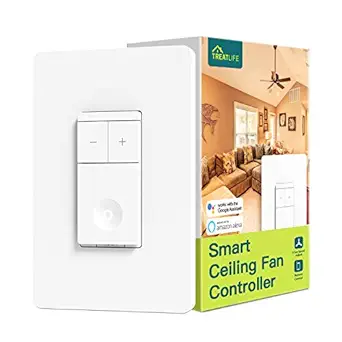 | Best Value for Fan-Only Control | Speeds: 4 fan speeds | Max Load: 1.5A ceiling fan load | WiFi: 2.4GHz only | VIEW ON AMAZON | See Our Full Breakdown |
| TREATLIFE Smart Ceiling Fan Control and Dimmer Light Switch, 2-Pack |  | Best Value Multi-Room Kit | Speeds: 4 fan speeds | Dimming: 10%–100% brightness | Max Load: 1.5A fan; 150W LED/CFL or 300W incandescent light | VIEW ON AMAZON | See Our Full Breakdown |
| MOES WiFi Smart Ceiling Fan Light Wall Switch, Black |  | Best Black Finish Pick | Finish: Black | Speeds: 3-gear fan adjustment (updated version) | Control: Fan and light independently controlled | VIEW ON AMAZON | See Our Full Breakdown |
| TREATLIFE Smart Fan and Light Switch Combo, Single Unit |  | Best Single-Room Combo Pick | Speeds: 4 fan speeds, AC fans up to 1.5A | Dimming: 10%–100%, up to 150W LED/CFL or 300W incandescent | WiFi: 2.4GHz only | VIEW ON AMAZON | See Our Full Breakdown |
| Kasa Smart Ceiling Fan Control & Dimmer Switch, KS240, Single Pole |  | Best Overall Combo | Fan Speeds: 4 | Dimming Range: 1–100% | Compatibility: Apple HomeKit, Amazon Alexa, Google Assistant | VIEW ON AMAZON | See Our Full Breakdown |
| Leviton Decora Smart Fan Speed Controller, Wi-Fi 2nd Gen, D24SF-1RW |  | Best Ecosystem Pick (Fan Only) | Fan Speeds: 4 (low, medium, high, max) | Compatibility: Alexa, Google Assistant, Apple Home, SmartThings, Sonos | Connectivity: Wi-Fi (no hub required) | VIEW ON AMAZON | See Our Full Breakdown |
| GHome Smart Dimmer Switch with 4-Speed Ceiling Fan Control |  | Best Budget Combo | Fan Speeds: 4 | Dimming Range: 0–100% stepless | Compatibility: Amazon Alexa, Google Assistant | VIEW ON AMAZON | See Our Full Breakdown |
| 6-Speed Ceiling Fan Bluetooth Hardwired Wall Control for Modern Forms Smart Fans |  | Best for Modern Forms Owners | Fan Speeds: 6 | Connectivity: Bluetooth (Modern Forms fans only) | Light Control: On/off with 0–100% brightness | VIEW ON AMAZON | See Our Full Breakdown |
| Lutron Caseta Smart Fan Control, 4-Speed for Paddle Fans |  | Best for Reliability & Expansion | Fan Speeds: 4 speeds plus off | Hub Required: Yes (Caseta Smart Hub) | Compatibility: Alexa, Apple Home, Google Assistant, Ring, Serena shades, Sonos | VIEW ON AMAZON | See Our Full Breakdown |
| MOES Star Ring Smart Ceiling Fan Control and Dimmer Light Switch |  | Best Combo for Automated Sleep Routines | Switch Type: Touch light switch with fan control | Fan Speeds: 4-speed control | Light Dimming: Stepless, 1% to 100% | VIEW ON AMAZON | See Our Full Breakdown |
| smart ceiling fan wall switch | Compatibility | Fan Speeds |
|---|---|---|
| Amazon Basics Smart Ceiling Fa | — | — |
| TREATLIFE Smart Fan Switch | Alexa, Google Home (no HomeKit) | — |
| TREATLIFE Smart Ceiling Fan Co | Alexa, Google Home, SmartThings | — |
| MOES WiFi Smart Ceiling Fan Li | Alexa, Google Home via Smart Life/Tuya app | — |
| TREATLIFE Smart Fan and Light | Alexa, Google Home, SmartThings (not HomeKit) | — |
| Kasa Smart Ceiling Fan Control | Apple HomeKit, Amazon Alexa, Google Assistant | 4 |
| Leviton Decora Smart Fan Speed | Alexa, Google Assistant, Apple Home, SmartThings, Sonos | 4 (low, medium, high, max) |
| GHome Smart Dimmer Switch with | Amazon Alexa, Google Assistant | 4 |
| 6-Speed Ceiling Fan Bluetooth | — | 6 |
| Lutron Caseta Smart Fan Contro | Alexa, Apple Home, Google Assistant, Ring, Serena shades, Sonos | 4 speeds plus off |
| MOES Star Ring Smart Ceiling F | — | 4-speed control |
More Details on Our Top Picks
Amazon Basics Smart Ceiling Fan Control Switch, 4-Speed, Single Pole
If your smart home already runs entirely on Alexa, this option stands out for dead-simple setup with zero extra apps. Everything happens inside the Alexa app — routines, scheduling, remote control — so there is no third-party account to create or manage, which is exactly where the TREATLIFE and MOES switches add friction with their separate Smart Life app registrations. The 4-speed control with LED indicators gives you visual feedback at the wall that app-only switches lack. The tradeoff is ecosystem lock-in: unlike the TREATLIFE Smart Fan Switch, this works with Alexa only, so anyone using Google Home or SmartThings is out of luck. It also controls the fan alone — no dimming — so rooms where the fan and light share one switch will need a combo unit like the TREATLIFE 2-in-1 instead.
Pros:- Setup and control entirely within the Alexa app — no third-party apps or hubs
- Works with Alexa routines for scheduling and automation
- LED speed indicators show the current setting at a glance
- Straightforward single-pole installation with guided instructions
- Control and scheduling from anywhere via the Alexa app
Cons:- Alexa-only compatibility — no Google Home or SmartThings support
- Fan control only; no lighting or dimming function
- Requires neutral wire and 2.4 GHz Wi-Fi, which excludes some older homes
Best for: Alexa-centric households who want the simplest possible app experience with no third-party registrations
Not ideal for: Google Home or SmartThings users, and anyone wanting light dimming from the same wall plate
- Speeds:4 fan speeds with LED indicators
- Ecosystem:Alexa only
- WiFi:2.4 GHz
- Hub Required:No
- Wiring:Neutral wire required, single-pole (1-way) only
- App:Amazon Alexa app
Our verdict“Buy this only if Alexa is your one and only smart home platform and you value simplicity over flexibility.”
TREATLIFE Smart Fan Switch, 4-Speed Ceiling Fan Control
This single-function switch makes the most sense for buyers who just want reliable smart fan control without paying for a dimmer they won’t use. Compared with the TREATLIFE fan-and-light combo, it trims the feature set to 4-speed control, scheduling, timers, and countdowns — and that focus pays off in simpler wiring, since you don’t need separate fan and light load wires in the wall box. Voice control spans both Alexa and Google Home, a real advantage over the Alexa-locked Amazon Basics switch. The bundle even includes a screwless snap-on wall plate, a small touch that most competitors skip. The restrictions are real, though: a 1.5A load ceiling rules out some larger fans, and it won’t work on 3-way circuits, DC motor fans, or any fan that already has its own remote or wireless system built in.
Pros:- Works with both Alexa and Google Home without a hub
- App control includes scheduling, timers, and countdown modes
- Includes both a standard plate and a screwless snap-on wall plate
- Fan-only design means simpler wiring than combo switches
- FCC certified
Cons:- 1.5A maximum fan load may not cover larger or older AC fans
- No light control — a separate solution is needed for fan-light fixtures
- 2.4GHz-only Wi-Fi and single-pole wiring limit where it can be installed
Best for: Budget-conscious buyers with a standard AC-motor ceiling fan who don’t need light dimming
Not ideal for: Homes with 3-way switch setups, DC motor fans, or fans that already have built-in remote or Wi-Fi controls
- Speeds:4 fan speeds
- Max Load:1.5A ceiling fan load
- WiFi:2.4GHz only
- Wiring:Neutral wire required, single-pole only
- Compatibility:Alexa, Google Home (no HomeKit)
- Hub Required:No
- Dimensions:Switch box 4.14 x 1.73 x 1.34 inches
- Certification:FCC certified
Our verdict“The most sensible low-cost pick if you only need fan speed control and your wiring and fan type fit its fairly strict compatibility list.”
TREATLIFE Smart Ceiling Fan Control and Dimmer Light Switch, 2-Pack
Buying two combo switches at once is where this set earns its spot — it is the cheapest path to smart fan-plus-light control in multiple rooms. Each unit replaces a dual-wired switch box with 4-speed fan control and 10–100% dimming, plus SmartThings support that the standalone TREATLIFE fan switch lacks. The vacation mode with randomized lighting is a thoughtful security touch you won’t find on the Amazon Basics switch. The catches mirror the rest of the category: your wall box needs separate fan and light load wires plus a neutral, homes built before 1978 often lack the neutral, and it refuses to play with smart bulbs or fans that have their own built-in controls. Dimmable LED/CFL loads top out at 150W, which is fine for most fixtures but tight for large multi-bulb setups.
Pros:- Two combo switches in one package for multi-room coverage
- SmartThings support in addition to Alexa and Google Home
- Vacation mode with random lighting for added home security
- Smooth, flicker-free dimming from 10% to 100% with Gentle On/Off
Cons:- Requires neutral, line, ground, and separate fan and light load wires
- 150W dimmable LED/CFL limit is restrictive for larger fixtures
- Incompatible with 3-way circuits, smart bulbs, and DC motor fans
Best for: Homeowners outfitting two or more bedrooms with compatible dual-load wiring who want fan and light control in one switch
Not ideal for: Older homes without neutral wires or separate fan/light load wires, and anyone using smart bulbs
- Speeds:4 fan speeds
- Dimming:10%–100% brightness
- Max Load:1.5A fan; 150W LED/CFL or 300W incandescent light
- WiFi:2.4GHz only
- Wiring:Neutral wire and separate fan/light load wires required, single-pole only
- Compatibility:Alexa, Google Home, SmartThings
- Hub Required:No
- Quantity:2 switches per pack
Our verdict“The smart buy for covering several rooms at once, provided your wiring already separates fan and light loads.”
MOES WiFi Smart Ceiling Fan Light Wall Switch, Black
Nearly every smart fan switch in this roundup ships in white only, which makes this the obvious choice for black switch plates and dark interiors. Beyond the finish, the updated version fixes a genuine annoyance of older MOES hardware: silent motor operation with no audible current hum, plus a deliberate 3-gear adjustment instead of random speed jumps. Fan and light work independently, so the light can stay off while the fan runs — matching the TREATLIFE combo’s behavior. Where it falls short of the TREATLIFE 2-pack is ecosystem breadth: no SmartThings support here, and the Smart Life app, while capable with timers and countdowns up to 60 minutes, is less polished than the Alexa-native experience of the Amazon Basics switch. It is a single unit, so multi-room buyers pay more per room than the 2-pack route.
Pros:- Black finish matches dark decor where white-only competitors can’t
- Updated version eliminates motor current noise
- Independent fan and light control via app or touch
- Group control and family sharing through the Smart Life app
Cons:- Single unit costs more per room than bundled 2-pack options
- No SmartThings support — Alexa and Google Home only
- Relies on the Smart Life app, which is less refined than first-party apps
Best for: Buyers with black or dark wall plates who want a matching smart fan-and-light combo without motor hum
Not ideal for: SmartThings users and multi-room projects where a 2-pack offers better per-switch value
- Finish:Black
- Speeds:3-gear fan adjustment (updated version)
- Control:Fan and light independently controlled
- Compatibility:Alexa, Google Home via Smart Life/Tuya app
- Hub Required:No
- WiFi:2.4GHz
- Timer:Countdown from 1 to 60 minutes
Our verdict“Pick this when aesthetics matter — it is the rare smart fan combo switch that blends into black decor and runs quietly.”
TREATLIFE Smart Fan and Light Switch Combo, Single Unit
For a one-room upgrade, this single combo switch is better suited than the 2-pack — same core capability, no paying for a second switch you don’t need. You get the familiar TREATLIFE package: 4-speed AC fan control up to 1.5A, flicker-free 10–100% dimming, scheduling, vacation-mode lighting, and Alexa, Google Home, and SmartThings support. The documentation here deserves credit for being unusually explicit about what will fail: shared fan/light wiring isn’t supported, any canopy receiver module must be removed before install, and non-dimmable bulbs simply won’t work. Compared with the MOES black switch, you gain SmartThings and a more mature app but lose the color option. The warranty support is direct from Treatlife, which is reassuring, but you are still bound by the same 2.4GHz, neutral-wire, single-pole rules that govern this entire category.
Pros:- Full fan-plus-dimmer functionality in one affordable single unit
- Works with Alexa, Google Home, and SmartThings
- Vacation mode and Gentle On/Off dimming for comfort and security
- Direct manufacturer warranty support and FCC certification
Cons:- Requires removal of any existing canopy receiver module before installation
- Shared fan/light wiring not supported — separate load wires mandatory
- Only works with dimmable bulbs; smart and non-dimmable bulbs are excluded
Best for: Anyone smartening a single bedroom or living room with a standard pull-chain AC fan and dimmable bulbs
Not ideal for: Renter or DIY-light buyers, since incorrect wiring identification and mandatory canopy module removal make installation less forgiving
- Speeds:4 fan speeds, AC fans up to 1.5A
- Dimming:10%–100%, up to 150W LED/CFL or 300W incandescent
- WiFi:2.4GHz only
- Wiring:Neutral, line, ground, and separate fan/light load wires; single-pole only
- Compatibility:Alexa, Google Home, SmartThings (not HomeKit)
- Dimensions:4.13 x 1.73 x 1.38 inches
- Certification:FCC certified with manufacturer warranty
Our verdict“The right-sized pick for one room, provided your fixture uses plain dimmable bulbs and your wall box has the required separate wires.”
Kasa Smart Ceiling Fan Control & Dimmer Switch, KS240, Single Pole
Kasa’s KS240 is the most complete package here because it handles both jobs in one gang box: four fan speeds plus a full 1–100 brightness dimmer for the light kit. Compared with the Leviton D24SF-1RW, which controls fan speed only, this Kasa model consolidates two dumb switches into a single smart panel — a real win for older bedrooms with limited wall space. The app-guided installation walks you through wiring step by step, which lowers the intimidation factor versus generic options like the GHome combo. HomeKit support also puts it ahead of Alexa-only picks like the Amazon Basics switch. The tradeoffs: it’s single-pole only, it needs a neutral wire, and it refuses to work on 5GHz networks, so older routers with a single merged SSID can cause setup headaches.
Pros:- Controls both fan speed and light dimming from a single switch
- Works with Apple HomeKit, Alexa, and Google Assistant
- App-guided installation removes wiring guesswork
- Scheduling and away-mode automation built into the Kasa app
Cons:- Single-pole only — no 3-way circuit support
- 2.4GHz Wi-Fi only, which complicates setup on mesh networks
- Requires a neutral wire, ruling out older homes
Best for: Homeowners with a pull-chain fan/light combo who want one switch to control both, especially Apple Home users
Not ideal for: Anyone with a 3-way circuit or a router that doesn’t broadcast a separate 2.4GHz network
- Fan Speeds:4
- Dimming Range:1–100%
- Compatibility:Apple HomeKit, Amazon Alexa, Google Assistant
- Connectivity:2.4GHz Wi-Fi
- Circuit Type:Single pole (1-way)
- Neutral Wire:Required
- Max Load:2.5A fan / 1875W
Our verdict“If you want the safest all-in-one upgrade for a standard fan-plus-light fixture, this is the switch to buy.”
Leviton Decora Smart Fan Speed Controller, Wi-Fi 2nd Gen, D24SF-1RW
Leviton’s D24SF-1RW stands out for its breadth of platform support — Alexa, Google Assistant, Apple Home, SmartThings, and Sonos — plus a physical design that fits the familiar Decora form factor. Where the Kasa KS240 doubles as a light dimmer, this one is fan-only by design, and that focus shows in details like LED speed indicators that show the current setting at a glance and a slim housing that fits crowded gang boxes more easily than chunkier combo units. The killer feature is the companion switch system: you can add a wired or wire-free second control point without re-running cable, something the TREATLIFE and GHome switches simply can’t do. The catch is the 1.5A ceiling — fine for pull-chain paddle fans, but it won’t drive fan/light combos, exhaust fans, or smart-bulb setups.
Pros:- Broadest platform support in the lineup, including SmartThings and Sonos
- Wired and wire-free companion switches for multi-location control
- LED indicators show current fan speed at a glance
- Slim design with included screwless wallplate and color-change options
Cons:- Fan-only — no dimming or light control whatsoever
- 1.5A load limit excludes many fan/light combos and exhaust fans
- Color kits and companions are separate purchases
Best for: Smart home enthusiasts with a dedicated fan-only circuit who want multi-platform support and flexible 3-way-style control
Not ideal for: Anyone with a combined fan and light kit — this controller is rated for fan loads only
- Fan Speeds:4 (low, medium, high, max)
- Compatibility:Alexa, Google Assistant, Apple Home, SmartThings, Sonos
- Connectivity:Wi-Fi (no hub required)
- Max Load:1.5A fan only
- Companions:DD00R, DD0SR, DAWDC, DAWSC
- Included:Screwless wallplate
Our verdict“This makes the most sense for a fan-only circuit in a household that wants deep smart-home integration and room-to-room control flexibility.”
GHome Smart Dimmer Switch with 4-Speed Ceiling Fan Control
The GHome combo switch delivers the same core promise as the Kasa KS240 — four fan speeds and stepless 0–100% light dimming in one unit — but at a friendlier price for outfitting multiple rooms. Its touch-sensitive slide interface feels more modern than Kasa’s button layout, and the 400W light rating gives it headroom the TREATLIFE single-function fan switch can’t touch. Scheduling tied to time, temperature, and weather triggers is a nice touch for automating fan use on hot afternoons. The compromises are typical of the budget tier: Alexa and Google only (no HomeKit), a 2.4GHz-only connection, and a firm warning that smart bulbs won’t play nice with the dimmer. App polish and long-term firmware support also trail what Kasa and Leviton offer, so expect a rougher software experience.
Pros:- Fan and dimmable light control in one affordable unit
- Stepless 0–100% touch dimming with slide control
- Automation triggers based on time, temperature, and weather
- UL certified with a solid 400W light rating
Cons:- No Apple HomeKit support
- Incompatible with smart bulbs
- App and firmware polish lag behind Kasa and Leviton
Best for: Budget-minded buyers upgrading two or three fan/light fixtures who don’t need HomeKit
Not ideal for: Apple Home users or anyone pairing the fixture with smart bulbs — neither is supported
- Fan Speeds:4
- Dimming Range:0–100% stepless
- Compatibility:Amazon Alexa, Google Assistant
- Connectivity:2.4GHz Wi-Fi only
- Max Load:120W fan / 400W light
- Circuit Type:Single pole
- Neutral Wire:Required
Our verdict“A sensible value pick if you want Kasa-style combo functionality across several rooms without paying flagship prices.”
6-Speed Ceiling Fan Bluetooth Hardwired Wall Control for Modern Forms Smart Fans
This one plays a completely different game from the Wi-Fi switches above. It’s a purpose-built companion control for Modern Forms smart fans, communicating over Bluetooth rather than your home network — which means no hub, no router config, and no cloud dependency. In exchange for that closed ecosystem, you get six fan speeds instead of the usual four, 0–100% luminaire brightness buttons, and a Winter/Summer reverse button that no other switch in this roundup offers — a genuine comfort feature for year-round air circulation. It also supports true 3-way and 4-way setups natively. The limitations are hard walls: it will not control any other brand of fan, RF and Bluetooth versions aren’t interchangeable, and there’s no Alexa or Google integration on the switch itself (that lives in the fan’s app).
Pros:- Six speeds plus Winter/Summer reverse mode
- No hub or Wi-Fi needed — direct Bluetooth control always works locally
- Native 3-way and 4-way multi-location support
- UL/cUL listed for damp locations, indoor or covered outdoor use
Cons:- Only works with Modern Forms smart fans
- Bluetooth and RF versions are not cross-compatible — easy to order wrong
- No direct Alexa or Google voice control from the switch itself
Best for: Modern Forms smart fan owners who want reliable wall-mounted control or a multi-location setup
Not ideal for: Anyone with a standard pull-chain fan from another brand — this control simply won’t pair
- Fan Speeds:6
- Connectivity:Bluetooth (Modern Forms fans only)
- Light Control:On/off with 0–100% brightness
- Special Features:Winter/Summer reverse mode
- Multi-Location:3-way and 4-way supported
- Installation:Hardwired, single pole wallplate included
Our verdict“Skip the Wi-Fi switches entirely if you own a Modern Forms fan — this is the matching control with more speeds and a reverse function nobody else offers.”
Lutron Caseta Smart Fan Control, 4-Speed for Paddle Fans
Lutron’s Caseta fan control earns its spot on reputation and architecture. Because it runs through the Caseta Smart Hub instead of straining your Wi-Fi like the Kasa KS240 or GHome switch, it stays responsive even when the internet drops — and it plays nicely with Ring, Serena shades, Sonos, and every major voice assistant. The standout trick is 3-way control without cutting holes or pulling wire: add a Fan Pico remote anywhere, which beats the hardwired-only approach of most budget switches. It’s also fan-only, like the Leviton D24SF, so you’ll need a separate Caseta dimmer for the light kit. The real barrier is cost stacking: the hub is mandatory, and the Pico remote and wall bracket are sold separately, so a single-fan setup costs more than Wi-Fi alternatives that need nothing extra.
Pros:- Hub-based design keeps control working locally even without internet
- Wireless 3-way setup via Fan Pico remote with no new wiring
- Works with Alexa, Apple Home, Google Assistant, Ring, and Sonos
- Lutron’s track record for long-term reliability and firmware support
Cons:- Caseta Smart Hub required — an extra purchase and setup step
- Fan Pico remote and wall bracket sold separately
- No light dimming; fan speed only like the Leviton
Best for: Buyers planning a larger Lutron-powered smart home who value rock-solid offline reliability
Not ideal for: Someone upgrading a single fan on a budget — the required hub pushes the total cost well past Wi-Fi switches
- Fan Speeds:4 speeds plus off
- Hub Required:Yes (Caseta Smart Hub)
- Compatibility:Alexa, Apple Home, Google Assistant, Ring, Serena shades, Sonos
- Remote Support:Fan Pico remote (PJ2-3BRL-GXX-F01, sold separately)
- 3-Way Setup:Wireless, no new wiring needed
- Control Methods:App, voice, wall, or Pico remote
Our verdict“The pick for whole-home automators who want the most dependable fan control money can buy, provided they accept the hub-first entry cost.”
MOES Star Ring Smart Ceiling Fan Control and Dimmer Light Switch
This MOES switch earns its place by pairing 4-speed fan control with stepless 1–100% dimming in a single gang box, which is the same combo formula the TREATLIFE 2-Pack uses — but MOES pushes ahead on routine-building. Its customizable schedules and sleep modes let you wind the fan down gradually overnight, something the Amazon Basics fan-only switch simply can’t do since it lacks any light control at all. The touch panel with a deactivatable backlight is a thoughtful touch for bedrooms, where a glowing switch can be a nuisance. Compared with the Lutron Caseta, you skip the hub requirement entirely, relying instead on 2.4GHz Wi-Fi. The tradeoffs are real: you need a neutral wire plus two load wires in the wall box, it won’t work with DC motors or remote-controlled fans, and it’s single-pole only — no three-way circuits.
Pros:- Combines 4-speed fan control and 1–100% stepless dimming in one switch
- Actively disables its backlight for genuinely dark bedrooms at night
- Sleep routines and schedules ramp fan speed down gradually overnight
- Works with both Alexa and Google Assistant without a hub
- Touch panel feels modern compared to rocker-style rivals like the Amazon Basics switch
Cons:- Requires a neutral wire plus two load wires — older homes may not have the wiring
- Incompatible with DC-motor fans and fans that ship with built-in remotes
- Single-pole design only; can’t be used in three-way switch setups
Best for: Homeowners with standard AC-motor fans who want one switch to handle fan speed, dimming, and gradual overnight sleep routines without buying a hub.
Not ideal for: Anyone with a DC-motor fan or a fan that came with its own remote — the switch can’t communicate with either, and homes lacking a neutral wire are out of luck too.
- Switch Type:Touch light switch with fan control
- Fan Speeds:4-speed control
- Light Dimming:Stepless, 1% to 100%
- Connectivity:Wi-Fi (2.4GHz), no hub required
- Voice Assistants:Amazon Alexa, Google Assistant
- Circuit Type:1-way (single pole)
- Operating Voltage:110 Volts
- Wiring Requirement:Neutral wire and two load wires
- Temperature Range:68°F – 122°F
Our verdict“Buy this if you want fan-plus-light automation built around sleep scheduling in a hub-free package, but verify your wiring and fan motor type first.”

How We Picked
I evaluated each switch against the factors that actually decide whether a smart fan control succeeds or ends up uninstalled: speed control quality (how many speeds, how smoothly the fan transitions between them, and whether motor hum appears at low settings), ecosystem compatibility (Alexa, Google Home, SmartThings, and HomeKit support), wiring requirements (neutral wire needs, single-pole vs. 3-way support), and connection reliability (Wi-Fi only vs. hub-based). I also weighed app usability, scheduling and automation features, build quality of the physical paddle or button, and whether each switch is UL certified — a genuine safety consideration when you’re controlling a motor.
The ranking logic favors switches that balance reliability and compatibility over raw feature counts. That’s why the Lutron Caseta leads despite needing a hub, and why dedicated fan-only switches with 4-speed control outrank generic dimmers repurposed for fans. Combo units that control both fan and light earned higher placement than fan-only units at similar prices, since they solve two problems in one gang box. Proprietary options like the Modern Forms Bluetooth control ranked lower on versatility but are highlighted where they fit — because a beautiful switch that only talks to one brand of fan is a poor general recommendation but an excellent targeted one.
Factors to Consider When Choosing Smart Ceiling Fan Wall Switch
Before clicking buy on any smart fan switch, a few wiring and ecosystem realities will make or break your purchase. These are the factors I’d check first — in this order — because getting them wrong means returns, electrician bills, or a switch that never quite works right.Check Your Wiring Before Anything Else
The single most common mistake in this category is buying a switch that doesn’t match what’s in the wall. Most Wi-Fi fan switches — including everything from Treatlife, GHome, MOES, and Kasa — require a neutral wire in the switch box, which many homes built before the mid-1980s lack. If your box only has two wires plus ground, your realistic options narrow to the Lutron Caseta or a Bluetooth hardwired control. Also confirm whether your setup is single-pole or 3-way: nearly every switch here is single-pole only, meaning if two switches control the same fan, one will become decorative unless you buy matching companion units. Finally, note that a fan speed controller is not a dimmer — using a light dimmer on a fan motor can damage the motor and void warranties, so always buy a switch explicitly rated for fan control.
Wi-Fi vs. Hub: The Reliability Tradeoff
Wi-Fi-only switches (Treatlife, MOES, GHome, Kosa, Amazon Basics) need no extra hardware and connect straight to your 2.4 GHz network, which keeps costs down and setup simple. The tradeoff is that every command rides your home network, so a congested band, a flaky router, or a switch too far from the access point means delayed commands or a fan that won’t respond. Hub-based systems like Lutron Caseta use the Clear Connect protocol, which doesn’t compete with Wi-Fi traffic and responds noticeably faster and more consistently — that reliability is why it commands a premium. My rule of thumb: if your home Wi-Fi already frustrates you with smart bulbs or plugs, don’t add a Wi-Fi fan switch to the problem. Also verify your router supports 2.4 GHz; none of these switches connect to 5 GHz bands, and mesh systems that force band-steering sometimes need configuration first.
Ecosystem Lock-In Costs You Later
The switch you buy should match the assistant you actually use, not the one you think you might adopt someday. The Amazon Basics switch is Alexa-only — a dealbreaker for Google Households — while Treatlife models cover Alexa, Google Home, and SmartThings, giving them the widest compatibility in this lineup. Lutron’s app and Alexa/Google support are excellent, but HomeKit users should verify current support before committing, as it has shifted across product generations. If you anticipate adding smart shades, more switches, or a security system later, a platform like Caseta that scales across device types may justify the hub investment now. Proprietary controls like the Modern Forms Bluetooth unit are the extreme case: superb within their ecosystem, useless outside it.
Fan-Only vs. Fan-and-Light Combo
If your ceiling fan has a light kit, a combo switch that controls both speed and dimming from one unit is almost always the better value — you replace two wall switches with one smarter device instead of buying two separate smart switches. The Kasa KS240, Treatlife combo, GHome, and MOES Star Ring all take this approach, though their dimming quality varies, and a few work only with dimmable bulbs, so LED shoppers should check bulb compatibility. If your fan is fan-only, skip the combo and buy a dedicated fan controller — you’ll pay less and get a cleaner interface. One caution: combo units divide their buttons between two functions, so the physical controls can feel cramped compared to a single-purpose switch. Renters and minimalists who hate wall clutter generally prefer the combo route regardless.
Speed Steps and Motor Compatibility
More speed settings sound better on a spec sheet, but they only matter if they map cleanly to what your fan’s motor can do. Most residential pull-chain fans have three or four internal speeds, and a 4-speed switch aligns well with that reality; a 6-speed control like the Modern Forms unit is built for ECM motors in that brand’s fans and offers little benefit elsewhere. Cheaper switches sometimes introduce audible hum or flickering at low speeds on older motors — a tradeoff that rarely shows up in listings but shows up in your bedroom at 2 a.m. If your fan is older or an off-brand, favor switches with UL certification and solid-state speed control rather than the cheapest option. And if your fan has a remote receiver in the canopy, some switches conflict with it; you may need to bypass the receiver entirely, which changes the installation scope.
Frequently Asked Questions
Do I need an electrician to install a smart ceiling fan wall switch?
Most of these switches are a straightforward DIY swap if you’re comfortable turning off the breaker and connecting three or four wires, and every model here includes instructions aimed at homeowners. The catch is the neutral wire requirement: most switches here need a white neutral in the switch box, and if your older home doesn’t have one, an electrician may need to run it, which turns a fifteen-minute job into a billable visit. If your fan currently has a remote receiver in the canopy, installation gets more involved because you’ll typically bypass that receiver so the wall switch controls the motor directly. Anyone unsure about identifying line versus load wires should hire a pro — miswiring a fan controller can damage the motor. The Lutron Caseta and the Modern Forms Bluetooth control are the friendliest options for complicated older setups.
Will a smart fan switch work if my Wi-Fi goes down?
Yes, every switch here retains its basic physical function — you can still press the paddle to change speed or turn the fan off, exactly like a standard wall control. What you lose during an outage is the smart layer: app control, voice commands, schedules, and automations all go dark until the network recovers. Wi-Fi switches typically reconnect on their own after the router comes back, though a long outage occasionally requires a power cycle of the switch itself. Hub-based systems like Lutron Caseta handle this better because the local hub stores schedules, so timers keep running even when your internet is down, as long as the hub has power. If you rely on fan schedules for sleeping or pet comfort, that local scheduling resilience is a genuine reason to pay more for the hub route.
Can one smart switch control both the fan and the light separately?
Only combo models can, and the key requirement is that your fan’s light and motor wiring reach the same wall box on separate wires. Combo switches like the Kasa KS240, Treatlife fan-and-dimmer pack, GHome, and MOES Star Ring give you independent app control over speed and brightness, including separate schedules and voice commands for each. If your fan’s light is currently controlled by a pull chain or remote rather than the wall, a combo switch can’t reach it without rewiring at the canopy. Fan-only switches like the Amazon Basics or Treatlife single units will leave your light on whatever control it uses today. Before buying a combo, also confirm your bulbs are dimmable — non-dimmable LEDs paired with a dimmer function will flicker or fail early.
Is a hub-based system like Lutron worth the extra cost over a Wi-Fi switch?
It depends on how many smart devices you plan to own and how much you value instant response. The Lutron Caseta switch costs more once you factor in the required Smart Hub, but it delivers faster, more consistent commands because its radio protocol doesn’t share airtime with your Wi-Fi, and schedules keep running locally even during internet outages. A single Wi-Fi switch in a small apartment with a solid router will perform nearly as well for less money, so for one fan, the hub premium is hard to justify. The math changes once you add a second or third switch, smart lighting, or shades — Caseta spreads the hub cost across many devices. Wi-Fi switches also tend to need occasional re-pairing after router changes, while hub devices are famously set-and-forget.
Why does my smart fan switch hum or make the fan run rough at low speeds?
Smart fan switches regulate speed with solid-state circuitry, and cheaper controllers can introduce harmonic distortion that older or lower-quality fan motors translate into an audible hum or wobble at the lowest setting. It’s usually harmless short-term but annoying in a bedroom, and it’s one of the clearest quality differences between budget and premium switches in this category. If you hear hum, first try limiting yourself to the higher speed steps — the lowest setting is where distortion is worst. If the problem persists, a better-built controller like the Lutron or Kasa typically cleans it up, since their speed control circuitry is more refined. Also verify the switch is actually rated for fans rather than being a repurposed light dimmer, which causes the same symptom and can damage the motor over time.
Conclusion
Matching the right smart ceiling fan wall switch to your situation comes down to three questions: what’s in your wall, what ecosystem you use, and whether your fan has a light. For best overall, the Lutron Caseta Smart Fan Control wins on reliability and responsiveness — buy it if you’re building out a smart home or your Wi-Fi is already stretched thin. The Treatlife Smart Fan Switch is my best value pick, delivering 4-speed control with Alexa, Google, and SmartThings support at a no-hub price. For beginners, the Kasa KS240 is the smoothest install-and-forget experience, with an app and setup flow that’s friendlier than anything else here — ideal if you’re buying your first smart switch. Best premium goes to the Leviton Decora D24SF-1RW, whose build quality and 2nd-gen Wi-Fi platform suit whole-home plans. For specific needs: choose the Treatlife combo pack or GHome if you want fan and light control in one switch on a budget, the Amazon Basics if you’re all-in on Alexa and want the lowest possible price, the MOES Star Ring if you want a distinctive black finish with visual feedback, and the Modern Forms 6-speed control only if you own a matching Modern Forms fan. Whatever you pick, confirm your neutral wire and single-pole wiring first — that one check prevents most returns in this category.
Cold & flu season Picks
humidifiers
As an affiliate, we earn on qualifying purchases.