
To fix a wobbling ceiling fan and prevent motor damage, start by turning it off and inspecting the blades for dust, warping, or damage. Clean the blades and verify they’re evenly balanced using a balancing kit if needed. Check all screws and mounting hardware to make sure everything’s tight and level. Address any loose components or damaged blades promptly, and consider more detailed tips below to keep your fan running smoothly and avoid costly repairs.
Key Takeaways
- Turn off and inspect blades for dust, damage, and proper attachment; clean and replace if necessary.
- Use a blade balancing kit to add weights or reposition blades to correct wobbling.
- Tighten all blade screws and mounting hardware to ensure stability.
- Check ceiling box and mounting plate for levelness and secure attachment.
- Examine the motor and mounting components for looseness or misalignment; tighten or repair as needed.
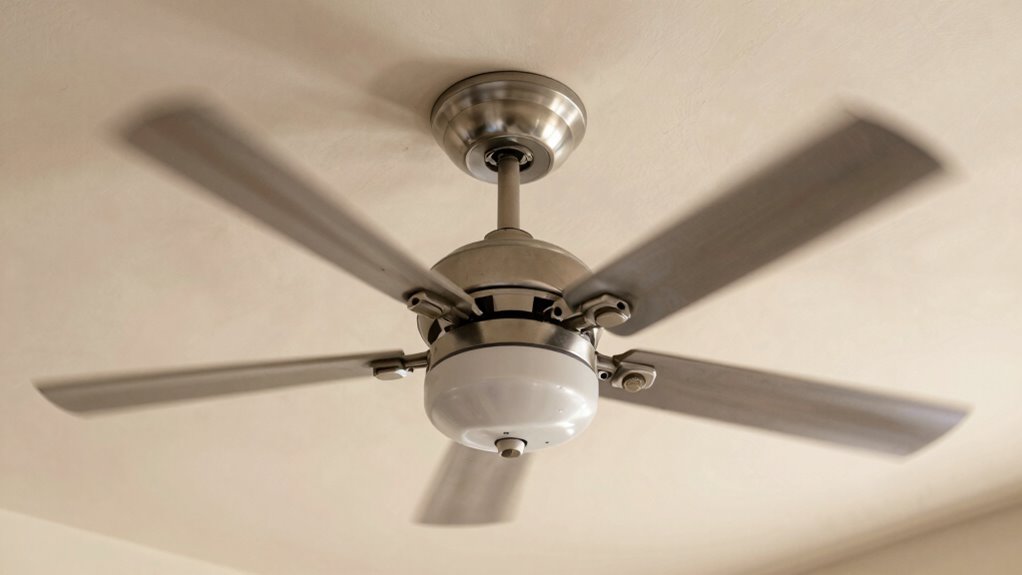
A ceiling fan wobble can be both annoying and disruptive, but it’s usually a problem you can fix yourself. When your fan wobbles, it often signals issues with blade balancing or motor noise. Addressing these problems promptly not only improves comfort but also prevents unnecessary wear on the motor, extending your fan’s lifespan. Proper European cloud innovation and regular maintenance can help prevent such issues from arising in the first place. First, check the blades for any imbalance. Over time, dust buildup or minor warping can cause uneven weight distribution. Turn off the fan and carefully clean each blade with a soft cloth, removing dust and debris. Next, inspect the blades for damage or warping; if you notice any cracks or bends, consider replacing those blades. To achieve proper blade balancing, use a blade balancing kit, which includes weights designed to correct minor imbalances. Attach the weights to the blades as instructed, typically near the tips, to see if the wobble reduces. Sometimes, simply repositioning a blade or tightening the blade screws can resolve the wobble. Loose screws can cause blades to shift and create imbalance, so ensure each blade is securely fastened to the motor housing. Motor noise can also contribute to a wobbling fan. Unusual sounds often indicate a loose or misaligned motor or mounting bracket. Turn off the fan and examine the mounting hardware to ensure it’s tight and secure. If the fan is mounted on a ceiling with a mounting plate, make sure everything is snug. Sometimes, the problem lies in the downrod or the motor itself, which might need lubrication or tightening. Be cautious when working around electrical components and follow safety guidelines. Adjusting the motor’s mounting or tightening loose parts can eliminate noise and stabilize the fan’s movement. If your fan still wobbles after balancing the blades and tightening hardware, it might be time to check the ceiling box and mounting bracket. An uneven or damaged mounting surface can cause instability. Reinforce or replace the mounting hardware if necessary. Remember, a well-balanced fan not only runs quieter but also reduces strain on the motor, preventing motor noise from escalating into more serious issues. Regular maintenance, like cleaning the blades and tightening screws, helps keep your ceiling fan running smoothly and quietly. Taking these small steps will save you money on repairs and ensure your fan doesn’t wear out prematurely. Fixing a wobble is often straightforward, and with a bit of patience, you can keep your fan spinning smoothly and quietly for years to come.
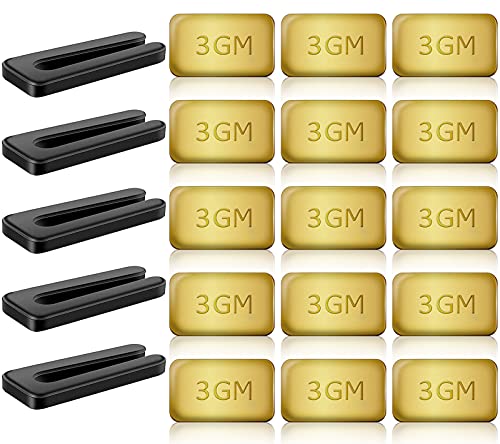
HFYHWT 20PCS Ceiling Fan Balancing Kit, 5 Sets High Calibration Blade Balance Tool Including 5 Pcs Resilient Clips and 15 Pcs Metal Self-Adhesive 3G Weight
PROFESSIONAL RESULTS: Ceiling fan balance kit include balance clip to locate problem area, self-adhesive 3G Weight-Balance helps to…
As an affiliate, we earn on qualifying purchases.
As an affiliate, we earn on qualifying purchases.
Frequently Asked Questions
How Often Should I Balance My Ceiling Fan?
You should check your ceiling fan’s balance every few months or if you notice wobbling. Proper fan blade alignment is key, so use balancing tips like adding a balancing kit or adjusting blade angles. Regularly maintaining your fan guarantees smooth operation and prolongs its life. If wobbling persists, recheck the blade alignment and balance to prevent motor wear and keep your fan running quietly.
Can a Wobbling Fan Cause Electrical Issues?
Imagine a wobbling fan as a loose bolt in a machine—if ignored, it can cause bigger problems. Yes, a wobbling fan can cause electrical hazards, like short circuits or overheating, risking damage to your home. It also indicates poor fan stability, which can strain the motor. Regularly balancing your fan helps prevent these risks, ensuring safe operation and prolonging its lifespan. Don’t wait—fix that wobble before it causes costly issues.
Is It Safe to Fix Wobble Yourself?
Yes, it’s generally safe to fix a wobbling ceiling fan yourself if you follow proper DIY safety guidelines. Make sure to turn off the power at the circuit breaker before starting. Use a sturdy ladder and handle tools carefully. If you’re unsure or uncomfortable, it’s best to seek professional repair. Taking these precautions helps prevent injury and guarantees the fix is effective, protecting your fan’s motor and your safety.
What Tools Are Needed to Fix a Wobbling Fan?
To fix a wobbling fan, gather a screwdriver, adjustable wrench, and possibly a ladder. You’ll need them for fan blade alignment and mounting bracket repair. Start by turning off the power, then check the blades for balance, tightening screws as needed. Use the wrench to secure the mounting bracket if it’s loose. These tools help make certain your fan stays steady, preventing further wear and tear on the motor.
When Should I Replace My Ceiling Fan?
You should replace your ceiling fan if you notice persistent motor noise or if realigning the fan blades doesn’t stop wobbling. When the blades are uneven or damaged, it causes instability and strain on the motor, risking early failure. If repairs don’t improve the fan’s balance or noise levels, it’s time for a new one to guarantee safety and efficiency. Don’t wait until it completely stops working—replace it early.

PH PandaHall Ceiling Fan Blade Arms, Metal Ceiling Fan Blade Brackets Alloy Replacement Parts Mounting Bracket Kit Fans Holder for Repairing Easy Installation, Golden
Replacement Blade Arm: the ceiling fan blade arms works with standard 52 inch ceiling fan blades, reliable replacement…
As an affiliate, we earn on qualifying purchases.
As an affiliate, we earn on qualifying purchases.
Conclusion
Don’t let that wobbling ceiling fan become a ticking time bomb. By balancing the blades and tightening loose parts, you’re giving it a fresh lease on life. Think of it as tuning a musical instrument — a small adjustment can bring harmony back to your room. Fixing the wobble now keeps your fan spinning smoothly and your motor happy, turning a shaky performance into a steady rhythm. Act today, and enjoy cool, wobble-free air tomorrow.

KALIONE Ceiling Fan Blade Balancing Kit Including Fan Balancing Clips and 12pcs Metal Self-Adhesive 3G Weight Practical Fan Balance Kit for Ceiling Fan Weight Balancing 4pcs
Package Content: You will receive 4 sets of fan balancing kit, enough quantity meets all your needs.
As an affiliate, we earn on qualifying purchases.
As an affiliate, we earn on qualifying purchases.

Ceiling Fan Mounting Bracket Kits With Installation Accessories Compatible With Living Room, Light Fixtures And Cathedral Ceiling Fans, Replace 77059 Ceiling Fan Mounting Bracket Black (No wires)
Included in the package: 1 x Ceiling Fan Mounting Bracket, 2 x Three different sizes of screws, 2…
As an affiliate, we earn on qualifying purchases.
As an affiliate, we earn on qualifying purchases.