If your ceiling fan works but the lights don't, it's often due to wiring issues or faulty connections. Check the switch for faults, as it might be blocking power to the light kit. Inspect the wiring connections at the light fixture for loose or damaged wires. It's also a good idea to test the voltage at the light sockets using a multimeter; zero volts can indicate a problem. Finally, verify the light bulbs aren't burned out and that the light kit's wattage isn't exceeded. Keep exploring to uncover more potential causes and solutions.
Key Takeaways
- A faulty wall switch may block power to the light kit, causing lights to not function while the fan operates.
- Burned-out light bulbs or loose connections can prevent lights from working even if the fan is functional.
- Damaged wiring connections at the light fixture can disrupt power delivery to the lights.
- Testing voltage at the light socket with a multimeter can help identify if power is reaching the lights.
- Internal wiring issues within the light kit may lead to light failures while the fan continues to run.
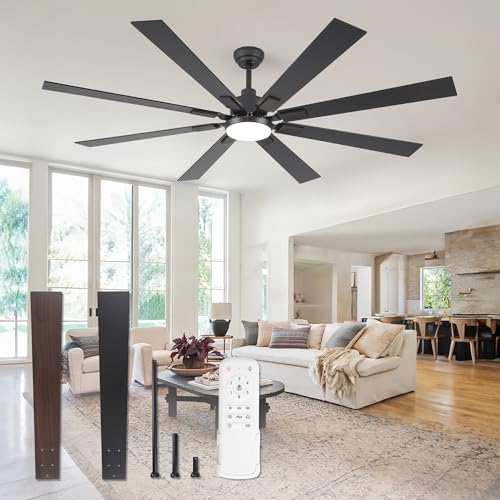
ZMISHIBO 72 inch Large Ceiling Fans with Lights and Remote, Indoor/Outdoor Black Modern Ceiling Fan for Kitchen Living Room Patio, 6 Speed Reversible Quiet DC Motor, 3 CCT, Dual Finish 8 Blades
72 Inch Ceiling Fan: This large ceiling fan includes 4“, 8”, and 24“ down rods, making it a...
As an affiliate, we earn on qualifying purchases.
Installation and Wiring Issues

When installing a ceiling fan, it's important to guarantee you have the correct wiring setup. Typically, a ceiling fan requires a 3-wire setup: black for hot, white for neutral, and green for ground. If you're using only two wires (black and white), verify the blue wire for the light kit connects to the ceiling's hot wire. This connection is vital; without it, the light won't come on.
Internal wiring issues can arise if the connections aren't secure or if wires are damaged. Always inspect the integrity of your wiring harness, particularly at the light fixture. Loose or faulty connections can disrupt the power supply to the light bulb socket, preventing the light from functioning while the fan operates normally.
Additionally, if you lack a ground wire, you could face safety risks, so it's significant to check for that as well. Make sure all connections are tight and use wire nuts to prevent shorts.

Fanbulous 65 Inch Ceiling Fans with Lights and Remote, Black Indoor/Outdoor Ceiling Fan with Quiet Reversible DC Motor, 6 Speeds, 3CCT, 8 Blades Large Ceiling Fan for Living Room Bedroom Patio
65 Inch Large Ceiling Fan: The living room ceiling fan has 2 colors on each blade - a...
As an affiliate, we earn on qualifying purchases.
Troubleshooting Light Problems

Light problems with your ceiling fan can be frustrating, especially when the fan runs smoothly but the lights refuse to illuminate.
Start by checking the wall switch; a faulty switch might be preventing power to the light kit. If that seems fine, grab a multimeter to test the voltage at the light bulb sockets. If you get a reading of zero volts, there could be loose connections or an issue with the light kit itself.
Inspect the sockets for any burn marks or charred areas, as these can indicate wiring problems. It's crucial to verify all connections between the ceiling fan and light kit are tight and secure; loose connections can disrupt power flow and cause the lights not to work.
Also, if your light kit has a watts limiter, make sure you're using the correct wattage for your light bulbs. Exceeding this limit can cause the limiter to shut off the lights.
After checking these components, you should have a clearer idea of why your ceiling fan works but the lights don't.

DEWALT 20V MAX Cordless Drill and Impact Driver, Power Tool Combo Kit , Includes 2 Batteries, Charger and Bag (DCK240C2)
Ergonomically Designed: Work in tight areas with a compact design that gets into tough spots
As an affiliate, we earn on qualifying purchases.
Multimeter Testing Techniques

Often, using a multimeter correctly can help you quickly identify issues with your ceiling fan's light circuit. Start by setting your multimeter to the 200VAC range to measure voltage accurately.
Here's how to perform the essential tests:
- Test Voltage: Connect the red lead to the blue (light) wire and the black lead to the white (neutral) wire, checking for a voltage reading around 120-122V.
- Check for Low Voltage: If you see low readings (like 2.2V), there might be a wiring issue or a malfunction in the light kit.
- Continuity Testing: Always turn off power at the breaker before disconnecting wires for continuity testing. Use the multimeter to check for continuity between the ceiling fan lights and light kit connections.
- Inspect the Light Socket: Measure voltage directly at the light socket to confirm whether power is reaching the bulb.
- Examine Wires: Look for any damaged wires, ensuring that connections between the red and white wires are secure.

DEWALT 20V MAX Cordless Drill and Impact Driver, Power Drill Brushless 2-Tool Power Tool Combo Kit, Includes 2 Batteries, Charger and Bag (DCK277D2)
The compact 7.6-inch front-to-back, lightweight design fits into tight areas, making it an ideal choice for a power...
As an affiliate, we earn on qualifying purchases.
Community Feedback Insights

Community feedback provides valuable insights into common ceiling fan light issues. Many users have discovered that a faulty wall switch is often the culprit behind a Ceiling Fan Light not working while the fan itself operates. If the switch isn't supplying power to the light fixture, you'll face this frustrating problem.
A lot of participants recommend inspecting your light bulbs for burnouts or loose connections. Even one non-functional bulb can prevent the entire light system from working.
Additionally, checking the wiring connections at the light fixture is essential, as loose or damaged wires frequently lead to these issues.
You might want to test the voltage at the light socket using a multimeter to verify power is reaching the fixture. This simple step can save you time in troubleshooting.
Some community members have also pointed out potential internal wiring issues within the light kit itself. These problems can cause the lights to fail while the fan motor continues to function correctly.
Maintenance and Safety Tips

To keep your ceiling fan in ideal condition, regular maintenance is essential for both performance and safety. Neglecting it can lead to electrical hazards and malfunctioning lights.
Follow these troubleshooting tips to guarantee your ceiling fan operates smoothly:
- Inspect the fan for dust and debris buildup, as it can affect performance and heat dissipation.
- Always turn off power at the circuit breaker before beginning any maintenance or inspections.
- Check that all wiring connections are tight and secure to prevent electrical hazards.
- Use the appropriate bulb wattage to avoid overheating and damage to the light fixtures.
- Safely cap any unused wires to comply with local electrical codes and standards.
Frequently Asked Questions
Why Is My Ceiling Fan Working but the Light Not Working?
If your ceiling fan's working but the light isn't, it's likely due to a few common issues.
Check if the bulbs are burnt out or if there are loose connections in the light sockets.
You should also inspect the wall switch and circuit breaker, as they might be tripped or faulty.
Finally, an internal wiring problem could be preventing the lights from functioning, even though the fan runs smoothly.
Why Does My Ceiling Light Have Power but No Light?
Imagine flipping a switch but getting no light, like expecting sunshine on a cloudy day.
If your ceiling light has power but no illumination, check for burned-out bulbs first. Sometimes, it's like having a car battery that's charged but a dead engine.
Loose wiring or faulty sockets might also be the culprits. Inspect for tripped breakers or wattage limiters too, as they can block the path to that bright glow you're craving.
Why Are My Ceiling Lights Not Working?
If your ceiling lights aren't working, start by checking the bulbs. They might be burned out or not properly installed.
Next, inspect the wall switch; it could be faulty.
Don't forget to examine the wiring connections in the fixture and junction box for any damage or looseness.
If everything seems fine, test the voltage at the light socket. If power's there but lights still don't work, further investigation is needed.
Why Does My Hampton Bay Fan Work but Not the Light?
It's like your Hampton Bay fan's throwing a party, but the lights forgot to RSVP!
If your fan's spinning happily but the light's in the dark, it could be a sneaky burned-out bulb, a rebellious wall switch, or loose wiring playing hide and seek.
Check that pull chain or remote too; they might be on the fritz.
Don't forget to inspect those bulbs—overloading them can turn off the fun!
Conclusion
To sum up, if your ceiling fan spins like a breeze but the lights stay dim, it's time to troubleshoot. Check your wiring, and don't shy away from using a multimeter to pinpoint the issue. Remember, keeping your fan and lights in harmony is key to a well-lit room. With a little maintenance and patience, you'll have your ceiling fan shining bright again, illuminating your space like a sunbeam breaking through the clouds.